
EMILink
EMI ↔ AE2 / BeyondDimensions integration enhancement mod, adding convenient AE2 and BD related operations to the EMI recipe interface.
截图
介绍
EmiLink
NeoForge 1.21.1
EMI ↔ AE2 / BeyondDimensions / ExtendedAE_Plus integration enhancement mod.
Dependencies
- Required: NeoForge ≥21.1.220, Minecraft 1.21.1, Java 21, EMI ≥1.1.22
- Optional: Applied Energistics 2 ≥19.2.17
- Optional: BeyondDimensions ≥0.7.14
- Optional: ExtendedAE_Plus ≥1.5.4
- Optional: Curios
Key Bindings
| Key Binding | Function | Applicable Scenarios |
|————-|———-|———————-|
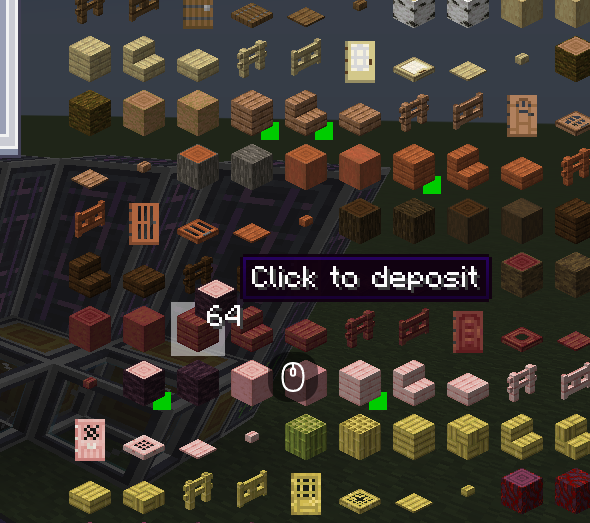
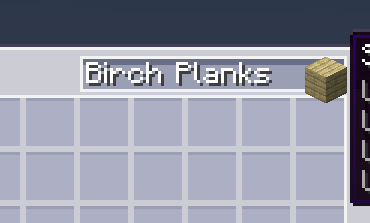
| F | Fill the EMI hovered item name into the search box | AE2 / BD terminal |
| Alt + F | Fill the search box in @modid format | AE2 / BD terminal |
| B | Quickly write a pattern | AE2 pattern encoding terminal |
| N | Fill the hovered item into an empty filter slot | Interfaces containing FakeSlot |
| Space + Left Click | Extract / Deposit items | AE2 / BD terminal |
| Space + Left Click on crafting result | Bulk craft (up to 512 times) | BD crafting interface |
| Shift + Left Click | Extract / Auto-craft items | AE2 network (requires EAEP) |
| Shift + Left Click on network storage slot | Extract a single stack of items | BD network interface |
| Middle Click | Open the crafting quantity interface | Requires EAEP + Wireless Terminal |
Features
AE Network Info Tooltip
Displays item quantity and craftable status from the AE network in the EMI sidebar. Supports /emilink clearcache to clear the cache.
Pattern Encoding
Press B in the pattern encoding terminal to automatically fill the EMI hovered recipe into the pattern slots and encode it. Supports AE2 and the ExtendedAE wireless pattern terminal.
Bookmark Priority
When encoding patterns, prioritizes items from the EMI bookmark bar to set filter slots. (Config option bookmarkPriority, enabled by default)
Book Wrapping (WB Mode)
Wraps the output item as a written book when processing the pattern encoding template. (Config option enableWrapBook, enabled by default)
EAEP Integration
Requires ExtendedAE_Plus to be installed.
| Feature | Description |
|———|————-|
| Middle Click | Opens the AE2 crafting quantity interface |
| Shift + Left Click | Extracts an item or automatically opens the crafting interface |
| Upload Pattern | Automatically selects the corresponding recipe type label |
BD Integration
Requires BeyondDimensions to be installed.
| Feature | Description |
|———|————-|
| Space + Click | Extracts / Deposits network items |
| Space + Click on crafting result | Bulk crafting (up to 512 times) |
| Shift + Click on network storage slot | Extracts a single stack of items |
Configuration
config/emilink-client.toml
| Config Option | Default | Description |
|—————|———|————-|
| enableWrapBook | true | Wraps the output as a written book when encoding a pattern |
| enableNetworkBadges | false | Shows network status badges in the corner of EMI item icons |
| bookmarkPriority | true | Prefers using EMI bookmark items when encoding patterns |
| cacheTTLMs | 5000 | AE cache TTL in milliseconds |
| batchFlushMs | 5000 | Batch query flush interval in milliseconds |
License
GNU AGPL 3.0
常见问题
EMILink 支持哪些 Minecraft 版本?
EMILink 支持 Minecraft Java 版 1.21.1,可用的加载器:NeoForge。下载时注意选择和你游戏版本一致的文件。
EMILink 怎么安装?
先用 PCL2 或 HMCL 启动器安装对应版本的 NeoForge,再把下载的 .jar 文件放进游戏目录的 mods 文件夹,重新启动游戏即可。开启了版本隔离的,mods 文件夹在 versions/版本名 下面。运行环境:客户端 / 服务端。
Chatterjay 的其他作品
查看全部 →
EMIAccelerator
Caches the EMI item stack list to disk and defers search index building to a background thread, drastically reducing EMI reload time.

Network Tool Plus
AE2 Network Tool enhancement mod with auto card collection and 21 upgrade slots.

Visible Energy
A FluxNetworks addon that highlights energy devices in-world with colored overlays, network connection lines, and transfer rate labels. Use /ve scan to find and visualize Flux Networks devices around you.

GadgetsmeNetwork
A NeoForge 1.21.1 mod that integrates Building Gadgets 2 with Applied Energistics 2, adding a "Order from AE" function to the material list screen.
评论
登录后评论和评分