
Durability Alerts
Durability Alert is a Minecraft mod designed to keep your tools in check! With real-time alerts, this mod ensures you're always aware when any item falls below 20% durability. Additionally, you can hover over items to see their current percentage.
截图

介绍


Welcome to Durability Alert – a Minecraft mod that enhances your gameplay by providing essential features related to item durability!
🎮 Features
- ⚠️ Durability Alert: Whenever any item or tool you are using in the game falls below 20% durability, the mod will now alert you. Never let your favorite tools break unexpectedly again! Stay informed and take action before it’s too late.

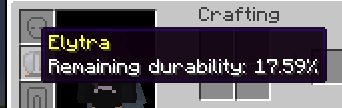
- 🔍 Hover-over Durability Percentage: From now on, when you hover over any item or tool with durability, you can see its current percentage. This information will help you manage your inventory more efficiently and make informed decisions during intense gameplay.

🚀 Installation
To use Durability Alert, you’ll need:
- Minecraft Version: 1.20.1
- Fabric Loader: 0.14.22 or higher
- Fabric API
- Make sure you have the required Minecraft version installed.
- Download and install the latest Fabric Loader from here.
- Place the Durability Alert mod JAR file along with the Fabric API in the “mods” folder in your Minecraft installation directory.
CurseForge:
Download the mod on CurseForge: Durability Alert on CurseForge
❤️ Feedback and Contributions
I value your feedback! If you encounter any issues or have suggestions for improvement, please don’t hesitate to open an issue. Contributions in the form of pull requests are also most welcome!
📝 License
This mod is open-source and distributed under the MIT License.
🎉 Enjoy the Game!
Thank you for choosing Durability Alert! We hope you have a fantastic time exploring, crafting, and surviving in the world of Minecraft with this mod. Happy gaming! 🎮
常见问题
Durability Alerts 支持哪些 Minecraft 版本?
Durability Alerts 支持 Minecraft Java 版 1.20.1,可用的加载器:Fabric。下载时注意选择和你游戏版本一致的文件。
Durability Alerts 怎么安装?
先用 PCL2 或 HMCL 启动器安装对应版本的 Fabric,再把下载的 .jar 文件放进游戏目录的 mods 文件夹,重新启动游戏即可。开启了版本隔离的,mods 文件夹在 versions/版本名 下面。运行环境:仅客户端。

评论
登录后评论和评分