
截图
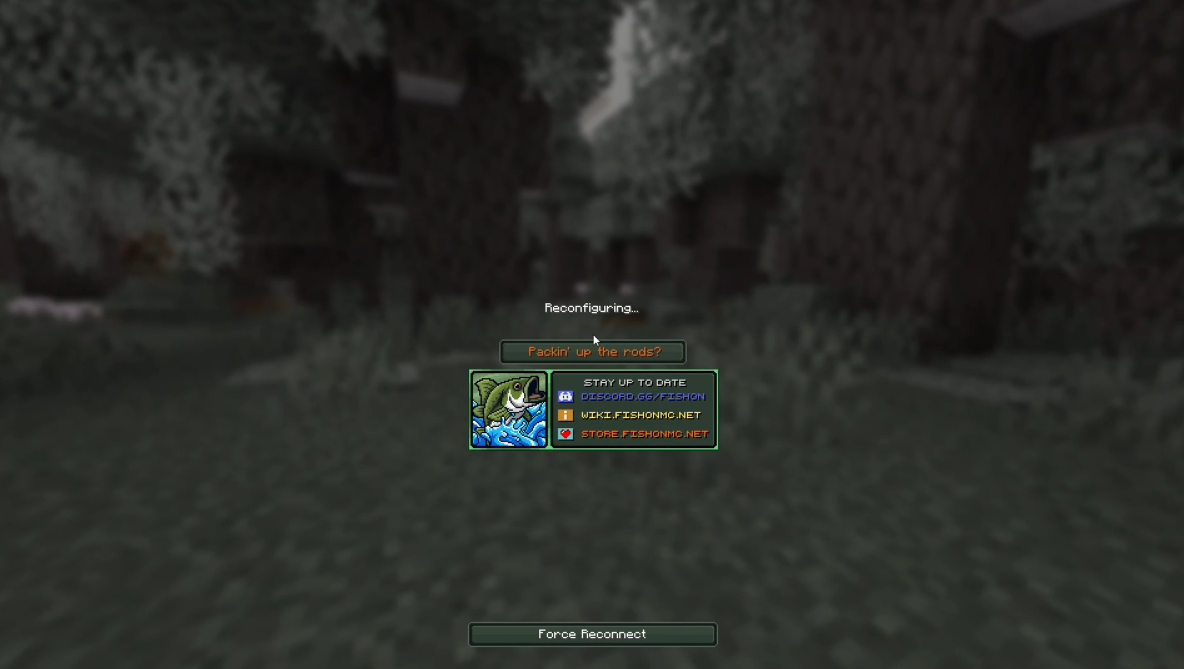
介绍




Welcome to FOMC Reconfig Fix – a simple quality-of-life mod that helps you avoid long delays (or even crashes) when your game gets stuck on the dreaded “Reconfiguring” screen.
🎮 Features
- ⚡ Reconnect Button: When Minecraft shows the Reconfiguring screen, it can sometimes take a very long time to disconnect, and on slower PCs it may even cause a crash. This mod adds a Reconnect button directly on that screen, letting you quickly rejoin without waiting.

🚀 Installation
To use FOMC Reconfig Fix, you’ll need:
- Minecraft Version: 1.21.4 or higher
- Fabric API
- Make sure you have the required Minecraft version installed.
- Download and install the latest Fabric API from here.
- Place the FOMC Reconfiguring Fix mod JAR file along with the Fabric API in the
modsfolder in your Minecraft installation directory.
Modrinth:
Download the mod on Modrinth: FOMC Reconfig Fix on Modrinth
❤️ Feedback and Contributions
I value your feedback! If you encounter any issues or have suggestions for improvement, please don’t hesitate to open an issue. Contributions in the form of pull requests are also most welcome!
📝 License
This mod is open-source and distributed under the MIT License.
🎉 Enjoy the Game!
Thank you for choosing FOMC Reconfig Fix! I hope this mod saves you time, prevents crashes, and makes your Minecraft experience smoother. 🎮
常见问题
FOMC Reconfiguring Fix 支持哪些 Minecraft 版本?
FOMC Reconfiguring Fix 支持 Minecraft Java 版 1.21.4–1.21.5,共 2 个版本,可用的加载器:Fabric。下载时注意选择和你游戏版本一致的文件。
FOMC Reconfiguring Fix 怎么安装?
先用 PCL2 或 HMCL 启动器安装对应版本的 Fabric,再把下载的 .jar 文件放进游戏目录的 mods 文件夹,重新启动游戏即可。开启了版本隔离的,mods 文件夹在 versions/版本名 下面。运行环境:仅客户端。

评论
登录后评论和评分