
UPNP for dedicated servers
Automatically forwards ports for your dedicated minecraft server with UPNP
截图
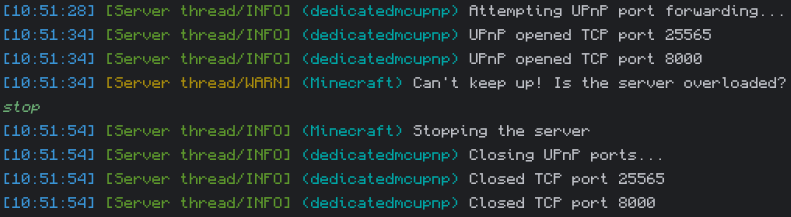
介绍
Automatically forwards ports for your dedicated minecraft server with UPNP. Opens ports when the server starts, and closes them when it stops. Useful if you want to quickly set up a server for your friends without the hassle of third party hosting or manually forwarding ports.
Usage:
The forwarded ports are configurable in the config file at config/upnp.txt.
Use the /upnp command to see in chat which ports are mapped and the IP players need to connect to the server with.
Both UDP and TCP ports can be opened. By default only the port TCP 25565 will be opened (the default port for Minecraft servers).
If you are using mods such as Simple Voice Chat or Geyser, you must add the relevant ports to the config.
常见问题
UPNP for dedicated servers 支持哪些 Minecraft 版本?
UPNP for dedicated servers 支持 Minecraft Java 版 1.16.5–1.21.8,共 26 个版本,可用的加载器:Fabric / Forge / NeoForge。下载时注意选择和你游戏版本一致的文件。
UPNP for dedicated servers 怎么安装?
先用 PCL2 或 HMCL 启动器安装对应版本的 Fabric / Forge / NeoForge,再把下载的 .jar 文件放进游戏目录的 mods 文件夹,重新启动游戏即可。开启了版本隔离的,mods 文件夹在 versions/版本名 下面。运行环境:仅服务端。
PigCart 的其他作品
查看全部 →
Particle Rain
用更精美的粒子效果替换天气效果

Cosy Critters & Creepy Crawlies
新增可爱的氛围动物:鸟类、虫子,还有些烦人的小生物。

Puddles & Floods
Adds detailed puddles and allows rivers to visually flood their banks

UPNP for dedicated servers
UPNP for dedicated Fabric servers
评论
登录后评论和评分