
Yzord’s PVP Modpack
A combination of Optimization and PVP mods for SMPs like Appleskin, Bettershields, Particle core and more.
截图


介绍
This modpack is a combination of a ton of optimization, PVP, and QoL mods that are meant to improve your FPS, your PVP experience, and overall enhance your time playing minecraft with mods like Appleskin, Sodium, Gamma Utils and much more.
BIG UPDATE COMING SOON (only for latest version of fabric) – 28 sep 2026
Total List of Mods:
Optimization:
- AsyncParticles
- Better Block Entities
- Concurrent Chunk Management Engine (Fabric)
- Consumable Optimizer
- Entity Culling
- Fast Noise
- FerriteCore
- Gnetum
- Ixeris
- Lithium
- ModernFix-mVUS
- More Culling
- Packet Fixer
- Particle Core
- Sodium
- XXL Packets
QoL/PVP:
- Gamma Utils (Fullbright)
- BetterShields
- GraphWaypoints
- Bundles Beyond
- Bundle Weight Counter
- Better F1 Reborn
- AppleSkin
- Continuity
- Custom Capes
- Light Overlay
- Marlow’s Crystal Optimizer
- Mod Menu
- Player Kits
- Resourcify
- Shield Fixes
- Shulker Box Tooltip
- Sprint After Death
- Status Effect Timer
- uku’s Armor HUD
- Zoomify (Zoom)
Libs & Other:
- Fzzy Config
- Herobot (1.21.11 only)
- Cloth Config API
- Fabric API
- Fabric Language Kotlin
- No Chat Reports
- OverlayLib
- Reese’s Sodium Options
- Sodium Extra
- Text Placeholder API
- ukulib
- WalksyLib
- YetAnotherConfigLib (YACL)
Credit to Remarkably Optimized for a lot of the optimization mods.
Installation Process
Installation process:
If you do not have fabric installed, follow this guide to install it: Fabric Installer
1.Dowload the pack for your specified version.
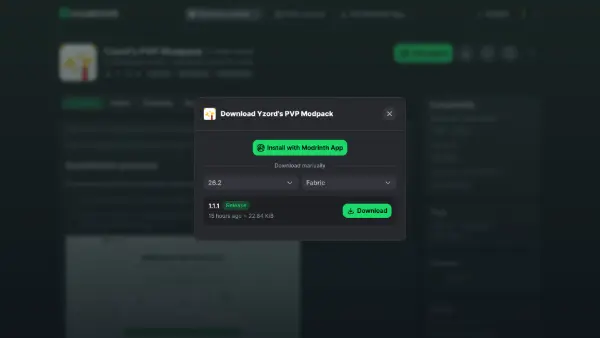
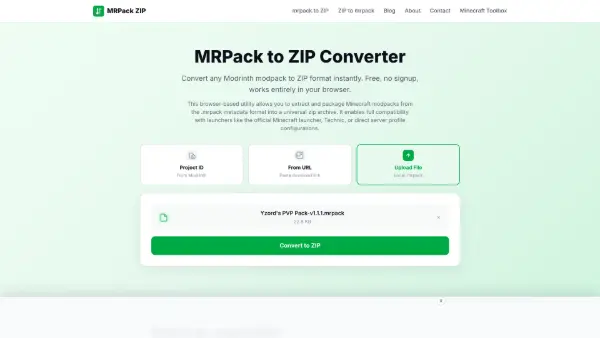
2.Go to: mrpack to ZIP and drag the mrpack onto the area where it says to. Then click convert to ZIP and once it’s done, click dowload.
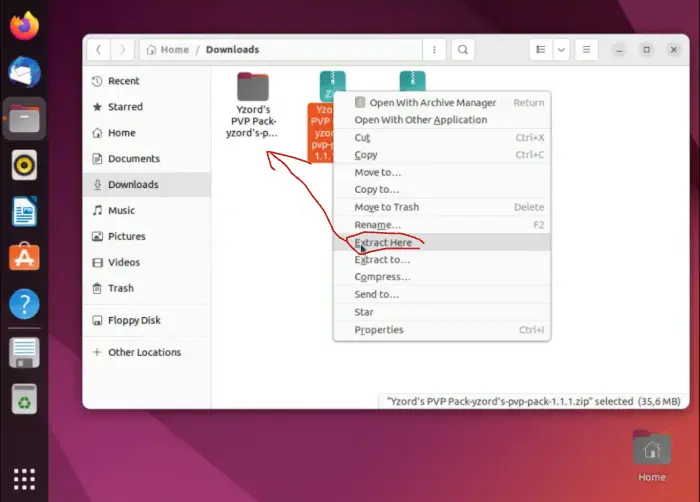
3.In your files, right click the new ZIP file and click extract. Then, inside of the folder, enter the “mods” folder and drag everything into the mods folder in minecraft (if there isn’t one just create a folder in your .minecraft named “mods” all lowercase).
4.Now open minecraft and enjoy!
包含的模组 49 个
 苹果皮
 AsyncParticles
 Better Block Entities
 Better F1 Reborn
 BetterShields
 Bobby
 Bundle Weight Counter
 Bundles Beyond
 Cloth Config API
 Concurrent Chunk Management Engine (Fabric)
 Consumable Optimizer
 Continuity
Custom Capes
 Effect Timer Plus
 Enchanted's Sodium Options
 Fabric API
 Fabric Language Kotlin
 Fast Noise
 FerriteCore
 Fzzy Config
 Gamma Utils (Fullbright)
 Gnetum
 GraphWaypoints
 Ixeris
 Light Overlay
 锂
 Marlow's Crystal Optimizer
 模组菜单
 ModernFix-mVUS
 Natural Motion Blur
 No Chat Reports
 OverlayLib
 Packet Fixer
 Particle Core
 Player Kits
 Reese's Sodium Options
 Resourcify
 Shield Fixes
 Shulker Box Tooltip
 钠
展开全部 49 个







绿色边框的模组本站有收录,点进去看中文介绍;其余跳转到 Modrinth。
常见问题
Yzord’s PVP Modpack 支持哪些 Minecraft 版本?
Yzord’s PVP Modpack 基于 Minecraft Java 版 26.2、26.1.2、1.21.11,使用 Fabric 加载器。
Yzord’s PVP Modpack 怎么安装?
点本页「前往下载」拿到整合包文件(Modrinth 的是 .mrpack,CurseForge 的是 .zip),在 PCL2 或 HMCL 启动器里选择「导入整合包」,启动器会自动装好 Minecraft、加载器和全部模组。这个整合包有 49 个模组,建议在启动器里给游戏分配 4–6 GB 内存。
Yzord’s PVP Modpack 开服需要多大内存?
推荐服务器内存 12 GB。在线人数多、或者建了大量机器和区块加载器时,可以再加 2–4 GB。
怎么和朋友一起玩 Yzord’s PVP Modpack?
点本页的「一键开服」,选好配置后会自动安装 Yzord’s PVP Modpack 的服务端,几分钟就能开好。把服务器地址发给朋友,大家用同一个版本的整合包连进去就行。
Yzord 的其他作品
查看全部 →
Gold Enchantment Glint
This project changes the enchament glint to be golden.

Gold XP Bar
This resource pack changes the default experience bar to be gold instead of green.

Yzord’s Custom Crosshair
This texture pack adds a custom sun pvp crosshair.

Bow Pulling Animations
This texture pack changes the crossbow and bow textures so that it is easier to tell what stage of charging they are on.
评论
登录后评论和评分