
截图
介绍
Chat Screen
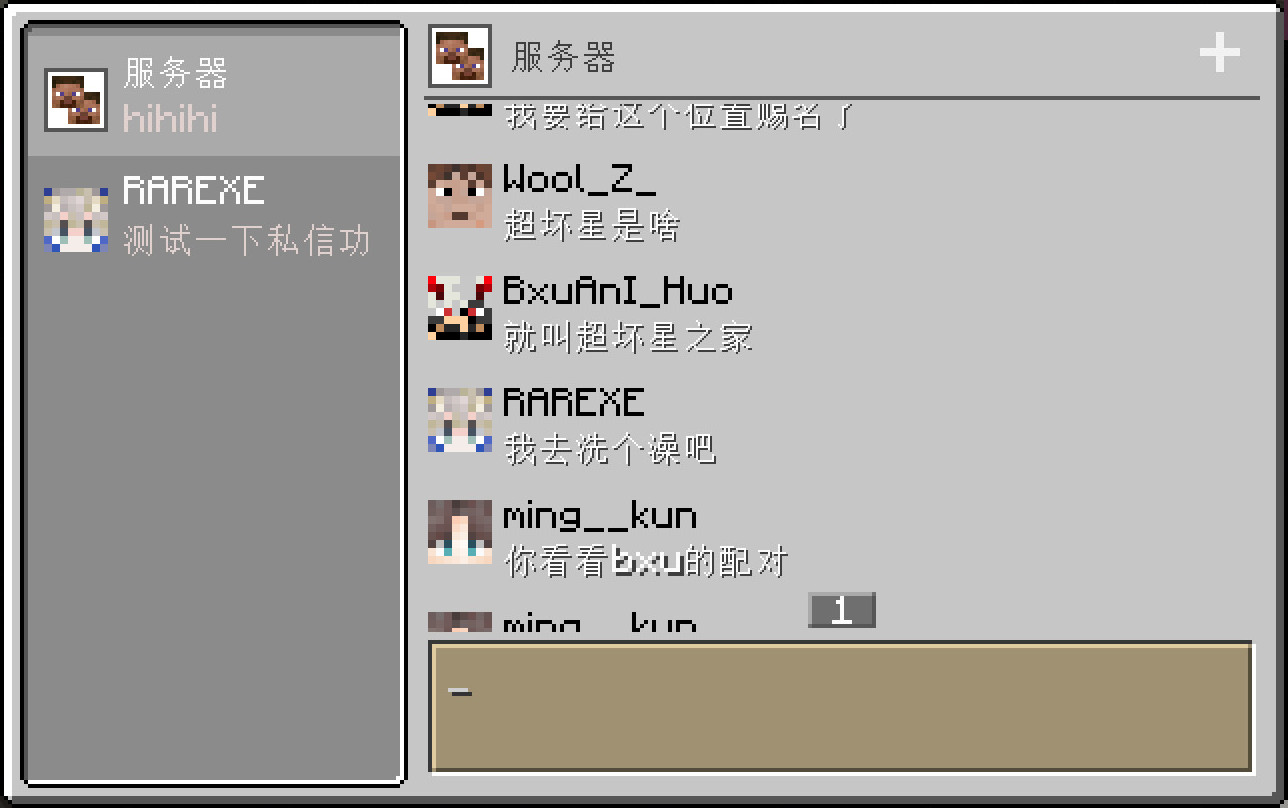
This mod add a modern chat screen to Minecraft.
The new chat screen is specifically designed for chatting of players.
This mod is client-side only and has no effect on the server-side.

Use chat screen
The chat screen is only available in Multiplayer worlds.
When the client connected to a server (including integrated servers, just like the vanilla social interactions screen), you can open the chat screen with C key (defaulted).
Server chat
You can always use the Server chat to send or receive chat message of the server. When you send a message through this chat, the client will send this message to the server like you type it in vanilla chat hud.
Team chat
You can use the Team chat when you are joined to a team. When you send a message through this chat, the client will send a /teammsg(the same as /tm) command to the server.
Personal chat
You can use a personal chat of any online player. When you send a message through this chat, the client will send a /msg(the same as /tell or /w) command to the server.
FAQ
- Unable to receive messages (of one or all types) through the chat screen.
This may be due to the server using a custom format to sent clients chat messages. Some plugins, such as CMI, can change that format.
If so, the chat screen cannot be used normally on this server unless you can persuade the admin to disable that custom format.
- Unable to send messages (of one or all types) through the chat screen.
This may be due to the server disabling some commands of sending message, like /msg, /teammsg and so on.
If so, the chat screen cannot send that kind of message normally on this server unless you can persuade the admin to reenable those commands.
常见问题
Chat Screen 支持哪些 Minecraft 版本?
Chat Screen 支持 Minecraft Java 版 1.20.1–1.21.10,共 3 个版本,可用的加载器:Fabric / Forge / NeoForge。下载时注意选择和你游戏版本一致的文件。
Chat Screen 怎么安装?
先用 PCL2 或 HMCL 启动器安装对应版本的 Fabric / Forge / NeoForge,再把下载的 .jar 文件放进游戏目录的 mods 文件夹,重新启动游戏即可。开启了版本隔离的,mods 文件夹在 versions/版本名 下面。运行环境:仅客户端。
whyvo 的其他作品
查看全部 →
Slide Show Pro
A simple slideshow(pro) projector in Minecraft.

Dynamic In-Game NBT Editor
Edit NBT dynamically and multis-creen.

Chaos World
Add a list of weapons with great abilities. A struction and a powerful boss.

Styled Boss Bar API
Design your Styled Boss Bar!
评论
登录后评论和评分