
截图
介绍
LookFree – Smooth 360° Freelook for Minecraft!
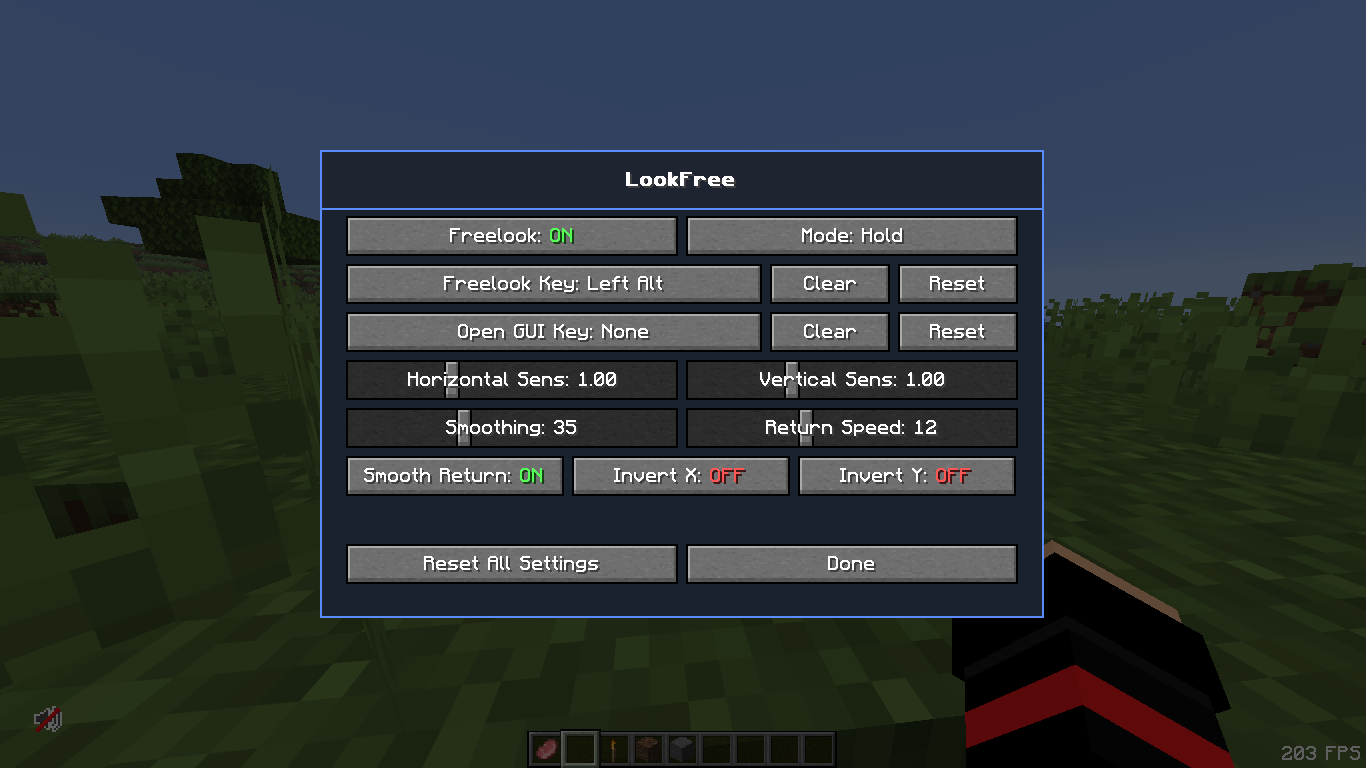
Take complete control of your camera with LookFree, a lightweight client-side Minecraft mod that allows you to freely look around your character without changing your actual player rotation or movement direction.
Inspired by the smooth Freelook experience found in popular Minecraft clients like Feather Client, LookFree brings convenient and customizable camera control directly to Minecraft.
✨ Features
-
360° Freelook: Freely rotate your camera around your player without changing your character’s actual facing direction.
-
Customizable Keybind: X is the default activation key, but you can assign your preferred key.
-
Toggle Mode: Press your assigned key once to activate Freelook and press it again to deactivate it.
-
Hold Mode: Keep Freelook active only while holding your assigned key.
-
Customizable Sensitivity: Adjust horizontal and vertical camera sensitivity.
-
Smooth Camera Return: Smoothly return to your original camera direction when Freelook is disabled.
-
Configuration GUI: Access all settings through the
/lookf guicommand. -
Lightweight Performance: Designed to use minimal CPU and memory resources without noticeable FPS drops.
-
Client-Side: No server-side installation required.
🎮 How to Use
-
Install LookFree.
-
Launch Minecraft.
-
Press X to activate Freelook (default key).
-
Move your camera freely while your character maintains its actual direction.
-
Use
/lookf guito customize your settings.
⚙️ Customization
LookFree gives you control over your Freelook experience with customizable activation modes, keybinds, camera sensitivity, and other configuration options.
⚡ Performance & Compatibility
LookFree is designed to be extremely lightweight and performance-friendly. It aims to work alongside popular Fabric client-side mods, including Sodium, Lithium, and other compatible modifications.
Look around. Stay in control. Experience Minecraft with LookFree!
常见问题
LookFree 支持哪些 Minecraft 版本?
LookFree 支持 Minecraft Java 版 26.1–26.3,共 2 个版本,可用的加载器:Fabric。下载时注意选择和你游戏版本一致的文件。
LookFree 怎么安装?
先用 PCL2 或 HMCL 启动器安装对应版本的 Fabric,再把下载的 .jar 文件放进游戏目录的 mods 文件夹,重新启动游戏即可。开启了版本隔离的,mods 文件夹在 versions/版本名 下面。
SaiyanBhai 的其他作品
查看全部 →
WarBed Client
适用于 1.8.9 的最佳 Bedwars 客户端,功能丰富
Saiyan PvP Pack
A Texture Pack that Boost Your PvP Experience

AnySkinn
This mod can change your skin and it is a skin Fletcher for AnySkin

HotBar++
Set Your Custom HotBar size
评论
登录后评论和评分