Better Fire Animation
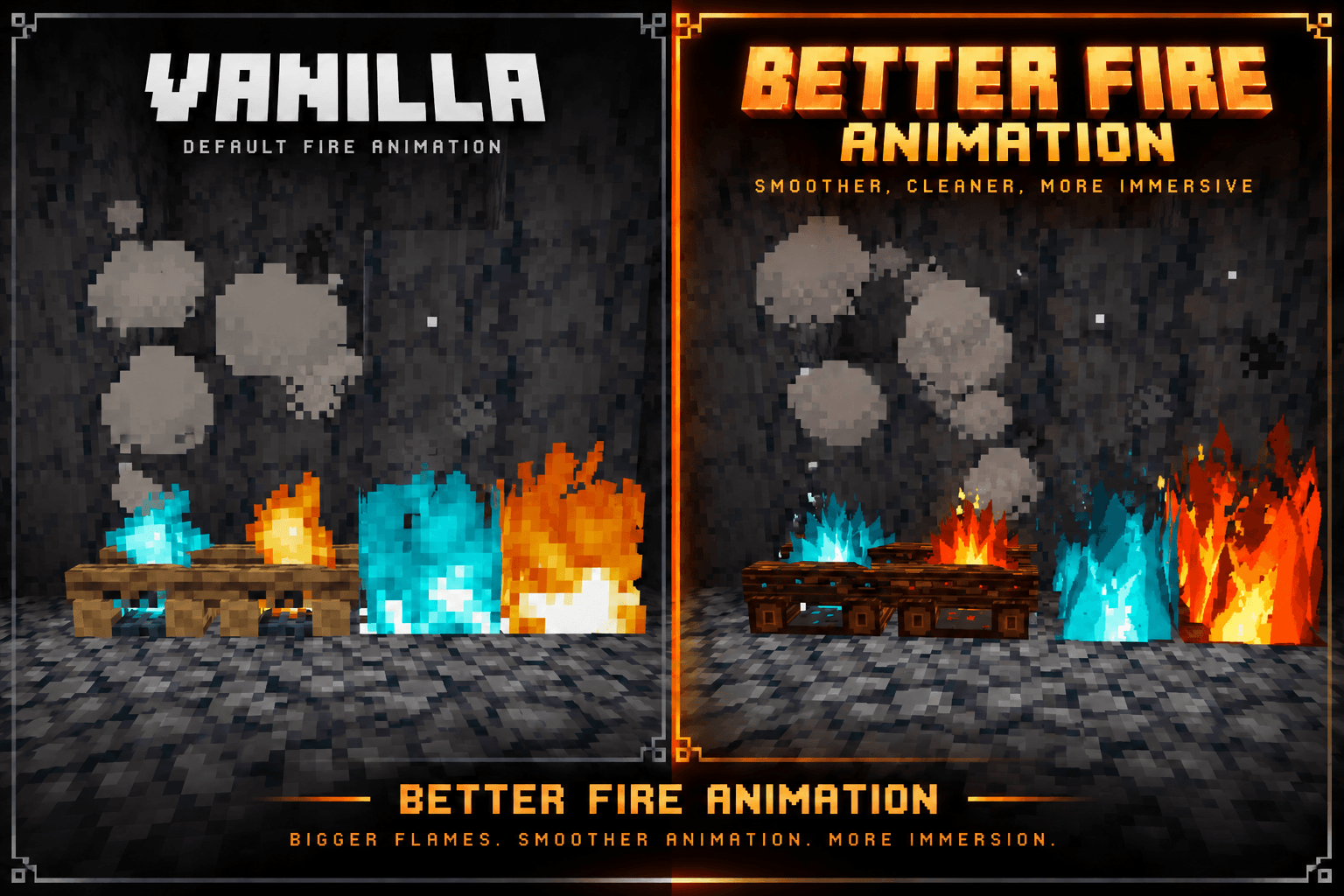
A complete fire animation overhaul with bigger flames, smoother animation, and richer visual detail.
截图
介绍
🔥 Better Fire Animation
Better Fire Animation is a complete visual overhaul for Minecraft’s fire effects. It replaces the default fire visuals with larger, more aggressive flames, stronger colors, sharper shapes, and a much more dynamic animated appearance.
✨ Features
🔥 Completely redesigned fire flames
🔥 Much larger and taller flame shapes
🌊 Smoother and more dynamic animation
🔵 Redesigned soul fire with a stronger cyan appearance
🔥 Redesigned campfire flames
💨 Updated campfire and fire visuals
✨ More detailed flame shapes, highlights, and movement
🎨 A bold visual style that significantly changes how fire looks in game
🎯 What It Changes
This pack focuses entirely on fire related visuals and animations. The flames are not intended to simply look like slightly improved vanilla fire. They are a substantial visual redesign with a more dramatic and energetic appearance.
The goal is to make fire stand out more, feel more alive, and look significantly better during gameplay.
📦 Installation
- Download the latest release.
- Open Minecraft Java Edition.
- Go to Options → Resource Packs.
- Open the Resource Pack folder.
- Place the downloaded ZIP file inside.
- Select Better Fire Animation in game.
No mod loader is required.
🔥 Bigger flames. Smoother animation. More immersion.
常见问题
Better Fire Animation 支持哪些 Minecraft 版本?
Better Fire Animation 支持 Minecraft Java 版 26.2。下载时注意选择和你游戏版本一致的文件。
Better Fire Animation 怎么安装?
把下载的 .zip 文件(不用解压)放进游戏目录的 resourcepacks 文件夹,进游戏后在「选项 → 资源包」里把它移到右边启用。
AshenThread 的其他作品
查看全部 →
Better Water Animation
一个轻量级的 64x 动画水资源包,适用于 Minecraft Java 版

VanillaFlux
Performance and worldgen focused modpack.
VanillaFlux
Performance and worldgen focused modpack.
Veinbound
A 64x64 vanilla-style Minecraft resource pack that overhauls ores, Deepslate ores, Nether ores, and Ancient Debris for Java Edition 26.2.
评论
登录后评论和评分