
截图
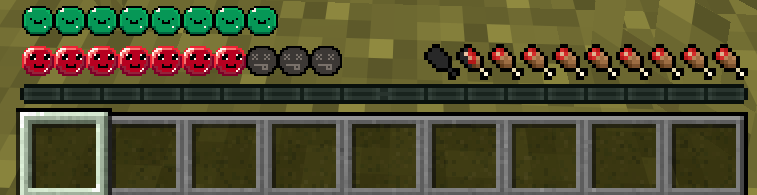
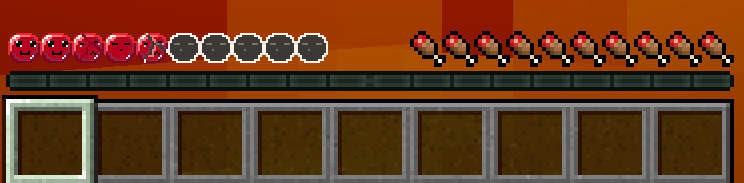
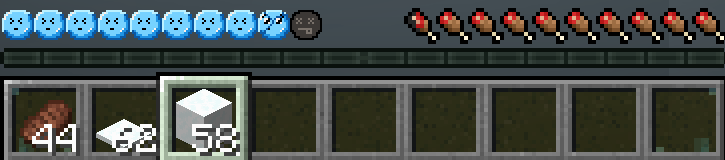
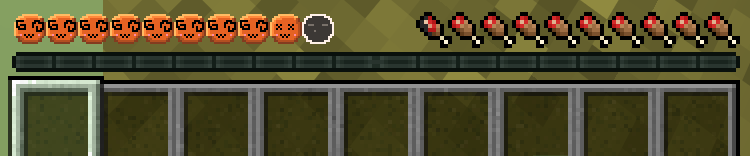
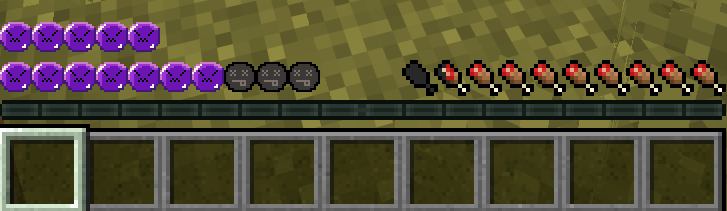
介绍
What is Wonky Health Bars?
Wonky Health bars It is a small texture pack that replaces Minecraft’s default health bar (the hearts), with small caricatures.
How do I install this Resource pack?
1- Open minecraft.
2- Go to settings, and click on the button labeled “Resource packs”
3- Press the button labeled “Open Pack Folder”
4- Drag the .zip file “Le_Wonky_Health_Bar.zip” into the “resourcepacks” folder.
5- Close the File Menu.
6- Hover your mouse above the icon for the resource pack and press the big triangle pointing to the right.
7- make sure the resource pack is ABOVE the default minecraft resource pack, else it won’t work.
8- Exit the minecraft settings, Done!.
Reference photo:
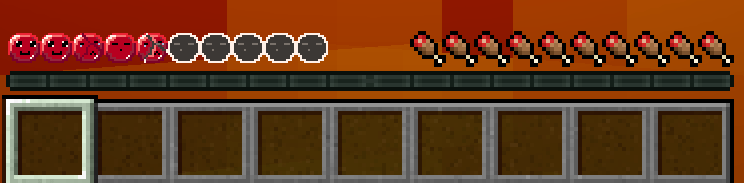
Additional notes:
In the future this will be ported for versions 1.12 and up (if possible)
This Texture pack should work with every major version from 1.21.1 onwards, should it not work, please let me know and I will try to make it work ASAP.
If you have any suggestions/questions/issues feel free to leave a comment!
常见问题
Le Wonky Health Bar 支持哪些 Minecraft 版本?
Le Wonky Health Bar 支持 Minecraft Java 版 1.12.2–1.21.11,共 4 个版本。下载时注意选择和你游戏版本一致的文件。
Le Wonky Health Bar 怎么安装?
把下载的 .zip 文件(不用解压)放进游戏目录的 resourcepacks 文件夹,进游戏后在「选项 → 资源包」里把它移到右边启用。
jgameo777 的其他作品
查看全部 →
Aero Glass GUI
A Resource Pack for Minecraft's GUI inspired by the Frutiger Aero style

PinkWobble GUI
A Resource Pack that swaps Minecraft's Gray GUI with pink and purple pastels.
Astral Clock
A whimsical texture for the minecraft clock.
Purple Redux
Resource pack that changes Minecraft's default health bar
评论
登录后评论和评分