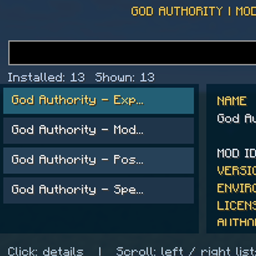
God Authority · Mod Inspector
A searchable, scrollable, read-only panel showing installed Fabric modules, their metadata, dependencies and detected registered content.
介绍
God Authority · Mod Inspector is a compact, command-free information panel for inspecting the modules loaded in the current Fabric instance. It provides a searchable index and a separate detailed information view. It does not enable, disable, install, remove or modify any module.
OPENING AND NAVIGATION
• Press F10 to open the inspection panel (Fn + F10 may be necessary on some keyboards).
• Type in the search box to filter the list by display name or Mod ID.
• The left panel shows the matching top-level modules, ordered by name. Click a row to inspect that module.
• The right panel displays the selected module’s details. Long descriptions are wrapped into multiple lines instead of being cut off.
• Use the mouse wheel over the LEFT panel to scroll its list. Use the mouse wheel over the RIGHT panel to scroll the details independently.
• Press Esc to close. No Apply or Save step is needed because this tool is read-only.
WHAT THE DETAIL PANEL SHOWS
• Module name, Mod ID and version.
• Declared environment, license and authors.
• Description provided by that module.
• Declared dependency entries and their version requirements.
• Detected registered content grouped into items, blocks, entities, status effects, sounds and particles. Counts and a preview of registered identifiers are shown for each group.
• Parent and bundled modules are grouped so the main list remains easy to navigate.
REGISTERED CONTENT ATTRIBUTION
Registered-content attribution uses the registry namespace. A module can use shared or unusual namespaces, so this is a best-effort overview, not a guarantee that every registered entry belongs exclusively to the selected module. The loaded metadata itself is read directly from Fabric Loader.
INSTALLATION
Install the Fabric Loader and Fabric API for version 1.21.11, place the supplied JAR in the mods directory, start the Fabric instance and press F10. No commands, permissions or configuration files are needed for the viewing workflow.
常见问题
God Authority · Mod Inspector 支持哪些 Minecraft 版本?
God Authority · Mod Inspector 支持 Minecraft Java 版 1.21.11,可用的加载器:Fabric。下载时注意选择和你游戏版本一致的文件。
God Authority · Mod Inspector 怎么安装?
先用 PCL2 或 HMCL 启动器安装对应版本的 Fabric,再把下载的 .jar 文件放进游戏目录的 mods 文件夹,重新启动游戏即可。开启了版本隔离的,mods 文件夹在 versions/版本名 下面。
Ruochen_Liu 的其他作品
查看全部 →
Nightmare Survival — Enhanced Mobs 🌟
噩梦生存——强化生物 🌟 I(系列 M 标签:M2):穿戴盔甲并附魔的敌对生物、毁灭性的苦力怕、白天生成敌人,以及扩展的村民交易,带来更艰难的生存体验。
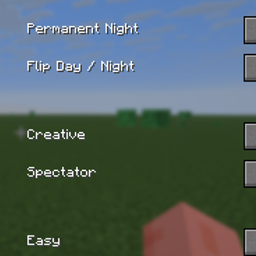
GOD AUTHORITY · WORLD CONTROL
A command-free Fabric 1.21.11 world-control panel for instantly managing time, game mode, difficulty, weather, and special testing utilities from an in-game GUI.
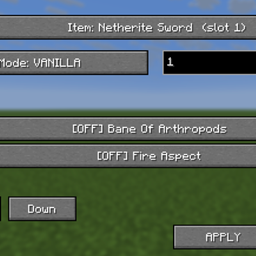
God Authority · Enchantment Lab
Edit item enchantments from a compact F1 + F2 panel with Vanilla and Merged modes and levels 1–255.
GOD AUTHORITY · ENTITY LOCK
Search and block registered entity types with reversible hostile restrictions and an F7 control panel.
评论
登录后评论和评分