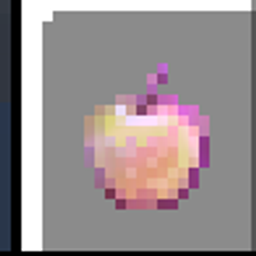
God Authority · Experience Golden Apples
Four edible experience utilities: a 200-level boost, a timed 99,999-level state and two persistent infinity-style variants.
介绍
God Authority · Experience Golden Apples provides four separate edible experience utilities for controlled equipment, level and effect testing. Each apple uses an ordinary eating action; its effect is applied once the eating animation finishes. There is no command, configuration screen or confirmation button.
HOW TO OBTAIN AND USE
1. Open the creative inventory group named “God Authority | Experience Apples” and select the desired apple. Two early tiers also include crafting recipes described below.
2. Hold the apple, use it and finish the full eating action. The effect does not trigger merely by selecting or holding it.
3. Review the level display or applicable status indicator. Different variants change experience state in different ways.
FOUR APPLE VARIANTS
• Experience Apple | 200 — grants 200 additional experience levels after being eaten. This is a one-time level boost, not a temporary mode.
• Temporary Experience Apple | 99999 · 10 Minutes — activates a 99,999-level testing state for 12,000 simulation ticks (10 minutes at the normal tick rate), then restores the previously recorded experience state. Its active state has a separate status indicator.
• Infinity Experience Apple | ∞ — establishes a persistent infinity-style experience state with an infinity marker and a very high displayed experience level.
• Omni Infinity Apple | ∞ — a separate infinity-style variant with its own additional Omni status marker.
CRAFTING RECIPES
• Experience Apple | 200: shapeless crafting with 1 iron ingot and 2 golden apples. In survival-style crafting, this output also requires and deducts 5 experience levels.
• Temporary Experience Apple | 99999: shapeless crafting with 1 obsidian, 1 diamond, 3 golden apples, 1 gold block, 1 coal block, 1 netherite ingot and 1 enchanted book. In survival-style crafting, this output requires and deducts 10 experience levels. The mod also checks the ingredient enchantment data for Mending and does not allow that recipe output when Mending is detected.
• The two infinity-style variants are provided in the dedicated creative inventory group. No separate crafting recipe is declared for those two variants in this release.
STATUS INDICATORS AND VISUALS
The custom experience status indicators use a dark black base with violet enchantment-style highlights. The existing apple silhouettes and normal eating behaviour are preserved. The experience-tracking state is separate from ordinary removable status effects.
INSTALLATION
Use version 1.21.11 with Fabric Loader and Fabric API. Place the JAR in the mods directory and start with the Fabric profile. This utility does not need commands or a keybinding.
常见问题
God Authority · Experience Golden Apples 支持哪些 Minecraft 版本?
God Authority · Experience Golden Apples 支持 Minecraft Java 版 1.21.11,可用的加载器:Fabric。下载时注意选择和你游戏版本一致的文件。
God Authority · Experience Golden Apples 怎么安装?
先用 PCL2 或 HMCL 启动器安装对应版本的 Fabric,再把下载的 .jar 文件放进游戏目录的 mods 文件夹,重新启动游戏即可。开启了版本隔离的,mods 文件夹在 versions/版本名 下面。
Ruochen_Liu 的其他作品
查看全部 →
Nightmare Survival — Enhanced Mobs 🌟
噩梦生存——强化生物 🌟 I(系列 M 标签:M2):穿戴盔甲并附魔的敌对生物、毁灭性的苦力怕、白天生成敌人,以及扩展的村民交易,带来更艰难的生存体验。
GOD AUTHORITY · WORLD CONTROL
一个无需命令的 Fabric 1.21.11 世界控制面板,可通过游戏内 GUI 即时管理时间、游戏模式、难度、天气和特殊测试工具。
God Authority · Enchantment Lab
通过紧凑的 F1 + F2 面板编辑物品附魔,支持原版和合并模式以及 1–255 等级。

GOD AUTHORITY · ENTITY LOCK
搜索并阻止已注册的实体类型,带有可逆的敌对限制和 F7 控制面板。
评论
登录后评论和评分