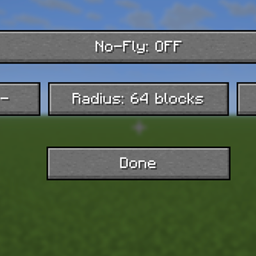
God Authority · No-Fly Domain
Control a no-flight area with an F9 panel and adjustable radius.
介绍
God Authority · No-Fly Domain
No-flight control for testing and controlled environments.
OVERVIEW
No-Fly Domain creates an adjustable no-flight restriction around the player’s current position. When enabled, the utility restricts airborne movement for nearby players and living entities. The affected area follows the player’s position rather than remaining fixed at a placed location.
This is a control and testing utility, not a progression or RPG feature. All settings are available from a simple panel without typing commands.
AVAILABLE RADIUS OPTIONS
Choose one of five radius values:
– 16 blocks — Small, close-range area.
– 32 blocks — Local area around the player.
– 64 blocks — Medium area; default radius.
– 128 blocks — Large surrounding area.
– 256 blocks — Maximum available radius.
These are radius values, not diameters. For example, 32 blocks means a reach of 32 blocks from the center in each direction. The restriction applies to qualifying targets inside the selected distance.
CONTROL PANEL
Open the panel: F9
– No-Fly: OFF — Click to turn the restriction ON.
– No-Fly: ON — Click to turn the restriction OFF.
– – — Select the previous radius.
– Radius: [number] blocks — Shows the active radius. Clicking the radius button also advances to the next radius.
– + — Select the next radius.
– Done — Close the panel.
The available radius order is:
16 → 32 → 64 → 128 → 256 → 16.
The – button moves through the same options in reverse order.
STEP-BY-STEP USER GUIDE
1. Enter the environment where you want to use the restriction.
2. Press F9 to open No-Fly Domain.
3. Check the current No-Fly status and radius.
4. Use – or + to select 16, 32, 64, 128, or 256 blocks.
5. Click No-Fly: OFF. The status changes to No-Fly: ON.
6. Click Done to close the panel.
7. Move to the area you want to control. The restriction checks the area around the player’s current position.
8. To change the area size, press F9 again, select another radius, and close the panel.
9. To disable the restriction, press F9 and click No-Fly: ON so that the label changes to No-Fly: OFF.
10. Click Done to return.
EXAMPLE SETUPS
– Close-range testing: Radius 16, No-Fly ON.
– General local testing: Radius 64, No-Fly ON.
– Wide-area testing: Radius 128 or 256, No-Fly ON.
– Return to unrestricted movement: No-Fly OFF.
IMPORTANT OPERATING NOTES
– ON/OFF and radius changes take effect when selected. Done closes the panel; it is not a separate Apply button.
– Radius 64 is the initial default.
– The selected settings are runtime controls; this version does not provide a saved-per-world profile.
– The main airborne restrictions target players and living entities; the tool is not a universal blocker for every non-living object or projectile.
– The no-flight behavior is a restriction applied near the player. It does not create a stationary, permanent barrier at a marked location.
– Custom movement systems from other mods can behave differently; compatibility with every third-party entity is not guaranteed.
常见问题
God Authority · No-Fly Domain 支持哪些 Minecraft 版本?
God Authority · No-Fly Domain 支持 Minecraft Java 版 1.21.11,可用的加载器:Fabric。下载时注意选择和你游戏版本一致的文件。
God Authority · No-Fly Domain 怎么安装?
先用 PCL2 或 HMCL 启动器安装对应版本的 Fabric,再把下载的 .jar 文件放进游戏目录的 mods 文件夹,重新启动游戏即可。开启了版本隔离的,mods 文件夹在 versions/版本名 下面。
Ruochen_Liu 的其他作品
查看全部 →
Nightmare Survival — Enhanced Mobs 🌟
噩梦生存——强化生物 🌟 I(系列 M 标签:M2):穿戴盔甲并附魔的敌对生物、毁灭性的苦力怕、白天生成敌人,以及扩展的村民交易,带来更艰难的生存体验。
GOD AUTHORITY · WORLD CONTROL
一个无需命令的 Fabric 1.21.11 世界控制面板,可通过游戏内 GUI 即时管理时间、游戏模式、难度、天气和特殊测试工具。
God Authority · Enchantment Lab
通过紧凑的 F1 + F2 面板编辑物品附魔,支持原版和合并模式以及 1–255 等级。
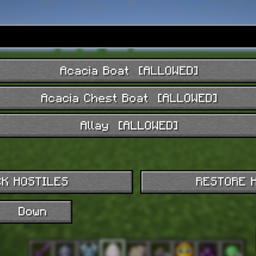
GOD AUTHORITY · ENTITY LOCK
搜索并阻止已注册的实体类型,带有可逆的敌对限制和 F7 控制面板。
评论
登录后评论和评分