
DeepSpace
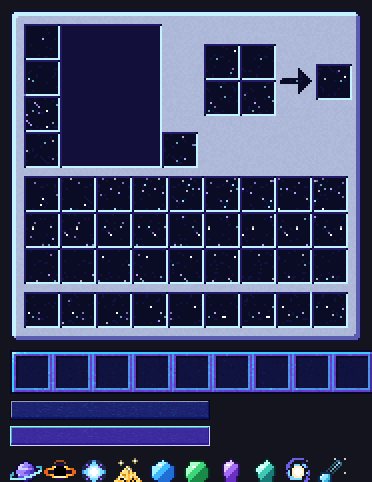
Space-themed GUI, inventory and items for Minecraft 1.8 to 26.x. Starfield slots, neon hotbar and buttons, and 10 custom items like a ringed planet, black hole and galaxy.
截图
介绍
# Deep Space
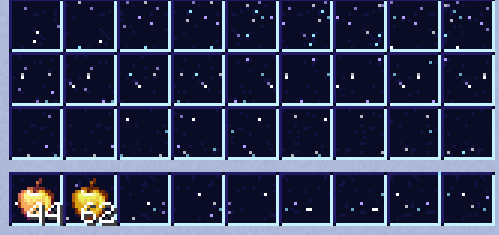
Turn your Minecraft interface into a spaceship console. Deep Space gives your inventory, hotbar, buttons and a set of items a space theme, while keeping the vanilla 16x look.
## Features
**Space-themed GUI**
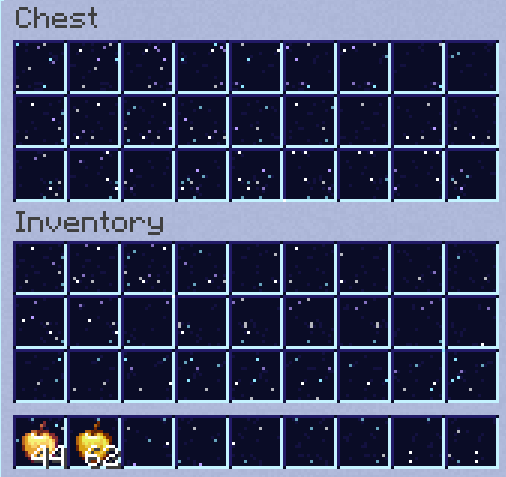
– Silver hull-style panels with deep-space slots filled with tiny stars
– Neon cyan and violet hotbar and selection frame
– Futuristic buttons with normal, hover and disabled states
– Redesigned containers: inventory, crafting table, chests, furnace, blast furnace, smoker, dispenser, hopper, brewing stand, anvil, enchanting table and shulker box
**10 custom items**
– Ender Pearl: ringed planet
– Eye of Ender: black hole
– Nether Star: shining star
– Glowstone Dust: stardust
– Diamond and Emerald: space crystals
– Amethyst Shard and Echo Shard: cosmic crystals
– Heart of the Sea: spiral galaxy
– Prismarine Crystals: comet
## Compatibility
– Resolution: 16x
– Minecraft Java Edition 1.8 up to 26.x
– The light panels keep the default dark menu text readable
## Installation
1. Download the .zip file (do not extract it).
2. In Minecraft, go to Options > Resource Packs > Open Pack Folder.
3. Drop the .zip into the folder and activate Deep Space in the pack list.
## Feedback
Found a bug or want more items (tools, armor, food)? Leave a comment and it may come in a future update!
常见问题
DeepSpace 支持哪些 Minecraft 版本?
DeepSpace 支持 Minecraft Java 版 1.8–26.3,共 74 个版本。下载时注意选择和你游戏版本一致的文件。
DeepSpace 怎么安装?
把下载的 .zip 文件(不用解压)放进游戏目录的 resourcepacks 文件夹,进游戏后在「选项 → 资源包」里把它移到右边启用。
BerDVeloper 的其他作品
查看全部 →
Stimpy waar pack
来自 YouTuber stimpy 的材质,我拿来后对材质做了一些修改,改动了一些东西并决定发布到 CurseForge 上供大家下载,材质为 Minecraft PvP 制作

Verzide 64x
texture of the old youtuber verzide very famous between 2015/2016/2017 until 2019 youtuber of Minecraft PvP PotPVP/ the truth is, I took the texture and changed armor, swords, ores, etc.

Vibrantpvp 16x FPS
Vibrant 16x PvP/UHC pack for MC 1.8–1.20.1. Custom swords, axes, armor, 80+ blocks, potions, crosshair, hotbar and FPS boost. OptiFine recommended.

Névoa Azul – Blue-Gray GUI Overhaul
A clean, light blue-gray GUI/interface overhaul — buttons, hotbar and inventory redesigned with a soft glass look. Compatible from 1.8 up to the latest versions.
评论
登录后评论和评分