
Extended Stats LOTR
Add-on for Extended Stats: 21 new statistics for The Lord of the Rings Mod
截图
介绍
Extended Stats LOTR
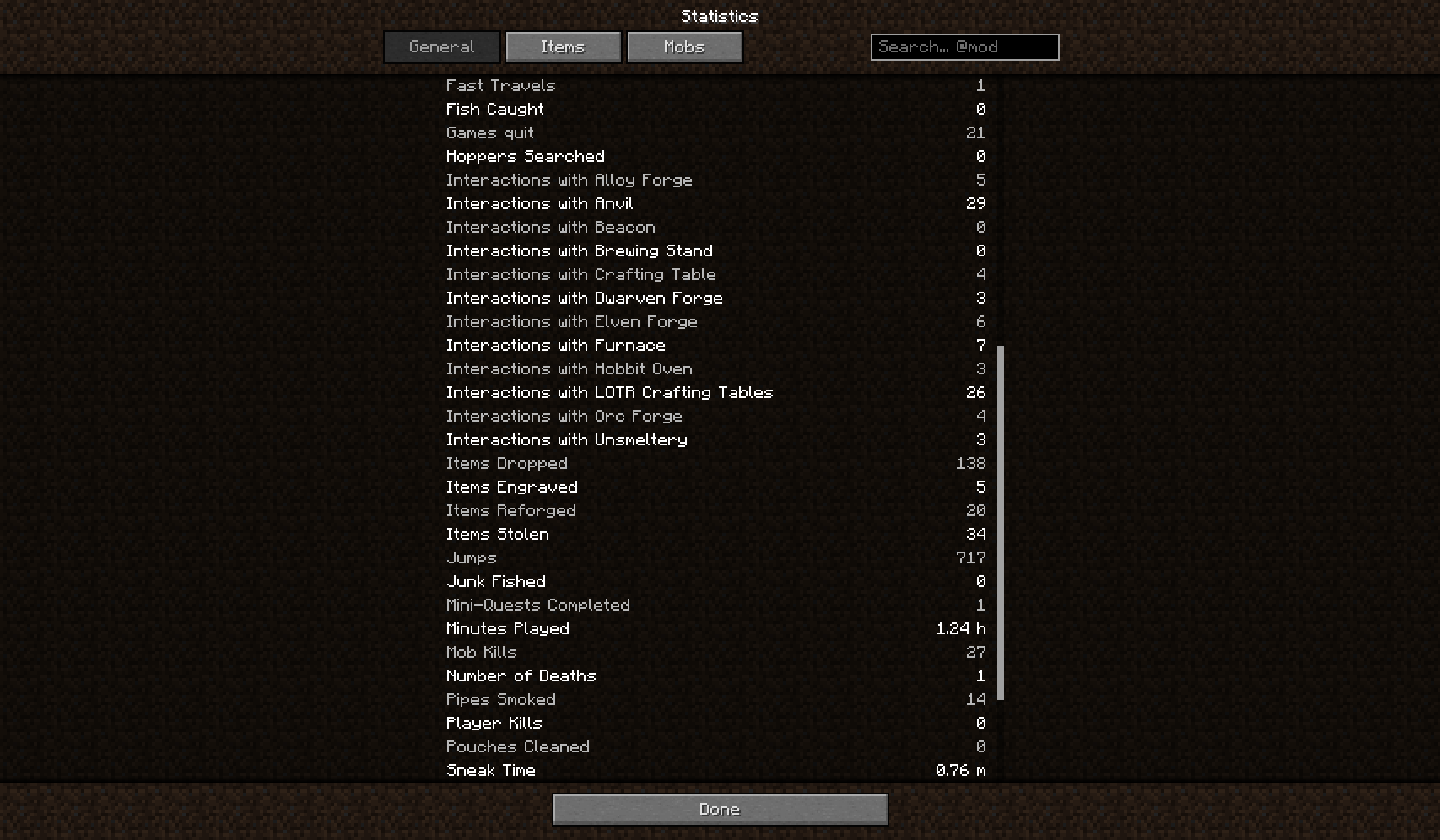
An add-on for Extended Stats that brings Middle-earth into your statistics.
21 new general statistics for The Lord of the Rings Mod (Legacy), built-in merge rules for LOTR items and a fix for the anvil statistic. Requires Extended Stats and The Lord of the Rings Mod Legacy (Update 36.15).
New statistics
You will find them on the General tab of the Extended Stats screen.
Workstations
- Interactions with LOTR Crafting Tables (all faction tables together)
- Interactions with Alloy Forge, Dwarven Forge, Elven Forge, Orc Forge
- Interactions with Hobbit Oven, Interactions with Unsmeltery
Factions and quests
- Units Hired, Trades Made, Conquest Earned (all factions together)
- Mini-Quests Completed, Bounties Completed
- Fast Travels
Life in Middle-earth
- Drinks Drunk, Alcoholic Drinks
- Pipes Smoked
- Pouches Cleaned
- Items Reforged, Items Engraved (at an anvil or at a smith)
- Times Robbed, Items Stolen (by Bandits, Harad Bandits and Ruffian Spies)
Your history counts: Units Hired, Trades Made, Conquest Earned, Mini-Quests, Bounties and Fast Travels are read from the data LOTR already keeps about you, so everything you did before installing the add-on is counted too.
Only what really happened is counted: a faction table that refuses you, a pipe without pipeweed or a bandit who only chased you do not count.
Also included
- Anvil fix: with LOTR enchanting on, LOTR replaces the vanilla anvil window, so “Interactions with Anvil” of Extended Stats never counted. Now it does.
- Merge rules for LOTR items: mugs, beds, plates, crops and other things that LOTR registers as a separate block and item are shown as one row on the Items tab, without editing any config.
- Backup: with Extended Stats 1.2.0 or newer, these statistics are kept in its backup file and survive starting the world without the add-on.
Installation
Minecraft 1.7.10 with Forge 10.13.4.1614. Required mods:
- Extended Stats (1.2.0 or newer recommended, 1.1.0 works without the backup)
- The Lord of the Rings Mod Legacy, Update 36.15
Without either of them the game does not start, and Forge shows which one is missing.
- Singleplayer: put the jar into
modsnext to the other two. That’s all. - Server: put the same jar on the server and on every client, together with Extended Stats. There is no separate server version.
Why both? The server counts the statistics, the client only shows them.
- Add-on on the server only: everything is counted and saved, but players without the add-on don’t see the LOTR statistics.
- Add-on on the client only: the server doesn’t count anything LOTR-related, so the LOTR statistics stay at zero.
Neither case crashes or breaks anything, so players without the add-on can still join a server with it.
If you wrote the LOTR rules into config/extendedstats-merge.txt yourself, remove them (or put # in front). They are now built in.
Compatibility
- Made for and tested with LOTR Update 36.15. With another LOTR version some statistics may stop counting (a warning appears in the log); the game does not crash.
- Tested together with MiddleEarth Tweaks 1.6.21.
- Tested with one player on a dedicated server. Feedback from singleplayer and bigger servers is welcome.
Languages
English and Slovak. Translations are welcome: copy assets/extendedstatslotr/lang/en_US.lang, translate the text after each = and send it on Discord.
Discord
Bug reports, ideas for new statistics, translations and questions: the Extended Stats Discord has its own category for this add-on.
Thanks
A big thank you to Mevans, the creator of The Lord of the Rings Mod, for bringing Middle-earth to Minecraft. This add-on only counts what his mod made possible.
常见问题
Extended Stats LOTR 支持哪些 Minecraft 版本?
Extended Stats LOTR 支持 Minecraft Java 版 1.7.10,可用的加载器:Forge。下载时注意选择和你游戏版本一致的文件。
Extended Stats LOTR 怎么安装?
先用 PCL2 或 HMCL 启动器安装对应版本的 Forge,再把下载的 .jar 文件放进游戏目录的 mods 文件夹,重新启动游戏即可。开启了版本隔离的,mods 文件夹在 versions/版本名 下面。

评论
登录后评论和评分