Elytra Quickswap
Swap your chestplate and elytra with one key, or automatically with a double jump. Picks the best armor for you and swaps back when you land.
截图
介绍
Elytra Swap is a client-side mod for beginners. It stops you from fumbling in the inventory while falling. Hold a firework rocket, double jump in the air, and the mod puts on your best elytra and starts gliding. Land, and it puts your best chestplate back on.
Features
- One key swap (G): swaps between your chestplate and elytra.
- Auto swap on double jump: jump, let go, press jump again in the air while holding a flight firework rocket (main hand or off hand). The elytra is equipped and you start gliding. Rockets with firework stars do not count.
- Auto swap back: after you glide and land, your best chestplate returns. It works even with the inventory open.
- Smart chestplate choice: ranked by how much damage it really absorbs (armor, toughness and Protection), then Mending, then Unbreaking, then durability. For example, an iron chestplate with Protection IV can beat a plain diamond one.
- Smart elytra choice: Mending first, then Unbreaking.
- Low durability protection: items near breaking are skipped while a healthier one exists.
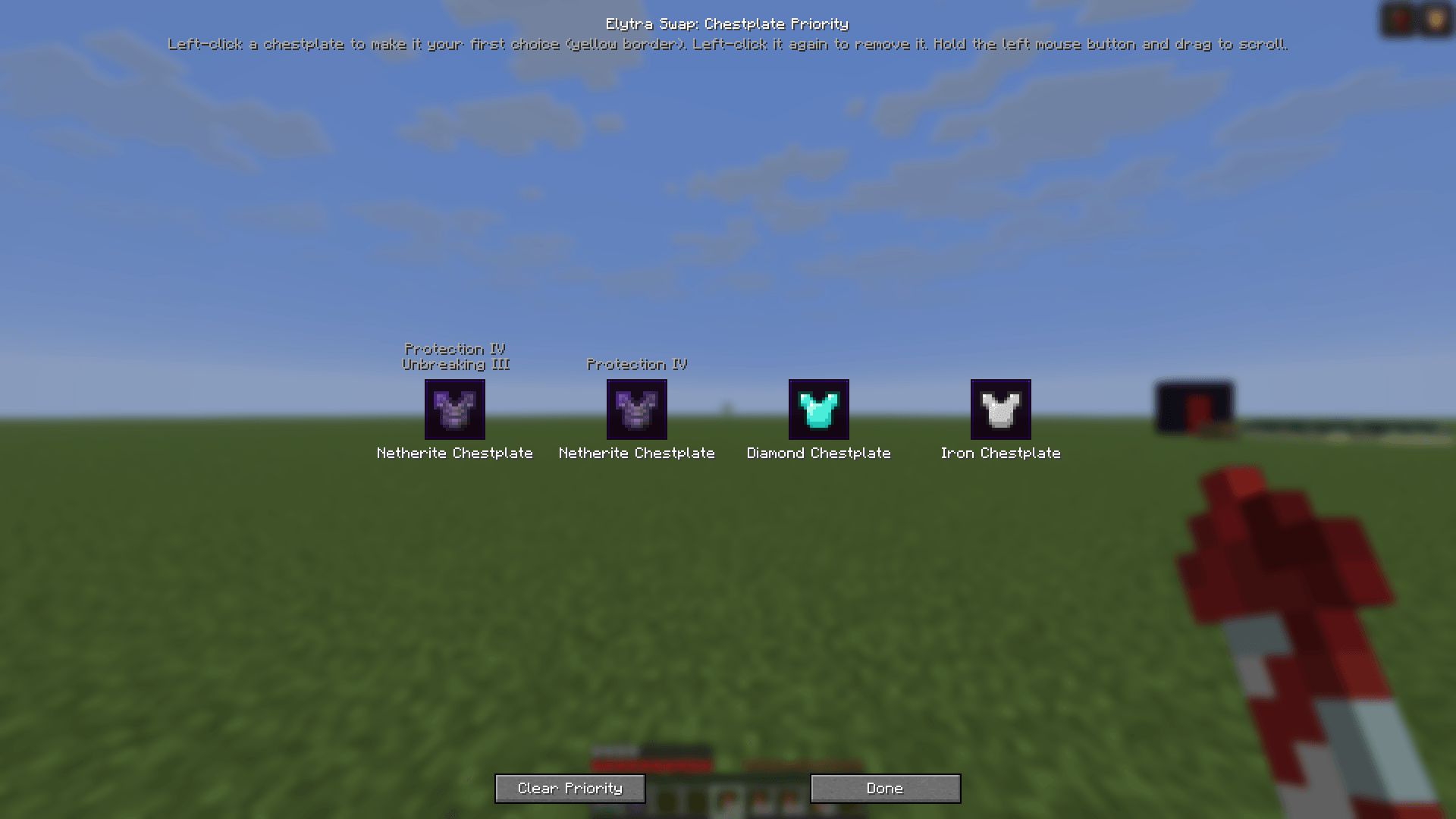
- Priority screen (H): pick one chestplate to always use first. Left-click to select (yellow border), click again to remove. Drag with the mouse to scroll if you have many.
- Safe: never wears a Curse of Binding item and never takes one off.
Controls
| Key | Action |
|---|---|
| G | Swap chestplate and elytra |
| H | Open the chestplate priority screen |
Both keys can be changed in Options → Controls → Key Binds.
Notes
- Client-side only, so no server install is needed.
- Each Minecraft version has its own file. Download the one that matches your game.
- Requires NeoForge.
常见问题
Elytra Quickswap 支持哪些 Minecraft 版本?
Elytra Quickswap 支持 Minecraft Java 版 1.21.1–26.3,共 6 个版本,可用的加载器:NeoForge。下载时注意选择和你游戏版本一致的文件。
Elytra Quickswap 怎么安装?
先用 PCL2 或 HMCL 启动器安装对应版本的 NeoForge,再把下载的 .jar 文件放进游戏目录的 mods 文件夹,重新启动游戏即可。开启了版本隔离的,mods 文件夹在 versions/版本名 下面。
user_5r3ht2xu88btoe3x 的其他作品
查看全部 →
no fog
移除游戏世界中的渲染迷雾,让视野更清晰、距离更远。效果可完全切换——随时按 F8 开关迷雾,方便快速对比视图或在需要时恢复原版迷雾。
low on fire
Reduces the visual intensity/size of fire and flame effects in-game. Unlike the No Fog mod, this one is always active with no toggle — fire will render at a lower intensity by default whenever the mod is installed.

Fullbright F9
Toggle fullbright with a keybind to see clearly in caves, at night, and in the Nether.

AFK Autoclicker
Lightweight AFK autoclicker with click/hold modes, configurable timing, and anti-AFK camera nudge.
评论
登录后评论和评分