MyMochila
Adds wearable 3D backpacks with 27 storage slots, 16 dye colors, opening animations, and quick inventory organization.
介绍
GPTJJ Backpacks adds wearable 3D backpacks with personal storage, dye customization, and animated opening and closing. Carry supplies on your back, organize your inventory, and choose a color that suits your character.
Portable storage
Each backpack has its own 27-slot inventory. Hold one in either hand or equip it in the mod’s dedicated back slot to access its contents. The back slot is separate from your armor, so wearing a backpack does not replace your chestplate.
An equipped backpack is visible on your character, with shoulder straps that follow the torso. Opening it moves the backpack to the front and plays an opening animation; closing it returns it to its original position. Nearby players can see these visual changes in multiplayer.
Colors and customization
Keep the original brown appearance or recolor your backpack using any of the 16 standard dyes. Combine one backpack with one dye in a crafting grid to replace its previous color. Recoloring preserves the stored items and any custom anvil name.
The backpack’s inventory interface follows its selected color. Unnamed backpacks display a color-specific item name, while custom names take priority.
Quick organization
The backpack interface includes tools to help manage supplies:
-
Sort: organize items and merge compatible stacks.
-
Store matching items: transfer matching stacks from the main player inventory into the backpack without moving the hotbar’s contents.
-
Take items out: move stored items into available inventory space, leaving anything that does not fit inside the backpack.
-
Capacity indicator: check how many storage slots are occupied.
Backpacks cannot contain other backpacks or shulker boxes.
Crafting and controls
Craft a backpack using eight leather surrounding one iron nugget in a crafting table.
-
B: open the backpack held in your hand, or the equipped backpack if neither hand holds one. Press B again to close its menu.
-
Sneak + B: open the back-slot equipment menu.
-
Escape: close the menu.
Requirements and multiplayer
-
Minecraft Java Edition 1.21.1
-
NeoForge 21.1.256
-
Java 21
Install the same mod version on the server and every player’s client. No additional mod dependencies are required.
This is a beta build. In-game verification of storage behavior, multiplayer synchronization, and compatibility with mods that replace player animations or rendering is still required.
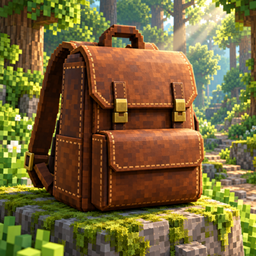
Artwork disclosure: The project icon is AI-generated concept art illustrating the backpack theme. It is not an in-game screenshot and does not show the exact appearance of the mod’s model or interface.
常见问题
MyMochila 支持哪些 Minecraft 版本?
MyMochila 支持 Minecraft Java 版 1.21.1,可用的加载器:NeoForge。下载时注意选择和你游戏版本一致的文件。
MyMochila 怎么安装?
先用 PCL2 或 HMCL 启动器安装对应版本的 NeoForge,再把下载的 .jar 文件放进游戏目录的 mods 文件夹,重新启动游戏即可。开启了版本隔离的,mods 文件夹在 versions/版本名 下面。
user_9u9ylg942gt2c8rt 的其他作品
查看全部 →
TheHeroX
Adds superhero transformations, flight, energy attacks, and a cinematic Death encounter triggered by repeated totem use.
GPTJJ NPC Adventures
Adds an NPC campaign in Spanish with rescue quests, boss maps, and shared milestones to CustomNPCs-Unofficial.
评论
登录后评论和评分