
BetterInterFace
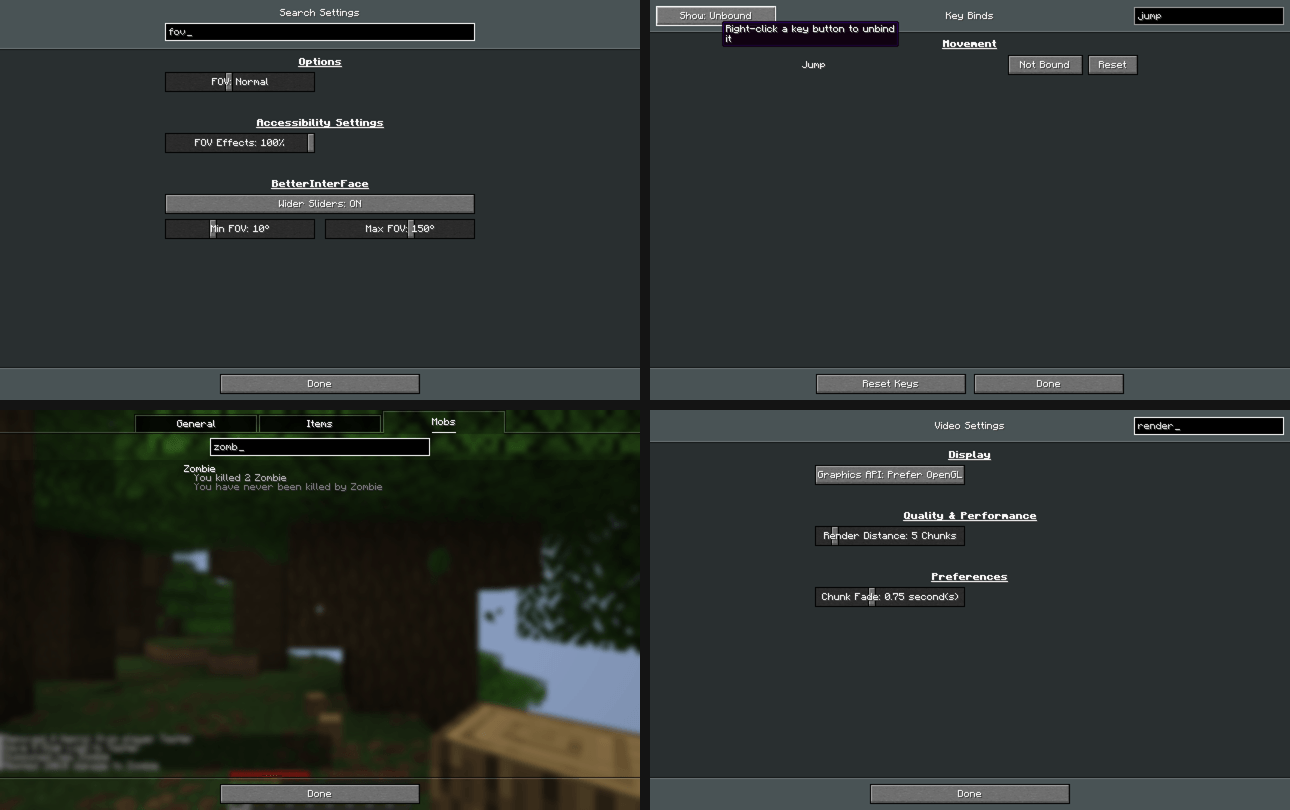
Search in Statistics, Key Binds and all settings, wider sliders, right click to reset or unbind.
截图
介绍
BetterInterFace
A client-side mod that adds search to the places where Minecraft doesn’t have it and makes the settings more flexible.
Search in Statistics
A search box under the General / Items / Mobs tabs. One search filters all three tabs:
- General stats are found by name.
- Items and mobs are found by name or by ID (for example
oak_log). - Column sorting in Items still works while a filter is active.
Key Binds
- Search by action name, category or by the key itself (type
Qto see everything bound to Q). - Show: All / Conflicts / Changed / Unbound filter button.
- Right click a key button to unbind it.
Search in Settings
- Every settings screen (Video, Sound, Chat, Controls, Accessibility and other mods’ screens built the same way) gets a search box that leaves only the matching options.
- The main Options screen gets a search over all settings at once. The results are grouped by screen and include matching key binds. You can change settings right in the results.
- Right click a setting to reset it to its default.
- Type to search: if no text field is focused, just start typing.
Wider sliders
| Setting | Vanilla | With the mod (default) | Max limit in the mod settings |
|---|---|---|---|
| Brightness | 0–100% | 0–500% | up to 1500% |
| FOV | 30–110 | 10–150 | 1–179 |
| Mouse Sensitivity | 0–200% | 0–400% | up to 1000% |
| Entity Distance | 50–500% | 25–1000% | up to 2000% |
Values outside the vanilla range are saved in options.txt and survive a restart. If you remove the mod, the game resets them to normal values.
Settings
Gear button next to the search box in the Options screen, or Mod Menu → BetterInterFace.
Every feature can be turned off, and the slider limits can be changed there. Config file: config/betterinterface.json.
Requirements
- Minecraft 26.3, Fabric Loader 0.19+, Fabric API
- Client only, not needed on the server
- Mod Menu is optional
The mod’s code was written with the help of AI (Claude by Anthropic).
常见问题
BetterInterFace 支持哪些 Minecraft 版本?
BetterInterFace 支持 Minecraft Java 版 26.3,可用的加载器:Fabric。下载时注意选择和你游戏版本一致的文件。
BetterInterFace 怎么安装?
先用 PCL2 或 HMCL 启动器安装对应版本的 Fabric,再把下载的 .jar 文件放进游戏目录的 mods 文件夹,重新启动游戏即可。开启了版本隔离的,mods 文件夹在 versions/版本名 下面。
DeTem_Studio 的其他作品
查看全部 →
Lily Bloom
Blooming lily pads you can grow, find in swamps and shear for a pottable Water Lily.

ColoredM
16 dye colors for pots, flower pots, chests, barrels, crafting tables, ladders, lanterns, sea pickles, frames, saddles and water.

ArtiCrystals
Synthesize 16 unique crystals, build glowing clusters and blocks, and craft lenses and an enhanced spyglass.
评论
登录后评论和评分