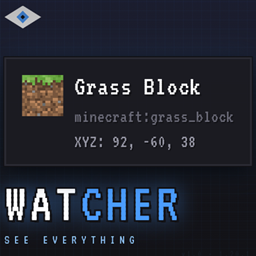
WatcherHUD
A context-aware HUD that shows what you're looking at: blocks, entities, containers, redstone, and more.
介绍
WatcherHUD
A context-aware HUD that shows what you’re looking at.
WatcherHUD is a modern, lightweight HUD mod for Minecraft 1.20.1 (Forge) that displays real-time information about the block, entity or container under your crosshair — without opening any menu.
✨ Features
🧱 Block Information
- Name and mod origin (namespace:path)
- Coordinates (XYZ + relative to player)
- Redstone signal (input power + analog output)
- Mining tool required to break the block
- Break progress (percentage while mining)
- Liquid detection (water, lava and modded fluids)
- Fluid bucket icon when targeting liquids
📦 Containers & Machines
- Chests, barrels, shulkers, hoppers, droppers, dispensers — full item grid preview
- Double chests — merged into a single 54-slot view
- Ender chests — per-player content
- Furnaces — input, fuel, output in real time
- Brewing stands — fuel + potions
- Beehives — bee count + honey level
- Jukeboxes — currently playing disc
- Note blocks — note and instrument
- Command blocks — stored command
- Spawners — entity type
🐄 Entity Information
- Name and mod origin
- 3D preview of living entities
- Health bar (with armor value)
- Active potion effects with duration
- Breeding status (baby timer, cooldown)
- Horses — jump strength + speed
- Llamas — strength value
- Villagers — profession and level
- Tamed pets — owner name
- Item frames — displayed item
- Armor stands — equipped armor
- Chickens — egg timer
🎨 Interface
- Sleek dark tooltip with blue accent
- Auto-scales with GUI Scale and screen resolution
- Sneak to reveal extra details
- Configurable position via drag-and-drop
- All toggles in an in-game custom config screen (KP_0)
🔌 Plugin System
- Public API for other mods to add their own providers
- Plugin manager with runtime enable/disable
- Per-plugin toggles shown in the config screen
- Keybind tracking — automatically disabled when the plugin is
- Version check — plugins declare their target API version
⌨️ Keybinds (Default)
| Key | Action |
|---|---|
| KP_0 | Open the config screen |
| KP_1 | Toggle the overlay |
| KP_2 | Toggle liquid display |
| KP_5 | Narrate current target |
Optional — WatcherHUDJEI addon
| Key | Action |
|---|---|
| KP_3 | Open JEI recipes for the targeted block |
| KP_4 | Open JEI uses for the targeted block |
🔧 Installation
- Install Forge 47.4.10 for Minecraft 1.20.1
- Drop
WatcherHUD-1.0.0-Alpha.jarinto yourmods/folder - Launch the game — that’s it
Optional: Install the WatcherHUDJEI addon for Just Enough Items integration.
🧩 Compatibility
- Client-side for most features
- Server-side installation recommended for container content (chests, shulkers, etc.)
- Works alongside JEI, REI, EMI via addons
- Independent from Jade, WTHIT, TOP — can be used together
🛠️ For Mod Developers
WatcherHUD exposes a public plugin API. Any Forge mod can extend the HUD with custom providers, toggles and keybinds.
public class MyPlugin implements WatcherHUDPlugin {

    @Override
    public String getPluginId() { return "mymod:main"; }

    @Override
    public void registerBlockProviders(BlockProviderRegistry registry) {
        registry.register(
                ResourceLocation.fromNamespaceAndPath("mymod", "my_provider"),
                MyBlock.class,
                (accessor, tooltip) -> tooltip.addStyled(
                        Component.literal("Hello from MyMod"),
                        TextStyle.SUCCESS)
        );
    }

    @Override
    public void registerEntityProviders(EntityProviderRegistry registry) {
        // ...
    }
}
常见问题
WatcherHUD 支持哪些 Minecraft 版本?
WatcherHUD 支持 Minecraft Java 版 1.20.1,可用的加载器:Forge。下载时注意选择和你游戏版本一致的文件。
WatcherHUD 怎么安装?
先用 PCL2 或 HMCL 启动器安装对应版本的 Forge,再把下载的 .jar 文件放进游戏目录的 mods 文件夹,重新启动游戏即可。开启了版本隔离的,mods 文件夹在 versions/版本名 下面。
diumstream 的其他作品
查看全部 →
DiumNasuka Adventures
DiumNasuka Adventures is a Minecraft 1.20.1 modpack that mixes technology, magic and exploration.

DiumStream
The DiumStream mod marks my debut in Minecraft modding using the MCreator software. It adds a Didier entity, a Hoverboard, and a Mangeoire system with custom AI, hunger mechanics, and interactive gameplay.
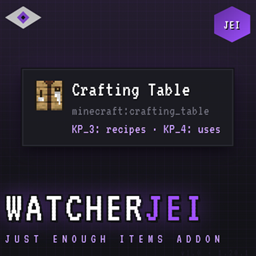
WatcherHUDJEI
Adds Just Enough Items integration to WatcherHUD — press KP_3 for recipes and KP_4 for uses on any targeted block.
评论
登录后评论和评分