介绍
FlashFreeze
FlashFreeze lets you remove and add content-
adding mods without dropping any blocks, entities or items.
You can use it to migrate to a newer version of Minecraft without waiting for That One Last Mod, or turn content mods on and off one by one to nail down that pesky bug.
Usage
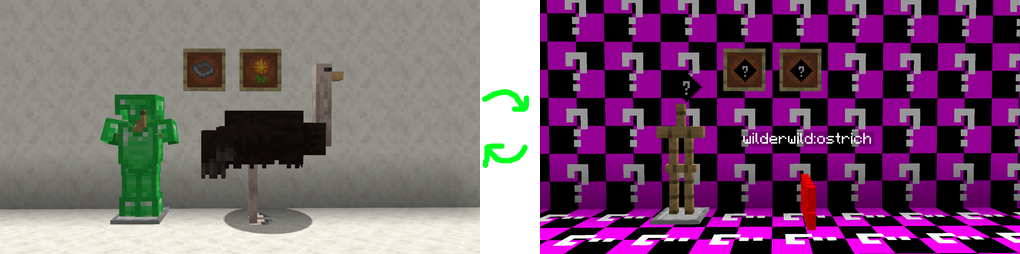
All unknown blocks, items and entities are presented as missing textures or as Source Engine ERROR models
Once you turn the content mods back on, all the FlashFrozen™ content is defrosted 100% fresh!
常见问题
FlashFreeze 支持哪些 Minecraft 版本?
FlashFreeze 支持 Minecraft Java 版 1.16.5–1.21.5,共 8 个版本,可用的加载器:Fabric / Forge / NeoForge。下载时注意选择和你游戏版本一致的文件。
FlashFreeze 怎么安装?
先用 PCL2 或 HMCL 启动器安装对应版本的 Fabric / Forge / NeoForge,再把下载的 .jar 文件放进游戏目录的 mods 文件夹,重新启动游戏即可。开启了版本隔离的,mods 文件夹在 versions/版本名 下面。运行环境:客户端和服务端都要装。
Jetsparrow 的其他作品
查看全部 →
Spirit Walker
Relatively balanced freecam potions
World Specific View Distance
Set view distance per dimension to preserve server resources.

Pingspam
Adds discord-like pinging to Minecraft

gadget
Debugger's Delight
评论
登录后评论和评分