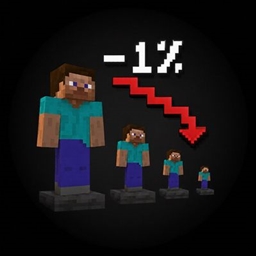
I Get 1% Smaller Every Time I Take Damage
A challenge mod where your player size and hitbox shrink by 1% every time you take damage!
介绍
🔍 Minecraft, But I Get 1% Smaller Every Time I Take Damage


📌 Summary / Краткое описание
EN: A hilarious and challenging Minecraft mod where your character model, hitbox, eye height, and step height shrink by 1% every single time you take damage! Features persistence across deaths and world reloads, full multiplayer support, an Anti-XRay camera clipping fix, custom Growth Elixir potion, and custom advancements!
RU: Увлекательный челлендж-мод для Minecraft, в котором ваш персонаж, хитбокс, высота глаз и шаг уменьшаются на 1% при каждом получении урона! Поддерживает сохранение при смерти и в мире, полноценный мультиплеер, анти-XRay камеру, Эликсир Роста и дерево достижений!
⚡ Features / Особенности
- 🌐 Multiplayer Ready: Friends on a server will see each other’s shrunk player models in real-time.
- 🧪 Growth Elixir: Craftable item to increase size back up by 10%-30%.
- 🏆 Custom Advancements: Unique challenge achievements!
- 🎨 Minimalist HUD: Non-intrusive slate badge displaying current size percentage and total hits taken.
🛠 Commands / Команды
| Command | Permission | Description |
|---|---|---|
/shrink info |
Everyone | View your current scale % and damage count |
/shrink reset |
OP (Level 2) | Reset player scale back to 100% |
/shrink set <percent> |
OP (Level 2) | Set custom scale % (5.0 – 200.0) |
🧪 Crafting Recipe / Рецепт Крафта
Growth Elixir Recipe:
  [ Sugar ]
[ Glistering Melon Slice ]
 [ Glass Bottle ]
🏷 Categories / Категории CurseForge & Modrinth
- Fun / Mini-Games / Challenge
- Gameplay / Mechanics
- Utility
📜 License
This project is licensed under the MIT License.
常见问题
I Get 1% Smaller Every Time I Take Damage 支持哪些 Minecraft 版本?
I Get 1% Smaller Every Time I Take Damage 支持 Minecraft Java 版 1.21,可用的加载器:Fabric。下载时注意选择和你游戏版本一致的文件。
I Get 1% Smaller Every Time I Take Damage 怎么安装?
先用 PCL2 或 HMCL 启动器安装对应版本的 Fabric,再把下载的 .jar 文件放进游戏目录的 mods 文件夹,重新启动游戏即可。开启了版本隔离的,mods 文件夹在 versions/版本名 下面。

评论
登录后评论和评分