
Blabby World
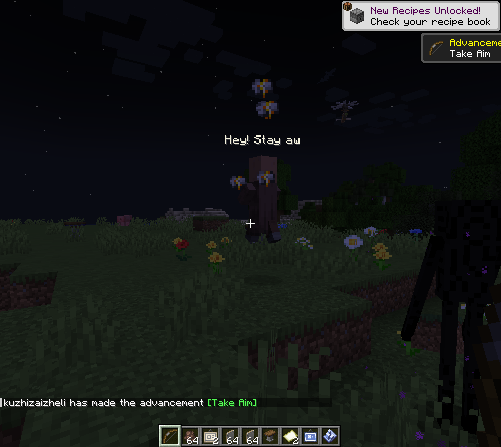
Blabby World gives Minecraft mobs configurable speech and ordered A/B conversations based on combat state, time, weather, and nearby entities.
介绍
Blabby World
Blabby World gives Minecraft mobs configurable speech and ordered A/B conversations based on combat state, time, weather, and nearby entities. It is designed for modpack authors and includes an in-game visual editor, so users do not need to type entity IDs or edit JSON manually.
Using the visual editor(Press B)
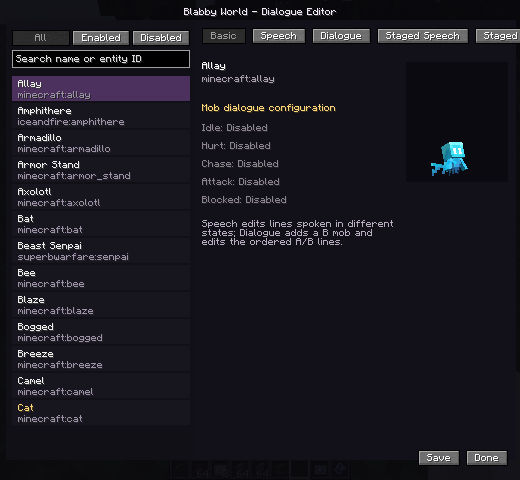
The left panel lists registered mob types and supports searching by display name or entity ID. The right panel contains five pages:
- Basic: shows the selected mob and which speech triggers are configured.
- Speech: edits single-mob lines for idle, hurt, chase, attack, and blocked states.
- Dialogue: adds a B mob for the selected A mob and edits an ordered A/B exchange.
- Staged Speech: edits single-mob lines for day, night, rain, snow, and thunder.
- Staged Dialogue: edits environment-specific A/B conversations.
- Adding and editing lines
- Select a mob in the left list.
- Open Speech, Dialogue, Staged Speech, or Staged Dialogue.
- Select a trigger, stage, and B mob where applicable.
- Press + beside the text editor to add a line.
- Select the line and edit it in the input box.
- On dialogue pages, use the A/B control to choose the speaker.
- Right-click a line to set its repeat frequency:
- Fast: eligible again after about 1 second
- Medium: about 5 seconds
- Slow: about 10 seconds
- Press Save. The server writes and reloads the rules immediately.
–
Use /blabby reload to reload rules from disk.
Triggers
Idle: the mob has no hostile target.
Hurt: the mob actually loses health.
Chase: the mob has a visible attack target.
Attack: the mob attacks a target.
Blocked: the mob hates a target but remains unable to see or attack it.
Dialogue / Meet: A is close to the configured B mob; neither participant is hostile or already in another conversation.
During an A/B conversation, both mobs stop navigation, look at each other, and play the current speaker’s ambient sound. After a line finishes, the other speaker starts after a random 0.5–1 second pause.
Text priority
The default trigger order is:
Hurt
Attack
Blocked
Chase
A/B dialogue
Idle
Environment specificity and the rule’s own priority are added to this base score. Weather and time are not mutually exclusive: during daytime rain, a rain rule wins when present, while a day rule remains a valid fallback.
Higher-priority text may interrupt lower-priority text. Lower-priority packets cannot replace text that is currently more important.
Built-in localized dialogue
The mod includes a small set of example lines for villagers, zombies, skeletons, creepers, iron golems, wolves, cats, cows, pigs, and sheep, plus a few A/B exchanges.
Built-in text is stored in:
assets/blabby_world/lang/en_us.json
assets/blabby_world/lang/zh_cn.json
It automatically follows each client’s language. Built-in rules are not written to the user’s rule file and do not clutter the visual editor.
Set enableDefaultDialogues=false in the common config to disable and hide every built-in line with one option.
Configuration
Common configuration:
enableDefaultDialogues: master switch for built-in localized lines.
debugLogging: trigger and packet diagnostics; disabled by default.
conversationDistance: distance at which A/B conversations may begin.
playMobSounds: plays the speaking mob’s ambient sound.
Client configuration:
textDistance: maximum text rendering distance.
maxVisibleMobs: maximum number of mobs with visible text.
textScale: base text scale; collision-box scaling is still applied.
animationSpeed: global typewriter and fade speed.
Custom rules are stored in config/blabby_world/conversations.json. The in-game editor is the recommended way to modify them.
License and contributions
Blabby World is licensed under the GNU General Public License v3.0. Modified distributions must comply with GPL-3.0 source and license requirements.
常见问题
Blabby World 支持哪些 Minecraft 版本?
Blabby World 支持 Minecraft Java 版 1.20.1–1.21.1,共 7 个版本,可用的加载器:Forge / NeoForge。下载时注意选择和你游戏版本一致的文件。
Blabby World 怎么安装?
先用 PCL2 或 HMCL 启动器安装对应版本的 Forge / NeoForge,再把下载的 .jar 文件放进游戏目录的 mods 文件夹,重新启动游戏即可。开启了版本隔离的,mods 文件夹在 versions/版本名 下面。运行环境:客户端和服务端都要装。
Kuzhizaizheli 的其他作品
查看全部 →
Find me
Find Me is a mod for storing, summoning, and managing creatures and vehicles.

Starter Cabin
Starter Cabin is a Minecraft mod that lets you save a player-built structure and automatically place it near the spawn point of any new world.

Building Blueprint
Building Blueprint lets players save buildings as blueprint items, preview them in the world, rotate the preview, and place the saved structure later.

Find me
Find Me is a mod for storing, summoning, and managing creatures and vehicles.
评论
登录后评论和评分