
Screen Craft
Show YouTube videos, images and GIFs in your world on resizable screen blocks, synced for every player.
截图
介绍
ScreenCraft
Turn any wall into a cinema, a shop sign or a server lobby display.
Screens
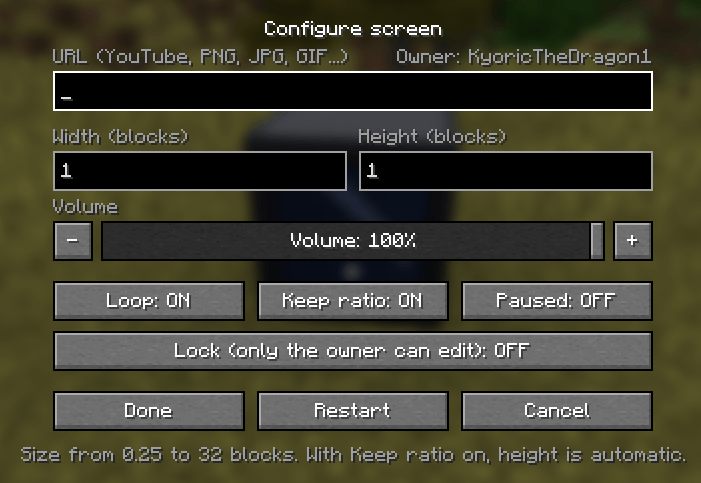
Place a Screen, right-click it and paste a link. It plays YouTube videos, online videos, images (PNG, JPG, WebP) and animated GIFs. The picture grows from the bottom-left corner of the front face, to the right and upwards.
Any size
Set the width and height from 0.25 up to 32 blocks. Turn on Keep ratio and the height adjusts itself to fit the video or image.
Sound
Use the volume slider or the + and − buttons. You hear the change instantly while the menu is open. The sound fades with distance and follows each player’s Master and Jukebox/Note Blocks volume settings.
Playback controls
Loop, pause and restart. The video pauses automatically when you open the pause menu in singleplayer.
Synced for everyone
Every player sees the same moment of the video. Players who join halfway through jump straight to where everyone else is, and pausing or restarting applies to all.
Lock
The player who places a Screen becomes its owner. Turn on Lock and only the owner can change it. Operators can always edit any screen.
Crafting
Iron ingots around, a glass pane in the middle and redstone at the bottom. You can also find it in the ScreenCraft creative tab.
Requires NeoForge for Minecraft 1.21.1. Works in singleplayer and multiplayer.
Requires WATERMeDIA: Multimedia API and WATERMeDIA: Binaries on the client.
You can use the mod in your modpack and publish it if you give credits.
常见问题
Screen Craft 支持哪些 Minecraft 版本?
Screen Craft 支持 Minecraft Java 版 1.21.1,可用的加载器:NeoForge。下载时注意选择和你游戏版本一致的文件。
Screen Craft 怎么安装?
先用 PCL2 或 HMCL 启动器安装对应版本的 NeoForge,再把下载的 .jar 文件放进游戏目录的 mods 文件夹,重新启动游戏即可。开启了版本隔离的,mods 文件夹在 versions/版本名 下面。

评论
登录后评论和评分