
Density Functions in Debug Screen
Worldgen developer tool that displays values of density functions in the debug menu (F3)
介绍
Density Functions in Debug Screen
This mod is a development tool for worldgen developers that shows the values of a configurable list of density functions in the debug screen (F3 menu).
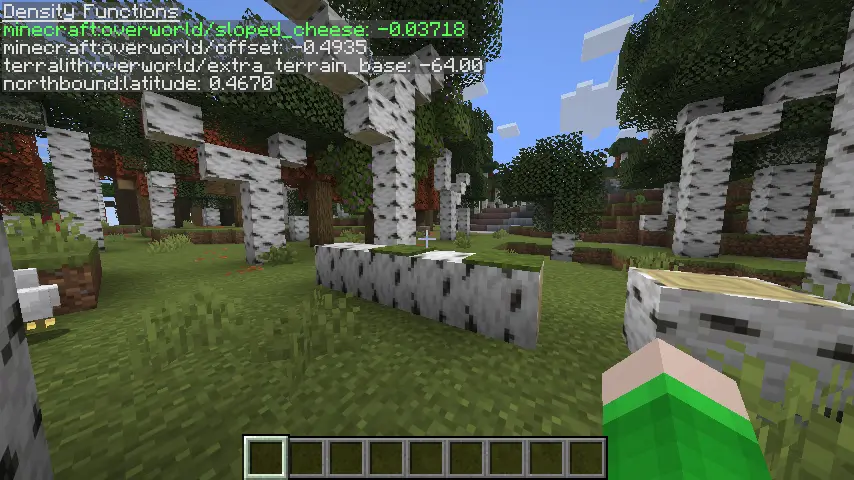
Features an extensive configuration file allowing customization of which density functions to evaluate as well (possibly only displaying them when in certain dimensions) as well as styling options.
Because this mod is solely intended as a development tool, this mod is only known to work on and only supports singleplayer.
NOTE: There is also a 26.3-snapshot-7 version of this mod, but it is not on CurseForge as CurseForge disallows uploading mods for snapshot versions. If you would like to download this version, please visit the GitHub repository.
常见问题
Density Functions in Debug Screen 支持哪些 Minecraft 版本?
Density Functions in Debug Screen 支持 Minecraft Java 版 1.20.1–26.2,共 6 个版本,可用的加载器:Fabric / Forge / NeoForge。下载时注意选择和你游戏版本一致的文件。
Density Functions in Debug Screen 怎么安装?
先用 PCL2 或 HMCL 启动器安装对应版本的 Fabric / Forge / NeoForge,再把下载的 .jar 文件放进游戏目录的 mods 文件夹,重新启动游戏即可。开启了版本隔离的,mods 文件夹在 versions/版本名 下面。
abkwreu 的其他作品
查看全部 →
Northbound
基于真实纬度气候带的世界生成!

Less Predictable Cave Biomes
Tweaks cave biomes to generate less predictably and independently of surface biomes

Copper Ore Nerf
Reduces the amount of copper obtained from copper ore to match other metal ores. With Tinkers/Create/Thermal compatibility

Spawncamp
Always spawn next to an abandoned camp!
评论
登录后评论和评分