
HitColor Customizer
Customize the hurt flash with RGB colors, opacity, and player or entity targets.
截图
介绍
HitColor Customizer
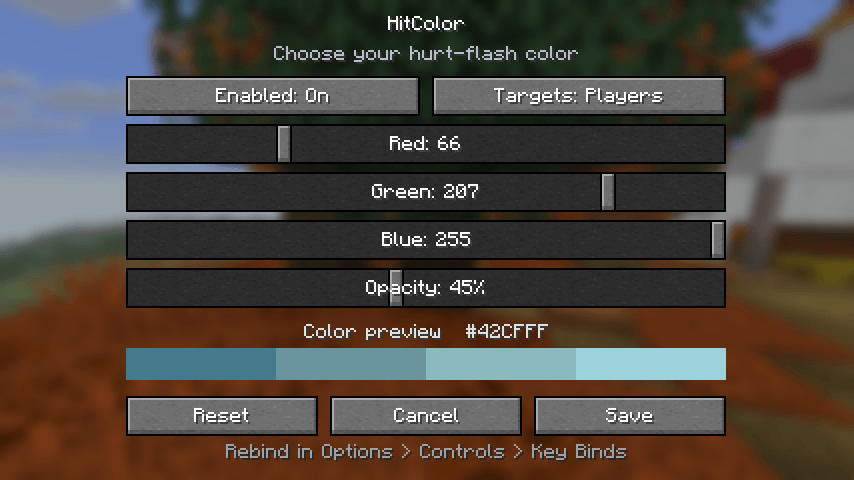
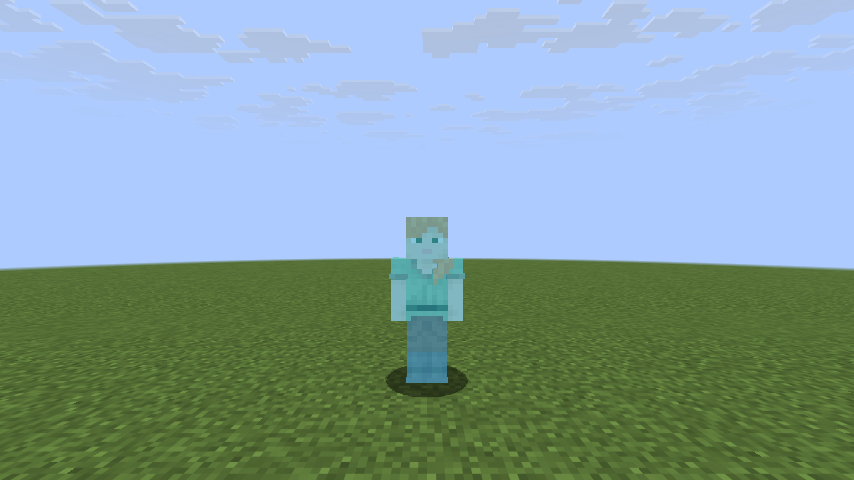
Make Minecraft’s hurt flash your own. Choose any RGB color, adjust opacity, and apply it to players or all living entities using a small native settings screen.
Controls
Press F9 to configure. The key can be rebound in Minecraft’s Controls menu. Save applies changes, Cancel discards them, and Reset restores the draft defaults. A live color swatch shows the selected blend. Off restores the vanilla red flash.
Installation
HitColor is client-side and cosmetic. Choose the file matching your exact Minecraft version and Fabric or NeoForge. No server installation or Fabric API dependency is needed. Use Java 21 for Minecraft 1.21.x and Java 25 for 26.x.
The standard hurt/death overlay is recolored. Some armor and special entity layers do not use that overlay and are not force-tinted. Render replacement mods or shader packs may conflict; follow your server’s mod policy. HitColor does not change combat mechanics or reveal hidden players.
Initial release: Beta. Code and original project artwork were created with AI assistance. Gameplay and settings screenshots are genuine Minecraft captures.
常见问题
HitColor Customizer 支持哪些 Minecraft 版本?
HitColor Customizer 支持 Minecraft Java 版 1.12.2–26.3,共 29 个版本,可用的加载器:Fabric / Forge / NeoForge。下载时注意选择和你游戏版本一致的文件。
HitColor Customizer 怎么安装?
先用 PCL2 或 HMCL 启动器安装对应版本的 Fabric / Forge / NeoForge,再把下载的 .jar 文件放进游戏目录的 mods 文件夹,重新启动游戏即可。开启了版本隔离的,mods 文件夹在 versions/版本名 下面。
dreamiiing 的其他作品
查看全部 →
Improved F3
This project is an improved F3 Menu with different translations and toggles in the config.

Day/Night Progress Bar
A sleek client-side HUD mod that displays the current day/night cycle progress with beautiful sun and moon indicators. Features customizable positioning, size scaling, weather effects, and an easy F8 configuration menu.
Not Enough Weapons (NeW)
Not Enough Weapons is a Minecraft Fabric mod that adds custom weapons to the game. The vanilla game clearly does not have enough.

Optimizer MAX
The only optimization modpack you really need. Perfect for performance.
评论
登录后评论和评分