
Low Health Alert
A configurable, steady screen-edge warning when your health is low, with optional sound.
截图
介绍
Low Health Alert
A subtle reminder to heal, without a flashing screen.
Low Health Alert adds a steady, configurable screen-edge border when your own health drops below your chosen number of hearts. The center-bottom area stays clear so your hotbar and health bar remain readable.
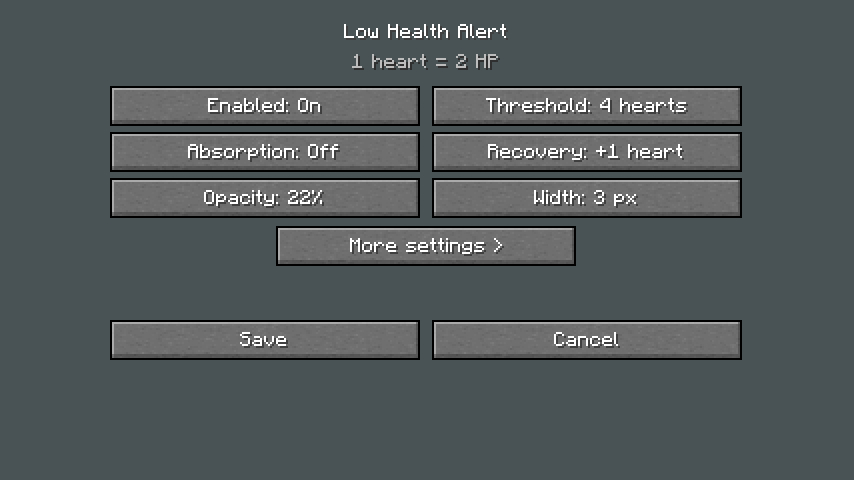
Choose your threshold, border color, opacity and width. Optionally count absorption hearts or enable a soft vanilla sound with adjustable volume and a cooldown. The warning rearms only after meaningful recovery, preventing sound spam while health remains low.
Open /lowhealth to adjust settings, preview the border, reset defaults, save, or cancel. Settings are local to your client. No server installation required. Sound is off by default. No flashing, opponent tracking, or automated combat. Respect the rules of servers where you play; allowed client mods vary.
Installation
Install the file for your exact Minecraft version and loader. Fabric builds also require Fabric API. Java 21 is required for 1.21.x targets; Java 25 for 26.x.
Initial Beta release. MIT license. Original code and icon created with AI assistance. This project is not affiliated with Mojang or Microsoft.
常见问题
Low Health Alert 支持哪些 Minecraft 版本?
Low Health Alert 支持 Minecraft Java 版 1.12.2–26.3,共 34 个版本,可用的加载器:Fabric / Forge / NeoForge。下载时注意选择和你游戏版本一致的文件。
Low Health Alert 怎么安装?
先用 PCL2 或 HMCL 启动器安装对应版本的 Fabric / Forge / NeoForge,再把下载的 .jar 文件放进游戏目录的 mods 文件夹,重新启动游戏即可。开启了版本隔离的,mods 文件夹在 versions/版本名 下面。
dreamiiing 的其他作品
查看全部 →
Improved F3
改进版 F3 菜单项目,支持不同语言,并可在配置中切换各项功能。

Day/Night Progress Bar
简洁时尚的客户端 HUD 模组,用精美的太阳和月亮指示器显示当前昼夜进度。支持自定义位置和缩放、天气效果,并提供便捷的 F8 配置菜单。

Not Enough Weapons (NeW)
Not Enough Weapons is a Minecraft Fabric mod that adds custom weapons to the game. The vanilla game clearly does not have enough.

Optimizer MAX
The only optimization modpack you really need. Perfect for performance.
评论
登录后评论和评分