介绍
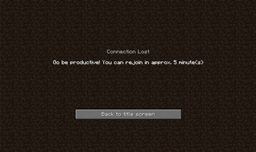
Spend all day playing Minecraft when you just need to get work done? Well then limit how long you or other players on your server can play with this mod!

You can set up individual times on a per player basis or a global setting that affects all players. Control how long a player can play at one time as well as how long of a break they must take before reconnecting to the server.
This also works on the client so if you find yourself playing too much on your own. It is NOT required on the client however.
The time a player has played decreases when they are logged off from the server to help keep things fair and in the future you’ll have control over how much time they can “earn” back by staying offline.
Usage:
The entire mod can be controlled in-game (if you are an OP or have cheats enabled) via the “/beproductive” command. Here are a few examples:
- Timeout a player by using the command: /beproductive timeout <playername> [minutes]
- Set a global time play limit for all players: /beproductive set globalmaxtimeon <minutes>
- Set a break time for a specific player: /beproductive set breaktime <playername> <minutes>
- Reset the timeout and play time for a player: /beproductive reset <playername>
By default, all time outs and break times are set to 0 so this mod does nothing. Configure it in-game or via the config files to set up the times.
Modpacks:
Feel free to redistribute as part of a mod pack, not need to ask for permission
常见问题
BeProductive 支持哪些 Minecraft 版本?
BeProductive 支持 Minecraft Java 版 1.7.10,可用的加载器:Forge。下载时注意选择和你游戏版本一致的文件。
BeProductive 怎么安装?
先用 PCL2 或 HMCL 启动器安装对应版本的 Forge,再把下载的 .jar 文件放进游戏目录的 mods 文件夹,重新启动游戏即可。开启了版本隔离的,mods 文件夹在 versions/版本名 下面。


评论
登录后评论和评分