
截图
介绍
Screenshot Uploader
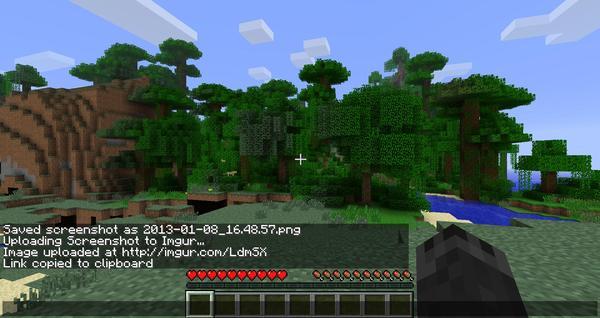
This simple mod uploads any screenshots you take directly to Imgur and provides you with a link.

To take a screenshot and upload it to Imgur, simply press F12! (This can be changed in the Controls menu)
Don’t want to upload the screenshot? Just use the default Minecraft screenshot button! (F2)
Requirements
Minecraft
Forge – http:minecraftforge.net/
Installation Instructions
(I recommend using MultiMC for managing mods)
Install Forge
Add ScreenshotUploader file to your mods folder
NOTE: This is a client side only mod, it is not required server side
Known Issues
Binding my screenshot key to F2 will take two screenshots
Planned Features
Ability to save Imgur links to a file locally or view a history of them
Add more image hosts as options
Social
- Twitter: KitsuneKihira
- Patreon: Kihira
- IRC: #kihira on esper.net
Modpacks
You are allowed to distribute this mod in your public or private mod pack so no long no revenue is generated in doing so
常见问题
Screenshot Uploader 支持哪些 Minecraft 版本?
Screenshot Uploader 支持 Minecraft Java 版 1.4.7–1.9.4,共 9 个版本,可用的加载器:Forge。下载时注意选择和你游戏版本一致的文件。
Screenshot Uploader 怎么安装?
先用 PCL2 或 HMCL 启动器安装对应版本的 Forge,再把下载的 .jar 文件放进游戏目录的 mods 文件夹,重新启动游戏即可。开启了版本隔离的,mods 文件夹在 versions/版本名 下面。
Kihira 的其他作品
查看全部 →
Tails
一大堆不同的尾巴、耳朵和翅膀,让你的角色更有个性!
FoxLib
一个提供多种实用功能的前置库模组

Player Rugs
Decorate your Minecraft world with your "favourite" players!

Immersive Floofs
For when you need to get floofy
评论
登录后评论和评分