
介绍
if this doesn’t get updated check on
https://modrinth.com/mod/inventorycleaner
Inventory Cleaner
Inventory Cleaner is a useful mod that automates the task of throwing away junk and useless items from your inventory. It provides a convenient solution for keeping your inventory clean and organized.
You can turn the mod on and off by going to Options > Controls > Keybinds.
Features
– Toggleable Cleaning: Enable or disable the InventoryCleaner to clean your inventory.
– Add Items to Throw List: Use commands to add items to the list of items that will be thrown when the InventoryCleaner is active.
– Remove Items from Throw List: Remove items from the throw list using commands.
Commands
– /ic additem <item> – Add an item to the throw list. For items with spaces like “Iron Sword,” use underscores (iron_sword).
– /ic delitem <item> – Delete an item from the throw list.
– /ic lockslot <slot> – Lock a slot so it won’t throw the item from that slot.
– /ic unlockslot <slot> – Unlock a previously locked slot.
– /ic list – Lists all items in the throw list and all locked slots.
– /ic config save <name> – Saves the current throw list and locked slots as a configuration with the given name.
– /ic config load <name> – Loads a saved configuration with the given name.
– /ic delay seconds <value> – Set the delay between items being thrown.
– ic mode WHITELIST: it wont throw the items in the list.
– ic mode BLACKLSIT: it will throw the items in the list.
Configuration
– The mod uses a configuration file (inventorycleaner.properties) to store the list of items to throw. This file can be found in the config folder.
Contributing
Feel free to open issues or submit pull requests for bug fixes or improvements.
Slot IDs
– Refer to the slot ID chart here: 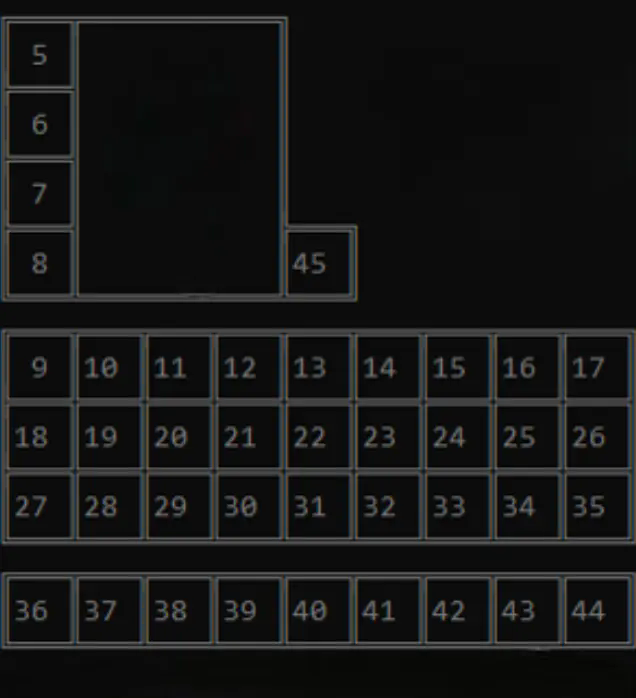
常见问题
InventoryCleaner 支持哪些 Minecraft 版本?
InventoryCleaner 支持 Minecraft Java 版 1.20.1–1.21.11,共 6 个版本,可用的加载器:Fabric / Quilt。下载时注意选择和你游戏版本一致的文件。
InventoryCleaner 怎么安装?
先用 PCL2 或 HMCL 启动器安装对应版本的 Fabric / Quilt,再把下载的 .jar 文件放进游戏目录的 mods 文件夹,重新启动游戏即可。开启了版本隔离的,mods 文件夹在 versions/版本名 下面。
CIOCOLATA47 的其他作品
查看全部 →
AntiAfk
防挂机模组,防止玩家在 Minecraft 中进入挂机状态。

AutoWalk
让你可以朝任意方向行走的模组。

NoRender+
允许停止渲染粒子、覆盖层、世界和实体,有助于 PvP 和提升帧率。

Player Health Indicator Plus
A mod that displays player health, armor, and equipment information.
评论
登录后评论和评分