
介绍
These tweaks are primarily for disabling certain features of Epic Fight Nightfall, made mostly for personal use.
DISABLE_AUTO_COMPUTE_SHADER
Nightfall automatically enables compute shader each time you load up the game. While compute shader may help with performance, it can also sometimes cause rendering problems.
Im not quite sure why nightfall forces this config to be enabled, so be aware of issues that may come up.
DISABLE_MOB_STATUS_EFFECTS
As of EFN 3.4.1, config option to disable individual effects has already been added.

Nightfall would display custom particles for certain status effects when AAA particles is installed.
The most notable example is the up arrows that appear on mobs if they have resistance effect.
| Effect name | Filename |
|---|---|
| MobEffect.RESISTANCE | def.efkefc |
| MobEffect.DAMAGE_BOOST | dmg.efkefc |
| ATTACK_SPEED_INCREASE | as.efkefc |
This config disables these particles. Requires to be in the server.
常见问题
ts epic fight nightfall tweaks 支持哪些 Minecraft 版本?
ts epic fight nightfall tweaks 支持 Minecraft Java 版 1.20.1–1.21.1,共 2 个版本,可用的加载器:Forge / NeoForge。下载时注意选择和你游戏版本一致的文件。
ts epic fight nightfall tweaks 怎么安装?
先用 PCL2 或 HMCL 启动器安装对应版本的 Forge / NeoForge,再把下载的 .jar 文件放进游戏目录的 mods 文件夹,重新启动游戏即可。开启了版本隔离的,mods 文件夹在 versions/版本名 下面。
tablesouls 的其他作品
查看全部 →
Souls Message Banners
为各种事件添加《艾尔登法环》/《黑暗之魂》风格的标题
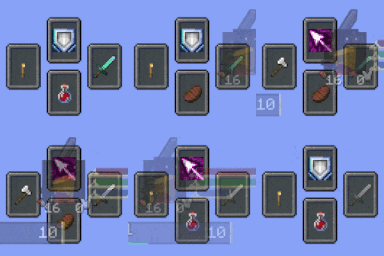
Souls Combat HUD
添加类魂游戏风格的 HUD,包含装备栏、Boss 血条、状态计量条和队伍显示。

Epic Fight Carry On Compat
携带物品时,将史诗战斗模式切换为原版模式。
Dual Axes Overrides Epic Fight Extra
Fixes dual axes to work with epic fight extra, will override the skill of the latter.
评论
登录后评论和评分