Action Bar by Karl Karlmann
A utility mod that intercepts key state queries from other mods, routing them into three centralized action slots. It reduces keybind conflicts and provides a clean inventory UI to assign, bypass, or hide captured abilities.
截图
介绍
Action Bar / Keybind Router
Action Bar is a client-side utility mod for Minecraft (Forge) designed to mitigate the keybind clutter commonly found in large modpacks.
By intercepting key state queries at the input level via Mixins, the mod allows the consolidation of active abilities from various mods into three centralized, easily accessible slots.
The original mods remain fully functional and react to virtual inputs triggered by the Action Bar, eliminating the need to assign dozens of individual physical hotkeys across the keyboard.
Core Mechanics
1. Slot-Based Routing
The mod provides three primary Action Slots (bound to R, G, and V by default). Discovered keybinds from other mods can be assigned directly to these slots. Pressing the designated Action Bar hotkey then triggers the corresponding mod ability.
2. Bypass Mode
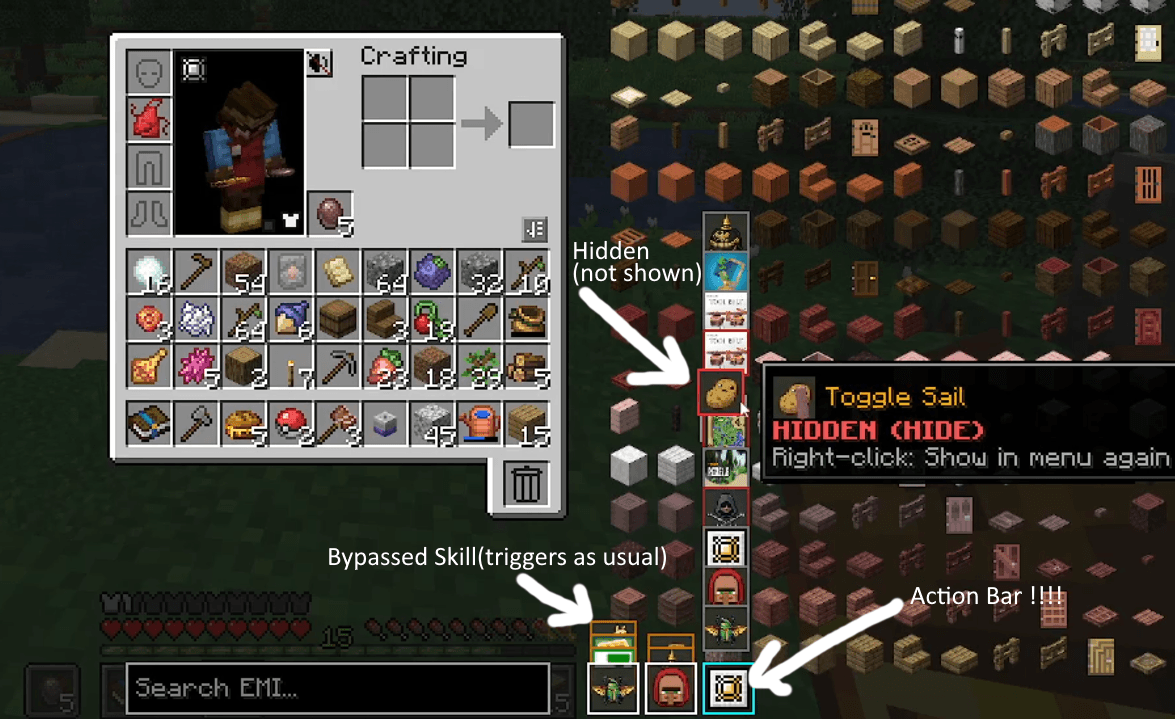
For abilities that should retain their original physical hotkeys, a Bypass Mode can be enabled. Bypassed abilities are unmapped from the main Action Bar slots but remain visually tracked in the HUD as small index tabs docked behind the main slots. This provides a visual indicator for active skills without changing their physical controls.
3. Ability Filtering (Hiding)
Unused, passive, or irrelevant keybinds can be completely hidden from the selection menu to keep the interface clean. Hidden abilities can be revealed at any time in the management interface by holding a modifier key.
4. Continuous Input Support
The system fully supports hold-to-cast and channeling abilities. The physical press duration of an Action Bar hotkey is accurately mirrored to the target mod, ensuring that continuous-activation skills function exactly as intended.
User Interface
Management of the Action Bar is integrated directly into the vanilla inventory screen. The configuration interface appears adjacent to the player’s character model:
- Slot Click (Left-click): Opens the dropdown selection list containing all discovered mod keybinds.
- Selection (Left-click): Assigns the selected ability to the active slot.
- Bypass Toggle (Ctrl + Left-click): Toggles Bypass Mode for the selected ability.
- Hide Toggle (Right-click): Hides the selected ability from the default dropdown list.
- Reveal Hidden (Hold Shift): Temporarily shows all hidden abilities within the selection list for reconfiguration.
The Resource Pack Exporter
Because automatically captured keybinds from other mods do not natively contain dedicated 16×16 Action Bar icons, the mod includes an integrated texture template generator:
- An “Export RP Template” button is accessible via the in-game pause menu.
- Clicking this button automatically generates a structured, ready-to-use Resource Pack template inside the
.minecraft/resourcepacksfolder. - The template contains automatically generated, pre-named placeholder folders and grayscale template PNGs for every captured keybind.
- Players can open these template files in any image editor to draw custom 16×16 icons. Once the Resource Pack is enabled in the game settings, the custom icons will render on the HUD and in the inventory menus.
🌟 Looking for a complete progression system?
Action Bar originally started as an internal tool while developing my main project, Stones.
After spending far too much time managing dozens of hotkeys from different mods, I wanted a cleaner way to organize active abilities. The solution eventually became useful enough to release as a standalone utility for everyone.
If you’d like to see Action Bar as part of a complete gameplay experience, take a look at Stones.
It’s a progression mod built around Minecraft’s vanilla XP system where Action Bar serves as the primary interface for active abilities granted by magical runes.
Click the image to visit the Stones page.
Links & Support
🎥 Showcase Video (German Audio):
☕ Support the Project:
https://ko-fi.com/karlkarlmann
常见问题
Action Bar by Karl Karlmann 支持哪些 Minecraft 版本?
Action Bar by Karl Karlmann 支持 Minecraft Java 版 1.20.1,可用的加载器:Forge。下载时注意选择和你游戏版本一致的文件。
Action Bar by Karl Karlmann 怎么安装?
先用 PCL2 或 HMCL 启动器安装对应版本的 Forge,再把下载的 .jar 文件放进游戏目录的 mods 文件夹,重新启动游戏即可。开启了版本隔离的,mods 文件夹在 versions/版本名 下面。
Karl_Karlmann 的其他作品
查看全部 →
[TaCZ] Warden & Sculk Gun Detection & Vibration Integration for Timeless and Classics Zero by Karl Karlmann
将 TACZ 枪械与监守者和幽匿感应系统连接起来。

[TaCZ] Timeless and Classics Zero Guns Stealth by Karl Karlmann Bridge by Karl Karlmann
修复这两个模组的部分兼容性问题,并让生物对枪声作出反应。

Occultism Relics Bridge by Karl Karlmann
连接 Relics 与 Occultism,全面改造物品获取方式。原本掉落的遗物会改为掉落部件。制作未觉醒的黄道神器,并举行恶魔仪式将灵体绑定其中。召唤恶魔的阶级将决定你的属性。

Book of Dragons Biomes o’ plenty fix by Karl Karlmann
Fixes dragon roost spawn with bioms o' plenty
评论
登录后评论和评分