
截图
介绍
Requires Forge
Client-side mod
New to 1.03 version:
Add new config option 'Override List':
Allows you to override specific screens with custom scaling.

E.g., Make chest screens bigger:
net.minecraft.client.gui.screens.inventory.ContainerScreen=500
Above sets Chest screen to use 500% scaling
To help with setting the above, there is a new DEBUG level log that the mod prints whenever you open a new screen with the screen name:
[Optiscale] Detected new screen=net.minecraft.client.gui.screens.inventory.InventoryScreen
Use this to set a custom scale or set this to 0 to blacklist Optiscale from scaling this screen
You can also give the name of the package instead of the screen, e.g., net.minecraft.client.gui.screens.inventory.*=200 to rescale all screens that are in that specific package

1.04:
Add the ability to override screens based on their "menu name" or the title of the screen.
e.g., To enlarge the 'Modern Life' mod Printer screen, you can write Printer=600
————————-
Note: Mod is totally resigned for 1.20.1.
Instead of integrating with the video screen, the scaling is now only configurable with a hotkey (default: F7, change in Key Bindings menu).
This is so that it can work even with custom video screen UIs such as Iris/Oculus.
————————-
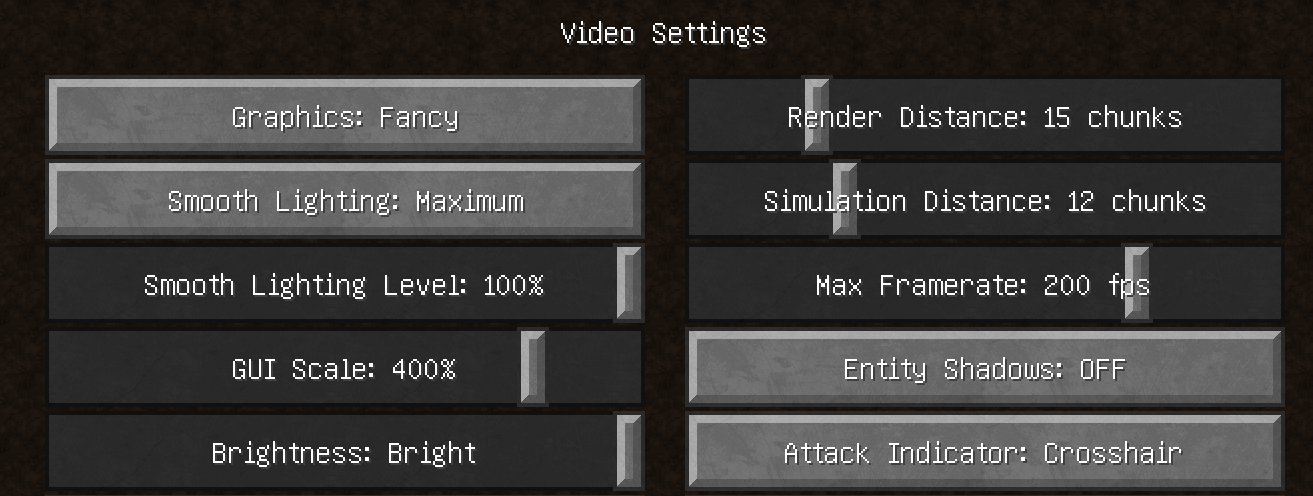
This mod will change your Video Settings “GUI Scale” option into a slider that allows for a wider range of configurations.
Other mods exist with this functionality but this mod is compatible with both vanilla and optifine.
In vanilla the scaling options are [1, 2, 3] but with this mod you can choose between 150% to 450% using a slider.
The vanilla scaling options correspond to the following percentages:
1: 200%
2: 300%
3: 400%
常见问题
Optiscale 支持哪些 Minecraft 版本?
Optiscale 支持 Minecraft Java 版 1.18.1–1.21.1,共 6 个版本,可用的加载器:Forge / NeoForge。下载时注意选择和你游戏版本一致的文件。
Optiscale 怎么安装?
先用 PCL2 或 HMCL 启动器安装对应版本的 Forge / NeoForge,再把下载的 .jar 文件放进游戏目录的 mods 文件夹,重新启动游戏即可。开启了版本隔离的,mods 文件夹在 versions/版本名 下面。
darimus 的其他作品
查看全部 →
Modern Life
用自行车、摩托艇、电锯等,让生活焕然一新。

SerializerDebug
自动修复“未知序列化器类型 xxx”错误

XenoTech
载具科技模组——推动驾驶技术不断进步

Refined Proxy
Refined storage proxy that will expose your refined storage as a container
评论
登录后评论和评分