
Beautified Chat [Server]
💬 A highly configurable mod to change the style and colour of chat messages with optional ranks server-wide.
介绍


This is the server variant of the Beautified Chat mod. It is highly configurable and allows users to change the chat input server-wide. The mod variant you’re currently looking at just needs the mod in the server mod list. It will make changes to the chat for all connected players without the need to have it on their clients. There is also a timestamp feature to know when messages were sent.
Version 3.0 adds the ability to create ranks, and set name colours based on those ranks!
The client version is also available and is called Beautified Chat [Client].
Both the client and server mod are compatible with each other, server-side takes priority.
In default Minecraft, all chat is in the format:
<Username> Message
The mod by default changes this to:
Timestamp | Username: Message
The default colours can be seen below in the example image. Both the format and the colour codes can be changed with ease via the config. If you don’t want the timestamp, just remove it in the chatMessageFormat config option.
The default timestamp format is 24-hours. If you want AM/PM, just input in the timestampFormat config option “hh:mm a” instead of the default “HH:mm“. If your server is hosted in another time zone, it can be set in the timestampTimeZone config option.
Names and colours that other mods give players are kept, such as ranks from FTB Ranks and team colours. Links and item hovers inside messages keep working as well. Other players’ names have their own colour by default, so your own name stands out. The mod is compatible with Chat Heads, and with Discord mods like Discord Integration. Command replies are given a colour too, dark green by default.


All available config options:
Show Spoiler
showRankTitles default true
Whether the rank titles, created in /bcs rank, should be shown before the username.
useRankColours default true
Whether rank colours, set in /bcs rank, should be used as the priority username colour.
chatMessageFormat default “%timestamp% | %username%: %chatmessage%”
Variables: %timestamp% = timestamp set in timestampFormat. %username% = the username of the player who sent the message. %chatmessage% = the message itself.
timestampFormat default “HH:mm”
Example time in formats: 5 seconds past 9 o’ clock in the evening. *=Default. *(HH:mm) = 21:00, (HH:mm:ss) = 21:00:05, (hh:mm a) = 9:00 PM
timestampTimeZone default “”
The time zone of the timestamp, like ‘Europe/London’ or ‘GMT+0’. Leave empty to use the server’s time zone.
rankTitleFormat default “[%rank] “
The rank format prefixed before %username% when showRankTitles is enabled.
chatTimestampColour default 8, min 0, max 15
The colour of the timestamp in the chat message. The possible values are; 0: black, 1: dark_blue, 2: dark_green, 3: dark_aqua, 4: dark_red, 5: dark_purple, 6: gold, 7: gray, 8: dark_gray, 9: blue, 10: green, 11: aqua, 12: red, 13: light_purple, 14: yellow, 15: white.
chatUsernameColour default 2, min 0, max 15
The colour of your own username in the chat message. The possible values are; 0: black, 1: dark_blue, 2: dark_green, 3: dark_aqua, 4: dark_red, 5: dark_purple, 6: gold, 7: gray, 8: dark_gray, 9: blue, 10: green, 11: aqua, 12: red, 13: light_purple, 14: yellow, 15: white.
chatOtherUsernameColour default 3, min 0, max 15
The colour of other players’ usernames in the chat message. chatUsernameColour is used for your own. The possible values are; 0: black, 1: dark_blue, 2: dark_green, 3: dark_aqua, 4: dark_red, 5: dark_purple, 6: gold, 7: gray, 8: dark_gray, 9: blue, 10: green, 11: aqua, 12: red, 13: light_purple, 14: yellow, 15: white.
chatMessageColour default 15, min 0, max 15
The colour of the chat message.
chatOtherSymbolsColour default 7, min 0, max 15
The colour of the other symbols from chatMessageFormat. So everything except the variables.
overwriteOtherModColours default false
Whether colours that other mods or teams give the username and message are replaced by the colours set here.
sendAsPlayerChat default true
Whether messages are sent as player chat instead of system messages, so mods like Chat Heads can see who sent them.
formatCommandFeedback default true
Whether the replies of commands get the colour set in commandFeedbackColour.
commandFeedbackColour default 2, min 0, max 15
The colour of command replies. Parts that already have a colour keep it. The possible values are; 0: black, 1: dark_blue, 2: dark_green, 3: dark_aqua, 4: dark_red, 5: dark_purple, 6: gold, 7: gray, 8: dark_gray, 9: blue, 10: green, 11: aqua, 12: red, 13: light_purple, 14: yellow, 15: white.

Use /bcs (alias: /beautifiedchatserver). Needs cheat-access.
/bcs usage – Show all commands with a short description.
/bcs rank create <rank-name> <colour> – Create or update a rank with the given chat colour.
/bcs rank remove <rank-name> – Delete a rank.
/bcs rank list – List all ranks and their colors.
/bcs player add <player-name> <rank-name> – Assign a rank to a player.
/bcs player remove <player-name> <rank-name> – Remove a rank from a player.
/bcs player list – List all players with assigned ranks.

The default format (“%timestamp% | %username%: %chatmessage%”):
You can also add ranks, and choose colours based on those: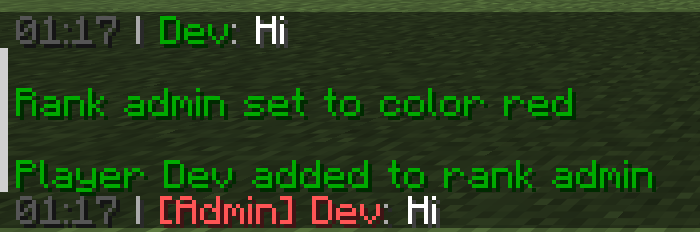
Names keep the colour of their team, or the one other mods give them. Command replies get a colour as well:
Use /bcs to see all available commands: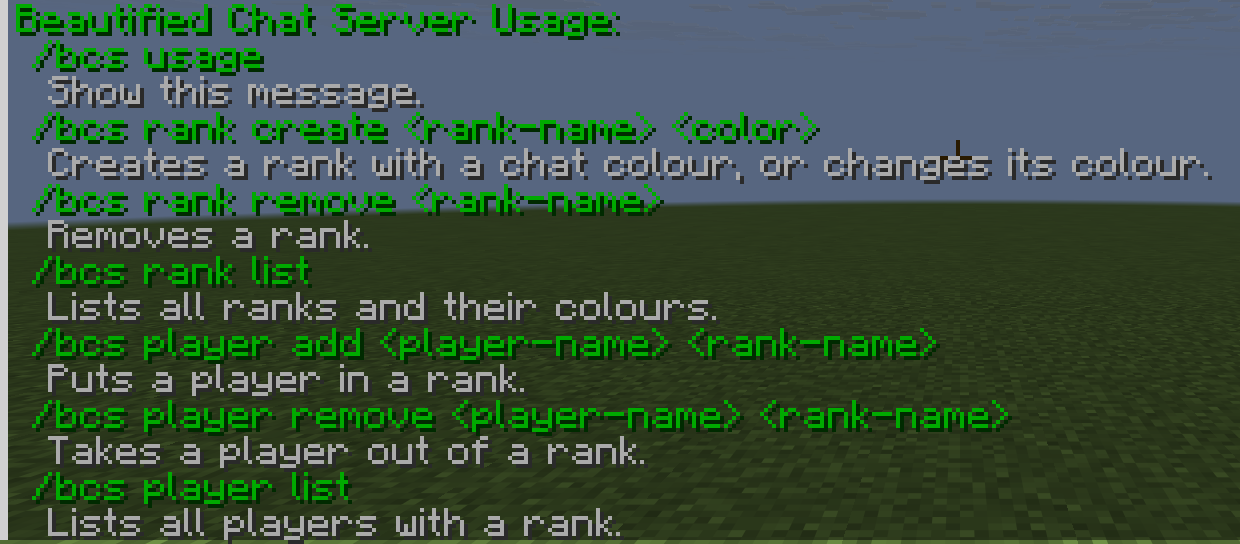

You may freely use this mod in any modpack, as long as the download remains hosted within the CurseForge or Modrinth ecosystem.
Serilum.com contains an overview and more information on all mods available.
For issues, ideas, suggestions or anything else there is the Github repo. Thanks!
常见问题
Beautified Chat [Server] 支持哪些 Minecraft 版本?
Beautified Chat [Server] 支持 Minecraft Java 版 1.16.5–26.3,共 29 个版本,可用的加载器:Fabric / Forge / NeoForge / Quilt。下载时注意选择和你游戏版本一致的文件。
Beautified Chat [Server] 怎么安装?
先用 PCL2 或 HMCL 启动器安装对应版本的 Fabric / Forge / NeoForge / Quilt,再把下载的 .jar 文件放进游戏目录的 mods 文件夹,重新启动游戏即可。开启了版本隔离的,mods 文件夹在 versions/版本名 下面。运行环境:仅服务端。
Serilum 的其他作品
查看全部 →
Collective
🎓 Collective 是 Serilum 所有模组共用的前置库,包含通用代码。

Starter Kit
📦 为加入世界的新玩家提供可配置的初始装备、物品、药水效果、Curios 和 Trinkets 饰品槽位和/或命令。兼容 FTB Team Islands。

Villager Names
为所有村民实体添加默认名称或自定义名称,让世界更加生动。

双开门 Double Doors
🚪 多个相同的双开门、活板门和栅栏门可以同时打开。
评论
登录后评论和评分