
Locator Bar
Recreated concept of a player locator bar for Minecraft. Simple, clean bar at the top of your screen.
截图


介绍

Locator Bar implements the reworked concept of a player locator bar for Minecraft. Simple, clean bar at the top of your screen.

How to install?
- Ensure you are using a correct version of the mod loader.
- Download the correct jar for your loader:
*-fabric-*.jaror*-neoforge-*.jar. - Drop the downloaded mod into your
modsfolder. - Launch the game. The mod is now installed, and you can config it in Minecraft options.
Features
🧭 Locator Bar
The mod adds a locator bar that helps you read a direction at a glance.
You can also show coordinates and in-game day counter under the bar.
World direction markers (N, S, E, W) can be shown directly on the bar.
There are multiple bar styles:
- Reworked style (custom top HUD style)
- Classic style (vanilla-like style near the XP bar).
😀 Players
Other players are shown as head markers on the locator bar, so you can quickly see where they are.
A player marker is hidden when:
- the player is crouching
- the player wears a carved pumpkin
- the player wears a mob head
📍 Waypoints
The waypoint system is based on paired lodestone compasses in your inventory.
These compasses create waypoint markers on the locator bar and point you toward their target location.
This gives you a simple navigation system without opening maps or extra screens.
Credits
- This project is an implementation of TIDZIMI idea for locator bar.
Translations
- en_us.json – Fuzja Jądrowa
- pl_pl.json – Fuzja Jądrowa
- pt_br.json – guigiffoni
License
This project is distributed under the PIF-1.0 license.
常见问题
Locator Bar 支持哪些 Minecraft 版本?
Locator Bar 支持 Minecraft Java 版 1.20.1–26.3,共 10 个版本,可用的加载器:Fabric / Forge / NeoForge。下载时注意选择和你游戏版本一致的文件。
Locator Bar 怎么安装?
先用 PCL2 或 HMCL 启动器安装对应版本的 Fabric / Forge / NeoForge,再把下载的 .jar 文件放进游戏目录的 mods 文件夹,重新启动游戏即可。开启了版本隔离的,mods 文件夹在 versions/版本名 下面。运行环境:客户端 / 服务端。
FuzjaJadrowa 的其他作品
查看全部 →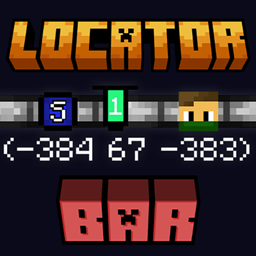
Locator Bar
Recreated concept of a player locator bar for Minecraft. Simple, clean bar at the top of your screen.

Hurtborder
The barrier expands as the player takes damage.

Coords & Days
Adds coords and days in left-top corner of the game.
Days Of Destiny
The new worlds look like someone has been there before... But who?
评论
登录后评论和评分