介绍
English
Overview
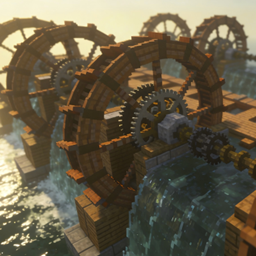
Waterwheel Immortal is an addon mod for NeoForge 1.21.1 and Create 6.
It adds a family of upgradeable WW Container blocks that can store water wheels, hold fluid, and generate rotational power for the Create kinetic network when properly supplied.
The gameplay loop is simple:
- put water wheels into the container
- fill the container with fluid
- let it output kinetic power
- upgrade to higher tiers for more storage slots
Features
- Adds 6 tiers of
WW Container - Tier progression:
Wood,Copper,Iron,Gold,Diamond,Netherite - Each tier provides a different number of item slots:
1 / 2 / 3 / 4 / 5 / 6 - Every container includes a built-in fluid tank
- Supported wheel items:
Water WheelandLarge Water Wheel - The container generates power when it has both fluid and wheel items
- Includes a GUI for inventory and fluid display
Tips
Large Water Wheelcounts more than a normalWater Wheel- The block only generates power when both fluid and wheel items are present
- Higher tiers mainly increase storage capacity
Notes
- The current release focuses on the
WW Containerfamily - For modpacks, make sure your NeoForge and Create versions match the required versions above
中文说明
模组简介
水车仙人 是一个基于 NeoForge 1.21.1 与 Create 6 的扩展模组。
它加入了一组可升级的 水车仙人 容器方块,用来储存水车、储存液体,并在满足条件时为 Create 动力网络提供转速。
这个模组的核心思路很直接:
- 把水车放进容器里
- 往容器里注入液体
- 让容器输出动力
- 通过更高品质的容器获得更多存储格
主要特色
- 新增 6 个品质的 水车仙人 容器方块
- 品质从低到高分别为:
木、铜、铁、金、钻石、下界合金 - 每个品质拥有不同的物品槽数量:
1 / 2 / 3 / 4 / 5 / 6 - 每个容器都带有液体储罐
- 容器可以接受:
水车 和 大水车 - 当容器内同时拥有可用液体和水车时,会输出动力
- 支持 GUI 查看物品槽和液体储量
提示
- 容器需要液体和水车同时存在才会输出动力
- 不同品质主要影响可存放的水车数量上限
常见问题
Waterwheel Immortal 支持哪些 Minecraft 版本?
Waterwheel Immortal 支持 Minecraft Java 版 1.20.1–1.21.1,共 2 个版本,可用的加载器:Forge / NeoForge。下载时注意选择和你游戏版本一致的文件。
Waterwheel Immortal 怎么安装?
先用 PCL2 或 HMCL 启动器安装对应版本的 Forge / NeoForge,再把下载的 .jar 文件放进游戏目录的 mods 文件夹,重新启动游戏即可。开启了版本隔离的,mods 文件夹在 versions/版本名 下面。
qincaizheng 的其他作品
查看全部 →
narutofix
为 narutomod 添加忍者背包,方便快速施法,并修复一些不合理的机制。
CreateMek_Steam
CreateMek Steam adds a `Steam Converter` block that attaches to the side of a Create boiler tank, converts the boiler's steam output into Mekanism steam, and feeds it into pressurized tubes and steam turbines for power generation.

Nekomusume
Nekomusume brings a nekomusume companion to the edge of your screen. She is not a HUD decoration or a chatbot skin — she is a quiet presence who watches, reacts, and stays close on her own terms.

SimpleBackHome
The current teleportation mods are too complex. This mod only adds home, sethome, and back commands
评论
登录后评论和评分