Hellspawn | Starting Dimension
A mod that allows you to pick the starting dimension of your world. Works with modded and datapack dimensions too!
截图
介绍
Hellspawn allows you to choose which dimension you want to start a new world in.
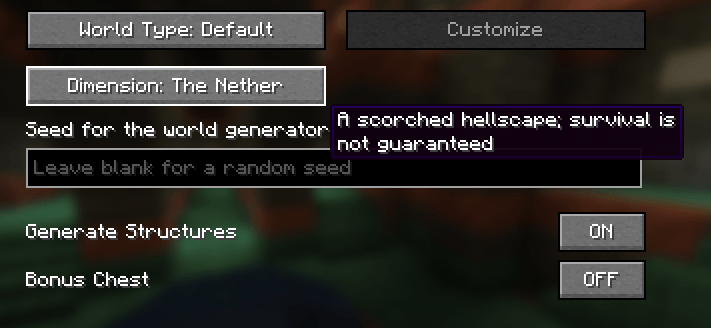
A new button in the “World” tab of the screen allows you to cycle between all three vanilla dimensions and any other dimensions added by mods or datapacks. Each dimension also has a unique description.
You will spawn in the selected dimension, and the world spawn will be moved to that dimension for all players.
For mod/modpack developers:
Dimensions loaded via datapacks are automatically integrated into Hellspawn, the button will use the standard translation key for dimensions, that being:
"dimension.namespace.dimension_id"
to register a description for your dimension, simply add this translation key to your lang file:
"hellspawn.dimension.description.namespace.dimension_id"
常见问题
Hellspawn | Starting Dimension 支持哪些 Minecraft 版本?
Hellspawn | Starting Dimension 支持 Minecraft Java 版 1.21.1,可用的加载器:NeoForge。下载时注意选择和你游戏版本一致的文件。
Hellspawn | Starting Dimension 怎么安装?
先用 PCL2 或 HMCL 启动器安装对应版本的 NeoForge,再把下载的 .jar 文件放进游戏目录的 mods 文件夹,重新启动游戏即可。开启了版本隔离的,mods 文件夹在 versions/版本名 下面。
EssenceDev 的其他作品
查看全部 →
Hellspawn
A mod that allows you to pick the starting dimension of your world. Works with modded and datapack dimensions too!

World’s Edge
Adds back The Farlands and Monoliths to newer versions. Every aspect of their generation can be configured and disabled.

Item Discovery
A small mod which lets survival players name all items whatever they want without imposing any pre-existing names.
评论
登录后评论和评分