
截图
介绍
KISS – Keep Inventories Sorted, Simple
Lightweight inventory sorting mod, an opinionated fork of Inventory Sorting.
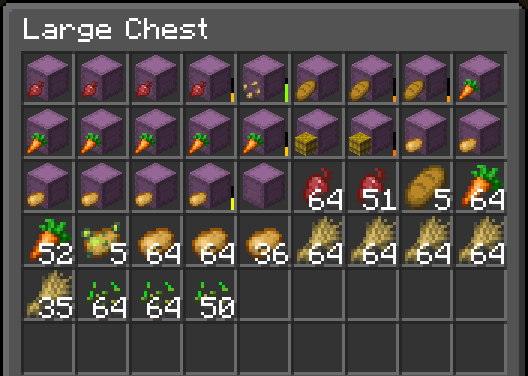
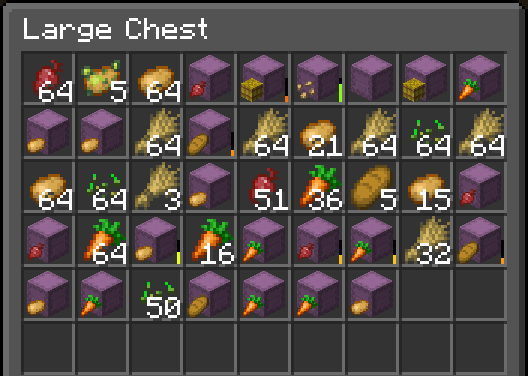
Screenshots
| Before sorting | After sorting |
|—————-|—————|
| | |
Configuration
Use Mod Menu for GUI configuration, or the /kiss command alternatively.
Usage
You can use the middle mouse button or R to sort the inventory you’re looking at. These keybindings can be changed in
Options -> Control -> Key Binds. You can also configure the mod to never sort the player inventory, or to always sort both the non-player inventory (e.g. a chest you opened) and the player inventory at the same time.
While the mod is technically only required on the server, you should install it on server _and_ client. If you only
install it on the server, vanilla clients can use it via the /kiss commands only. Due to a known issue with Modrinth,
I’ve marked the mod as Required on the client.
常见问题
KISS – Keep Inventories Sorted, Simple 支持哪些 Minecraft 版本?
KISS – Keep Inventories Sorted, Simple 支持 Minecraft Java 版 1.21–1.21.4,共 5 个版本,可用的加载器:Fabric / Quilt。下载时注意选择和你游戏版本一致的文件。
KISS – Keep Inventories Sorted, Simple 怎么安装?
先用 PCL2 或 HMCL 启动器安装对应版本的 Fabric / Quilt,再把下载的 .jar 文件放进游戏目录的 mods 文件夹,重新启动游戏即可。开启了版本隔离的,mods 文件夹在 versions/版本名 下面。运行环境:客户端和服务端都要装。

评论
登录后评论和评分