Filled Map Coordinates
A small mod that records where an empty map is filled and uses that to show coordinates of the area a filled map is covering.
截图
介绍
Filled Map Coordinates
A small mod that records where an empty map is filled and uses that to show coordinates of the area a filled map is covering.
Screenshots
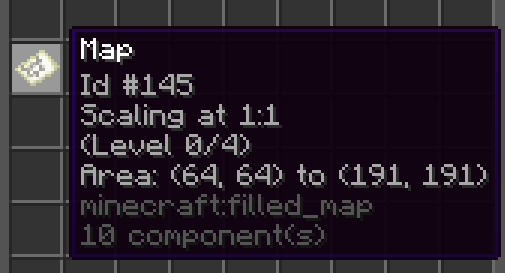
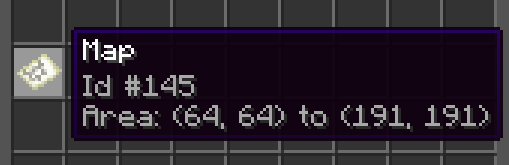
With advanced tooltips disabled:
With advanced tooltips enabled:
Configuration
There’s just a single config value, and… you could just _not_ install the mod if you’re inclined to change it:
# If enabled, the mod stores coordinate data on the map item when creating a new filled map
enabled: true
You can manage config in-game with the command /mapcoordinates <config-value> true/false.
Alternatively, you can edit it manually in config/FilledMapCoordinates/config.yml.
Usage
When enabled, simply use maps like you always would.
Whenever you create a new filled map, Minecraft will now store the exact coordinates where
you did so in custom component data on the map item itself. The mod then uses that data to
calculate the coordinates of the top-left and bottom-right corners of the area that this map
covers.
It will also record the scaling level of a map, and update it if you zoom the map out
on a cartography table. You can read up on the Wiki
zoom level / scale works with regard to the coordinates a map covers.
The mod needs to be present both on the server (for storing the data) and the client
(for showing the data). Note that already existing maps will not show the new tooltip
information as they do not have the required coordinates metadata present on the item.
If uninstalling the mod later, the metadata stored by the mod should not have any impact.
I was only able to get this mod done by building on somyk‘s mod Map Art Copyright. Thank you!
常见问题
Filled Map Coordinates 支持哪些 Minecraft 版本?
Filled Map Coordinates 支持 Minecraft Java 版 1.21–1.21.4,共 5 个版本,可用的加载器:Fabric / Quilt。下载时注意选择和你游戏版本一致的文件。
Filled Map Coordinates 怎么安装?
先用 PCL2 或 HMCL 启动器安装对应版本的 Fabric / Quilt,再把下载的 .jar 文件放进游戏目录的 mods 文件夹,重新启动游戏即可。开启了版本隔离的,mods 文件夹在 versions/版本名 下面。运行环境:客户端和服务端都要装。
评论
登录后评论和评分