Cheat Mode (Creative Inventory in Survival)
Access the creative inventory from the survival mode, toggle flight, reach ...
截图


介绍


Cheat Mode (Forge)
(MULTIPLAYER SUPPORT SINCE VERSION 2.0.0-beta)
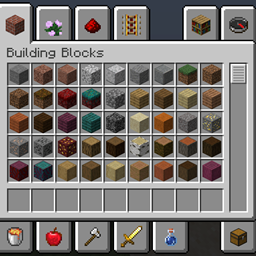
Cheat Mode is a mod that gives players an easy way to access the creative inventory from the survival mode, as well as some nice options. For versions 2.0.0+ these can be changed in the chat screen.
Opening the creative inventory in survival mode only works on servers where the player has gamemode permissions.
Options:
- Instantly Open Inv: when turned on opening the survival inventory will instantly open the creative inventory, otherwise there will be a button (grass block) in the survival inventory to open it.
- Flight: When turned on the player is able to fly in survival mode.
- Reach: Change the player reach (attacking entities and placing/breaking blocks) (default: 3.0) (values above about 5.0 aren’t effective on servers)
Screenshots:
常见问题
Cheat Mode (Creative Inventory in Survival) 支持哪些 Minecraft 版本?
Cheat Mode (Creative Inventory in Survival) 支持 Minecraft Java 版 1.16–26.2,共 23 个版本,可用的加载器:Forge / NeoForge。下载时注意选择和你游戏版本一致的文件。
Cheat Mode (Creative Inventory in Survival) 怎么安装?
先用 PCL2 或 HMCL 启动器安装对应版本的 Forge / NeoForge,再把下载的 .jar 文件放进游戏目录的 mods 文件夹,重新启动游戏即可。开启了版本隔离的,mods 文件夹在 versions/版本名 下面。
Krxwallo 的其他作品
查看全部 →
Cheat Mode (Creative Inventory in Survival) (Fabric)
Access the creative inventory from the survival mode, toggle flight, reach ...

Switcher
Use the gamemode switcher without operator permissions.

Notify
You don't want to create mixins for each project over and over again for the same events.
评论
登录后评论和评分