
截图


介绍
介绍由机器翻译自 CurseForge 原页面,仅供参考。

常见问题
计划添加更多附魔
- Hunter
- Confusion(可能会添加)
- Voiding(可能会添加)
- Straight Shot(可能会添加)
- ……?
通用技术定义
新增附魔效果触发点
equipment_change_trigger:更换任意已装备物品时- 此模组中的大多数附魔都会向目标实体添加数据附件,由其处理相关逻辑
- 因此,它们可能无法与其他附魔触发点良好兼容
新增战利品物品条件
entity_typematch_item_entity
实体类型
支持对实体进行更广泛的检查
EntityType(LootItemCondition)
{
  "type": Type,           // [Mandatory] ||
  "entity": EntityTarget  // [Mandatory] || Which entity of the loot context is checked
}
类型
living_entity:继承LivingEntity类的实体(例如不包括Minecarts、Items等)enemy:实现Enemy接口或属于MONSTER生物类别的实体tamed:继承TamableAnimal类且已驯服的实体animal:继承Animal类的实体item:继承ItemEntity类的实体experience_orb:继承ExperienceOrb类的实体
EntityTarget
thisattackerdirect_attackerattacking_player
匹配物品实体
允许使用 ItemPredicates 检查 Item Entity 中的物品
{
  "predicate": ItemPredicate, // [Optional] || To match the item of the item entity, all are valid if left empty
  "target": EntityTarget      // [Optional] || Which entity of the loot context is checked (Default: 'this')
}
补充说明
- ItemPredicate:请查看 match_tool 中的
predicate定义
EntityTarget
thisattackerdirect_attackerattacking_player
流体视觉
- 改善从流体上方观察时的视野
- 改善身处流体中时的视野
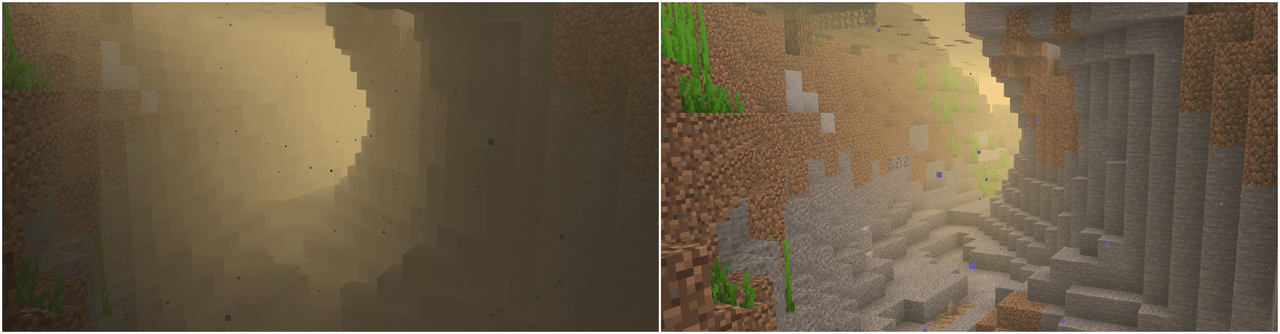
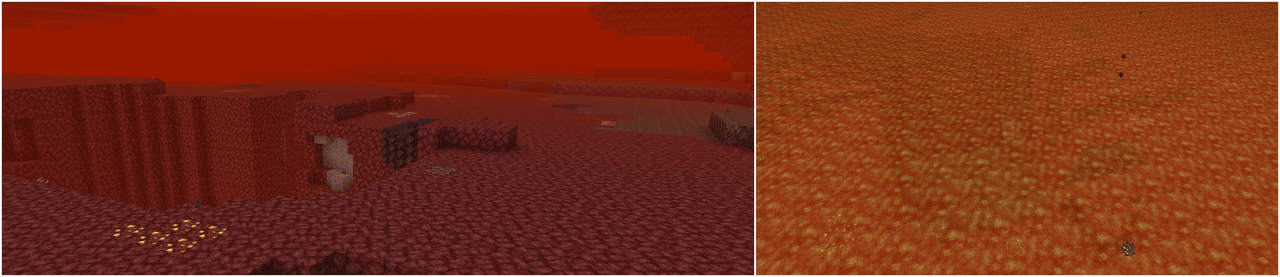
默认效果
等级 1:
- 改善在水中的视野
等级 2:
- 改善在熔岩中的可见度
- 改善在
create流体中的可见度(#additional_enchantments:create流体类型标签) - 改善在
the_bumblezone流体中的可见度(#additional_enchantments:bumblezone流体类型标签) - 进一步提升可见度
等级 3:
Level 1和Level 2中的流体- 进一步提升可见度
等级 4:
Level 1和Level 2中的流体- 进一步提升可见度
技术定义
{
  "vision": {                                     // [Mandatory] ||
    "values": [                                   // [Mandatory] ||
      {
        "level_range": {                          // [Mandatory] || Defines at which enchantment levels this effect will apply
          "min": integer,                         // [Optional]  ||
          "max": integer                          // [Optional]  ||
        },
        "value": [                                // [Mandatory] ||
          {
            "id": ResourceLocation,               // [Mandatory] || Unique identifier for the effect
            "fluid_types": HolderSet<FluidType>,  // [Mandatory] || Defines to which fluids this effect will apply to
            "percentage": LevelBasedValue         // [Mandatory] || Defines how see-through the fluid will be and by how much the viewing distance within the fluid will be improved
          }
        ]
      }
    ]
  }
}
补充说明
追踪
- 使投射物自动追踪目标
- 优先锁定最靠近镜头焦点的实体(即你正在注视的实体)
- 忽略友方实体(你驯服的动物、盟友及其驯服的动物;关闭 PvP 时也会忽略玩家)
- 优先检查优先级最高的目标定义
默认效果
所有等级:
- 生物实体(优先级 0)
- 不包括
minecraft:villager、minecraft:iron_golem和minecraft:enderman
- 不包括
- 动物(优先级 1)
- 敌对生物(优先级 2)
- 不包括
minecraft:enderman
- 不包括
- Boss(优先级 3)
#c:bosses和minecraft:warden
等级 2
- 提升搜索范围、速度以及每刻的转向角度
等级 3:
- 提升搜索范围、速度以及每刻的转向角度
技术定义
{
  "homing": {                                       // [必需] ||
    "values": [                                     // [必需] ||
      {
        "level_range": {                            // [必需] || 定义此效果适用的附魔等级
          "min": integer,                           // [可选]  ||
          "max": integer                            // [可选]  ||
        },
        "value": [                                  // [必需] ||
          {
            "id": ResourceLocation,                 // [必需] || 效果的唯一标识符
            "projectiles": HolderSet<EntityType>,   // [可选]  || 此效果适用的弹射物(未指定则适用于全部)
            "target_condition": LootItemCondition,  // [必需] || 确定要以哪些实体为目标
            "search_range": {                       // [必需] || 指定用于选择目标的搜索范围
                "front": LevelBasedValue,           // [可选]  ||(默认值:0)
                "back": LevelBasedValue,            // [可选]  ||(默认值:0)
                "left": LevelBasedValue,            // [可选]  ||(默认值:0)
                "right": LevelBasedValue,           // [可选]  ||(默认值:0)
                "up": LevelBasedValue,              // [可选]  ||(默认值:0)
                "down": LevelBasedValue             // [可选]  ||(默认值:0)
              },
            "velocity_multiplier": LevelBasedValue, // [必需] || 每刻应用于弹射物速度的倍率
            "max_turn_per_tick": LevelBasedValue,   // [可选]  || 弹射物每刻可转向的最大角度(默认值:180,即会直接转向目标)
            "priority": integer                     // [可选]  || 此效果的优先级(默认值:0)
          }
        ]
      }
    ]
  }
}
补充说明
- ResourceLocation
- HolderSet
- LootItemCondition
this指目标实体origin指目标实体的位置attacking_entity指弹射物的拥有者direct_attacking_entity指弹射物本身
- LevelBasedValue
感知
- 使用自定义颜色显示发光的实体;默认受影响的实体类型见下文
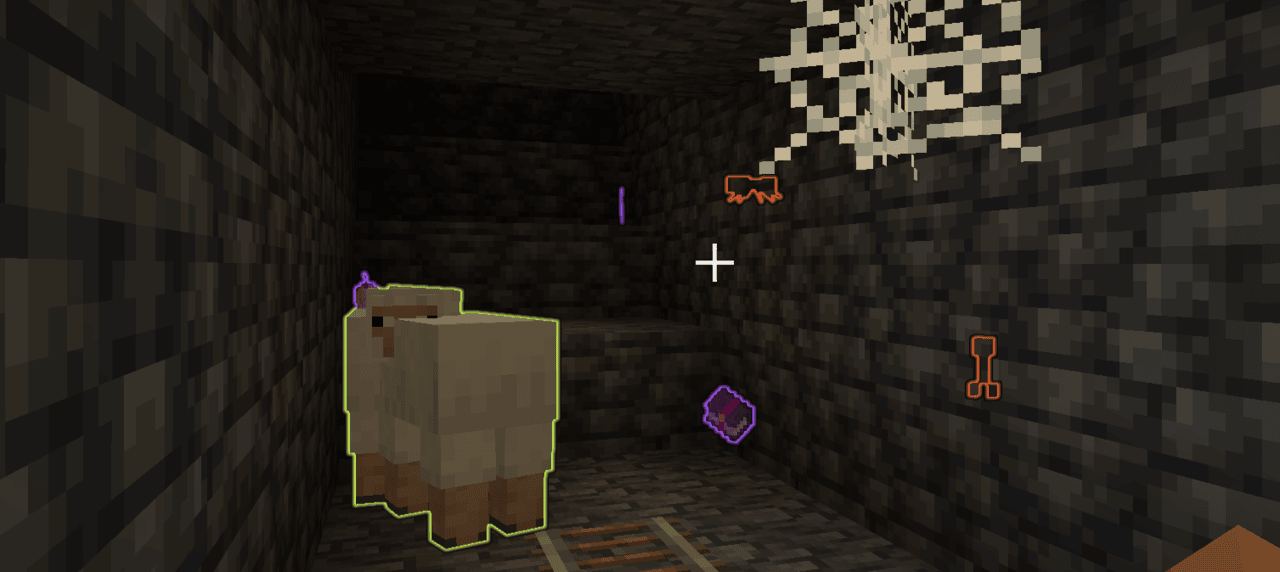
默认效果
等级 1:
- 高亮显示有价值的物品(
#additional_enchantments:valuables物品标签) - 高亮显示附魔物品
- 高亮显示敌人
- 高亮显示动物
等级 2:
- 高亮显示有价值的物品(
#additional_enchantments:valuables物品标签) - 高亮显示附魔物品
- 高亮显示敌人
- 高亮显示动物
- 高亮显示 Boss
等级 3:
- 以有限形式高亮有价值的物品(
#additional_enchantments:limited_valuables物品标签) - 高亮包含实用附魔的附魔书(例如,
Unbreaking II或Mending) - 高亮敌对生物
- 高亮动物
- 高亮 Boss
技术定义
{
  "perception": {                           // [Mandatory] ||
    "values": [                             // [Mandatory] ||
      {
        "level_range": {                    // [Mandatory] || Defines at which enchantment levels this effect will apply
          "min": integer,                   // [Optional]  ||
          "max": integer                    // [Optional]  ||
        },
        "value": [                          // [Mandatory] ||
          {
            "key": ResourceLocation,        // [Mandatory] || Unique identifier for the effect
            "condition": LootItemCondition, // [Mandatory] || Checks which entities this effect will apply to
            "range": LevelBasedValue,       // [Mandatory] || Defines up to which distance the entities will be affected at
            "color": ShiftingColor          // [Mandatory] || The colors of the effect
          }
        ]
      }
    ]
  }
}
渐变颜色
{
  "colors": [                 // [Mandatory] || The colors defined in here will be smoothly cycled through based on the specified shift rate
    {
      "color": TextColor,     // [Mandatory] ||
      "alpha": float          // [Optional]  || The alpha value of the color (0..1) (Default: 1)
    }
  ],
  "color_shift_rate": double, // [Optional]  || At which speed the colors will be cycled through (Default: 1.0)
  "priority": integer         // [Optional]  || Which color to be picked - the entry with the highest priority will be picked (Default: 0)
}
补充说明
- TextColor:可以是命名的 Minecraft 颜色,也可以是十六进制代码
- 资源位置标识符
- 战利品条件
this实体上下文指的是将获得发光效果的目标实体origin指的是目标实体的位置
- 基于等级的数值
宝藏探寻者
- 可通过不同方式高亮方块,详情见下文
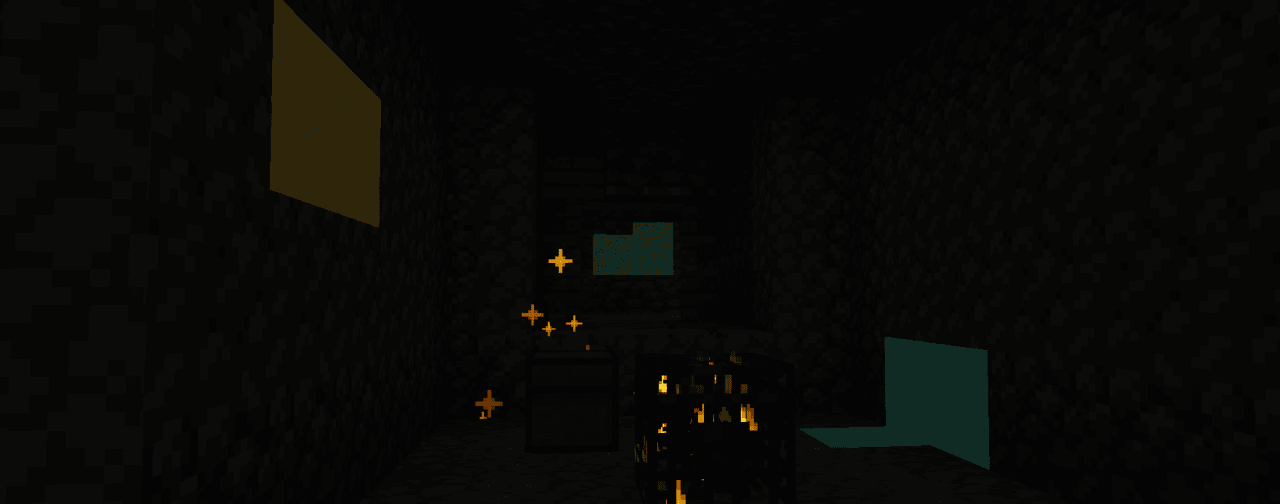
(压缩效果加上静态图片,让实际效果看起来比真实情况更差)
默认效果
所有等级:
treasures,使用particles显示类型
等级 1:
- (所有矿石均使用
simple_shader) - 铜矿石
- 铁矿石
- 锌矿石
- 银矿石
等级 2:
- (所有矿石均使用
simple_shader) - 铁矿石
- 锌矿石
- 银矿石
- 青金石矿石
- 金矿石
等级 3:
- (所有矿石均使用
simple_shader) - 青金石矿石
- 金矿石
- 绿宝石矿石
- 钻石矿石
等级 4:
- (所有矿石均使用
outline) - 绿宝石矿石
- 钻石矿石
- 下界合金矿石
技术定义
{
  "vision": {                             // [Mandatory] ||
    "values": [                           // [Mandatory] ||
      {
        "level_range": {                  // [Mandatory] || Defines at which enchantment levels this effect will apply
          "min": integer,                 // [Optional]  ||
          "max": integer                  // [Optional]  ||
        },
        "value": [                        // [Mandatory] ||
          {
            "id": ResourceLocation,       // [Mandatory] || Unique identifier for the effect
            "blocks": BlockDefinition,    // [Mandatory] || Defines to which blocks this effect will apply to
            "range": LevelBasedValue,     // [Mandatory] || Defines up to which distance the blocks will be affected at
            "display_type": DisplayType,  // [Mandatory] || Defines how the effect will be displayed
            "particle_rate": integer,     // [Optional]  || The rate at which particles will be spawned (only applicable to 'particles' display type) (Default: 0)
            "color": ShiftingColor        // [Mandatory] || The colors of the effect
          }
        ]
      }
    ]
  }
}
ShiftingColor
{
  "colors": [                 // [Mandatory] || The colors defined in here will be smoothly cycled through based on the specified shift rate
    {
      "color": TextColor,     // [Mandatory] ||
      "alpha": float          // [Optional]  || The alpha value of the color (0..1) (Default: 1)
    }
  ],
  "color_shift_rate": double, // [Optional]  || At which speed the colors will be cycled through (Default: 1.0)
  "priority": integer         // [Optional]  || Which color to be picked - the entry with the highest priority will be picked (Default: 0)
}
附加说明
- BlockDefinition 可以是以下两种类型之一
treasures:尚未开启的战利品容器(包含在additional_enchantment:treasures方块标签中)- 类型为
Block的 HolderSet
- DisplayType
outline:在方块周围显示轮廓,可隔墙看见particles:在方块位置生成粒子simple_shader:在方块周围显示发光效果
- TextColor:可以是 Minecraft 命名颜色或十六进制代码
- ResourceLocation
- HolderSet
- LevelBasedValue
攀爬
- 无需梯子即可攀爬大多数方块
- 等级较高时,还会禁用自动下滑,甚至允许攀爬天花板
默认效果
等级 1:
- 当方块符合以下条件时允许攀爬:
- 不是空气
- 是实心方块
- 不是流体
- 不属于
#additional_enchantments:slippery(冰块 / 玻璃)
等级 2:
- 可以附着在墙壁上
等级 3:
- 可以攀爬天花板
技术定义
{
  "climbable": {                            // [必填] ||
    "values": [                             // [必填] ||
      {
        "level_range": {                    // [必填] || 定义此效果将在哪些魔咒等级下生效
          "min": integer,                   // [可选]  ||
          "max": integer                    // [可选]  ||
        },
        "value": [                          // [必填] ||
          {
            "key": ResourceLocation,        // [必填] || 该效果的唯一标识符
            "blocks": BlockPredicate,       // [必填] || 定义哪些方块可攀爬
            "can_stick_to_walls": boolean,  // [可选]  || 若启用,实体不会自动沿墙下滑(按 SHIFT 可向下攀爬)
            "can_climb_ceilings": boolean   // [可选]  || 若启用,实体能够沿天花板攀爬
          }
        ]
      }
    ]
  }
}
补充说明
Green Foot
- 对你走过的方块以及你周围的方块施加骨粉效果
- 对于树苗和作物,该效果每次生效时还会损坏附魔物品
默认效果
等级 1:
- 任意方块:恒定 1% 概率
#minecraft:saplings:10% 概率,每级 + 7.5% 概率#minecraft:crops:30% 概率,每级 + 10% 概率
等级 2:
- 范围增加
- 概率增加
等级 3:
- 范围增加
- 概率增加
技术定义
{
  "growth_entries": [                 // [必填] ||
    {
      "predicate": BlockPredicate,    // [必填] || 检查要将此效果应用于哪个方块
      "probability": LevelBasedValue, // [必填] || 此效果生效的概率,在每个位置每次尝试前单独检查
      "priority": integer,            // [可选]  || 当多个谓词匹配时选择哪个效果——选择优先级最高的(默认:0)
      "damage": integer               // [必填] || 每次成功尝试效果时附魔物品将损失的耐久
    }
  ],
  "extra_range": LevelBasedValue      // [必填] || 除原点位置外,此效果将作用于玩家周围的额外范围(半径)
}
补充说明
常见问题
Additional Enchantments 支持哪些 Minecraft 版本?
Additional Enchantments 支持 Minecraft Java 版 1.19.2–26.1.2,共 6 个版本,可用的加载器:Forge / NeoForge。下载时注意选择和你游戏版本一致的文件。
Additional Enchantments 怎么安装?
先用 PCL2 或 HMCL 启动器安装对应版本的 Forge / NeoForge,再把下载的 .jar 文件放进游戏目录的 mods 文件夹,重新启动游戏即可。开启了版本隔离的,mods 文件夹在 versions/版本名 下面。
Cadentem 的其他作品
查看全部 →
Pufferfish’s Unofficial Additions
by Cadentem
额外的经验来源和奖励
453.6万
10 个月前
Modrinth · CurseForge

Additional Attributes
by Cadentem
为游戏添加更多属性
406.4万
1 年前
Modrinth · CurseForge

Quality Food
by Cadentem
这个模组为食物及部分食材(例如作物)添加了品质机制。
227.3万
5 天前
Modrinth · CurseForge

Cave Dweller Evolved
by Cadentem
洞穴潜行者模组的分支版本,并加入了额外改动。
153.3万
2 年前
Modrinth · CurseForge
评论
登录后评论和评分