
PlayerEX – MT Inventory Weight
Connects PlayerEX progression with MT Inventory Weight, allowing PlayerEX level and a configurable PlayerEX attribute/skill such as Carrying to increase maximum inventory weight.
截图
介绍
PlayerEX Inventory Weight
PlayerEX Inventory Weight is an add-on for MT Inventory Weight and PlayerEX: Directors Cut.
It connects PlayerEX progression with inventory weight capacity, allowing a player’s PlayerEX level and/or a configured PlayerEX attribute/skill to increase maximum inventory weight.
This mod is not standalone.
Features
- Fully customizable with fzzy_config — server-side synced config for gameplay values
- Adds integration between PlayerEX and MT Inventory Weight
- Uses the player’s PlayerEX level to modify max inventory weight
- Uses a configurable PlayerEX attribute/skill to modify max inventory weight
- Adds support for a custom
Carryingattribute - Can add
Carryingdirectly to PlayerEX’s existing primary attribute list - Supports flat and multiplier-based capacity scaling
- Supports refunding Carrying points through PlayerEX refund logic
- Supports two capacity modes:
EVENT_MODIFIERINVENTORY_WEIGHT_ATTRIBUTE
Carrying Attribute
The add-on registers a custom PlayerEX-style attribute:
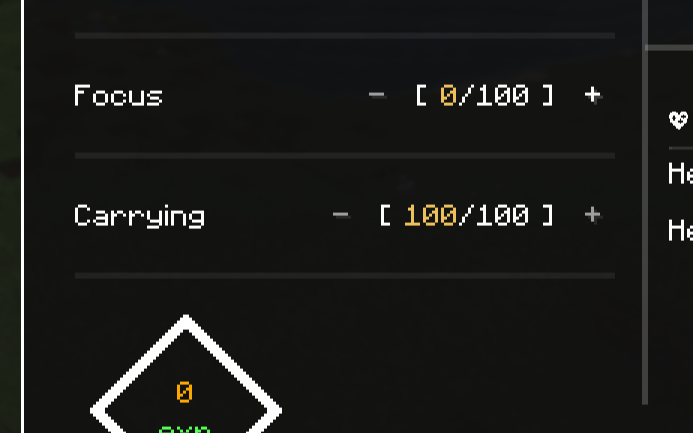
playerex_inventoryweight:carryingWhen enabled, this attribute is added directly to PlayerEX’s normal primary attribute menu alongside:
Constitution
Strength
Dexterity
Intelligence
Luckiness
Focus
Carrying
This means there is no separate Inventory Weight screen. Players can spend PlayerEX skill points on Carrying from the normal PlayerEX UI.
Capacity Modes
EVENT_MODIFIER
This is the recommended mode.
The add-on reads the configured PlayerEX attribute value and modifies MT Inventory Weight’s max weight through the Inventory Weight event system.
This mode supports:
- flat bonuses
- multiplier bonuses
- PlayerEX level scaling
- PlayerEX attribute/skill scaling
Example:
PlayerEX level multiplier: +1% per level
Carrying multiplier: +5% per Carrying level
INVENTORY_WEIGHT_ATTRIBUTE
This mode applies a modifier directly to the MT Inventory Weight max-weight attribute:
inventoryweight:generic.max_weightThis is best for flat bonuses, such as:
+10 max weight per Carrying levelFor multiplier-style scaling, EVENT_MODIFIER is recommended.
Configuration
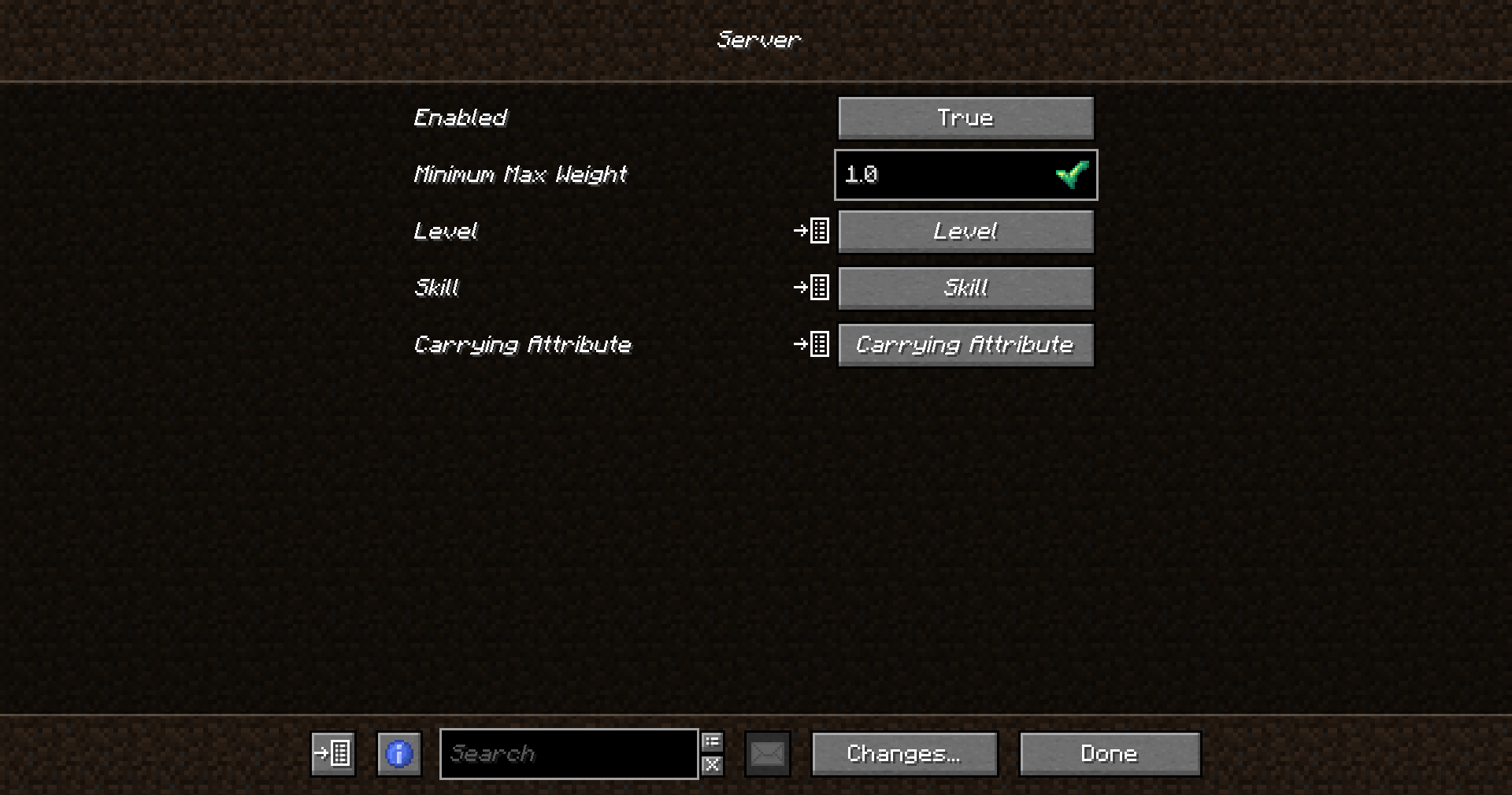
The add-on uses a synced server config.
You can configure:
- whether the integration is enabled
- minimum max weight
- flat bonus per PlayerEX level
- multiplier bonus per PlayerEX level
- which PlayerEX attribute/skill is used for capacity scaling
- flat bonus per configured skill level
- multiplier bonus per configured skill level
- whether the custom Carrying attribute is enabled
- whether Carrying is added to PlayerEX’s primary attribute list
- whether the add-on uses event-based scaling or the Inventory Weight attribute
Default-style scaling:
level.multiplierPerLevel = 0.01
skill.attributeId = playerex_inventoryweight:carrying
skill.multiplierPerLevel = 0.05
This gives:
+1% max weight per PlayerEX level
+5% max weight per Carrying level
Example Scaling
Base max weight: 100
PlayerEX level: 10
Carrying level: 10

Level multiplier: 1.10
Carrying multiplier: 1.50

Final max weight: 165
Notes for Modpack Developers
The custom Carrying attribute must be available on players through Data Attributes. The add-on includes the required data files for:
data/playerex_inventoryweight/data_attributes/entity_types/player.json
data/playerex_inventoryweight/data_attributes/overrides/carrying.json
If you want to use an existing PlayerEX attribute instead of Carrying, set the config value to one of these examples:
playerex:constitution
playerex:strength
playerex:dexterity
playerex:intelligence
playerex:luckiness
playerex:focus
playerex:mining
playerex:smithing
playerex:farming
Documentation
Full documentation for this add-on will be available here:
https://megatrex4.github.io/inventory-weight/guide/addons/playerex
常见问题
PlayerEX – MT Inventory Weight 支持哪些 Minecraft 版本?
PlayerEX – MT Inventory Weight 支持 Minecraft Java 版 1.20.1,可用的加载器:Fabric。下载时注意选择和你游戏版本一致的文件。
PlayerEX – MT Inventory Weight 怎么安装?
先用 PCL2 或 HMCL 启动器安装对应版本的 Fabric,再把下载的 .jar 文件放进游戏目录的 mods 文件夹,重新启动游戏即可。开启了版本隔离的,mods 文件夹在 versions/版本名 下面。运行环境:客户端和服务端都要装。
MEGATREX4 的其他作品
查看全部 →
MT Created Applied Energistics
将 AE2 方块和物品改成机械动力风格

MT Random Block Placement
从快捷栏随机放置方块,操作简单。

MT Random Block Placement
可快速放置快捷栏中的随机方块

MT Inventory Weight
加入重量机制!管理负重、平衡背包,让生存或RPG玩法更有代入感。
评论
登录后评论和评分