
介绍

Hardcore worlds can be restored by modifying the level.dat in the world directory but the problem is that players are usually lazy to do that or don’t know how to do so. That’s what the mod solve:). It also offer some customizations (see configuration banner).
Disclaimer: The mod will modify the level.dat of the specified world to restore. In case something would go wrong, a backup is done anyway in the same world folder.

When you die in a singleplayer hardcore world, a new button will be there: “Restore World”. Depending on the settings (explained below), you’ll be able to recover the world still as hardcore or as a survival.
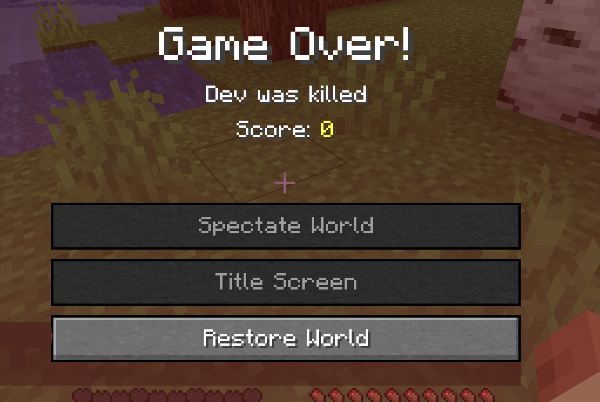

*Just in case, the mod create a backup of the world’s data, named under “level.dat_backup_restorehardcoreworld”

It has no GUI on FORGE yet to configure that ingame, but you can go to config/restorehardcoreworld-client.toml and you will be able to configure that:
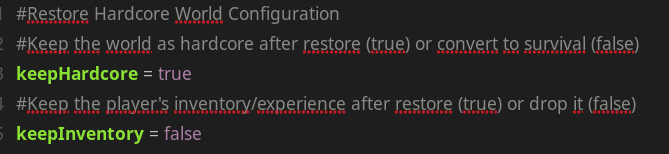

Coming soon!
Feel free to add this in any modpack published on curseforge! This is highly appreciated.
The code is open source : https://github.com/AwesomeHippo/RestoreHardcoreWorld under MIT license
常见问题
Restore Hardcore World 支持哪些 Minecraft 版本?
Restore Hardcore World 支持 Minecraft Java 版 1.20.1–1.21.1,共 5 个版本,可用的加载器:Forge / NeoForge。下载时注意选择和你游戏版本一致的文件。
Restore Hardcore World 怎么安装?
先用 PCL2 或 HMCL 启动器安装对应版本的 Forge / NeoForge,再把下载的 .jar 文件放进游戏目录的 mods 文件夹,重新启动游戏即可。开启了版本隔离的,mods 文件夹在 versions/版本名 下面。
AwesomeHippo 的其他作品
查看全部 →
Better Zoom
Smoothly zoom with wheel and hotkeys as much as you want, in a simple way with customizations

Modern Fullbright
Modern fullbright, no more dark! See everything luminous in any server! (client-sided)

Item Scrapper Pack – TACZ ZC
Item Scrapper Support for ZombieCraft

Custom FPS Display
Custom your FPS display in a modern way
评论
登录后评论和评分