
Better Zoom
Smoothly zoom with wheel and hotkeys as much as you want, in a simple way with customizations
介绍

Better Zoom v2.9, allows you to zoom smoothly with wheel scrolling and hotkeys. It offers a simple and efficent zoom with customizations. All of that without any mixin/asm, in order to improve the speed.
The goal of this mod is to provide a simple & suitable zoom with both wheel and hotkeys smooth zooming. No fancy or complicated parameters included. It still offers customizations (see screenshots below) on a Configuration GUI while running without any mixin or any additional library.
It’s also meant to be simple, compatible but still including all the necessary features, without fancy stuff.

Press “c” by default to toggle zoom. (Configurable keybind)
Press “+”/”-“ or scroll with wheel to zoom in/out ( Configurable) – You can also hold these keybinds!
*A new video and logo are being made!

Configuration GUI (Forge 1.20.1 v2.9.0 reference): (open with ‘ V‘ keybind by default) and at mods/config..:
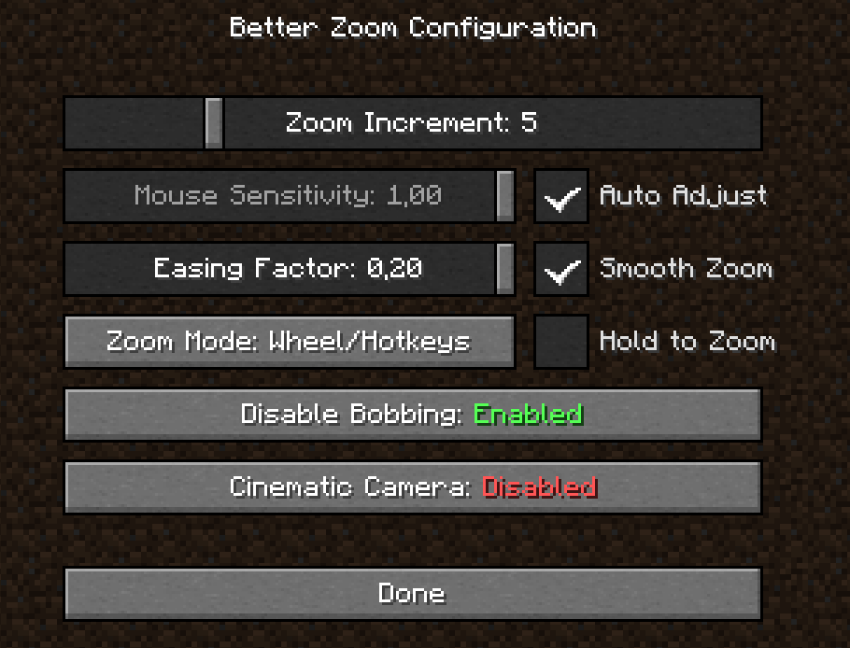
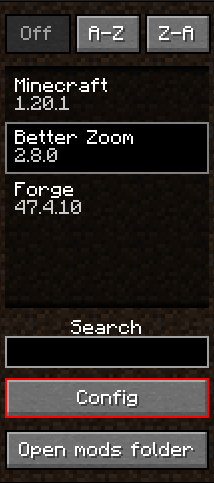
Details:
| Zoom Increment | How much zoom it increments per scroll wheel. (useful to zoom/dezoom very quickly) |
| — | — |
| Mouse Sensitivity | The mouse sensitivity that will be multiplited by when you zoom. (adjust as you need so the camera doesn’t move too fast when zooming a lot) |
| Auto Adjust | Adjust the mouse sensitivty automatically according to the zoom level. Less sensitive when Cinematic Camera is on. |
| Smooth Zoom | A real Smooth Fade in/out when zooming |
| Hold to Zoom | Require to hold the zoom keybind in order to keep zooming |
| Easing Factor | Easing factor for the smooth transitions. Lowers = slower/smoother |
| Disable Bobbing | Disable the bob biew/bobbing while zooming |
| Cinematic Camera | Cinematic Camera movements while zooming. Slow and smooth, useful for cinematic animations/videos. Note: it’s regulated with Auto-adjust mode, if you want a stronger cinematic feel, disable Auto-adjust and set lower value for Mouse sensitivity |
(Tooltips are avilable ingame for more informations)
Recommended: (What I use :D)
- Zoom Increment: ~5
- Mouse Sensitivity: Auto-adjust
- Easing Factor: 0.20
- Smooth Zoom: enabled
- Hold to Zoom: it depends..
- Zoom Mode: Both (yes, you can use wheel and hotkeys!)
- Disable bobbing: enabled
- Cinematic camera: it depends..
Custom keybinds:
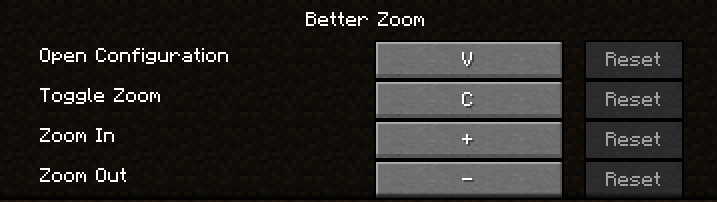
*You can even hold keybinds of zoom in/out

Translations are available for French and English yet. Feel free to suggest better one, or directly add translations on github with a pull request!
Feel free to add the mod in any modpack published on curseforge! This is highly appreciated.
The code is open source: https://github.com/AwesomeHippo/BetterZoom under MIT license
常见问题
Better Zoom 支持哪些 Minecraft 版本?
Better Zoom 支持 Minecraft Java 版 1.18.2–1.21.1,共 7 个版本,可用的加载器:Forge / NeoForge。下载时注意选择和你游戏版本一致的文件。
Better Zoom 怎么安装?
先用 PCL2 或 HMCL 启动器安装对应版本的 Forge / NeoForge,再把下载的 .jar 文件放进游戏目录的 mods 文件夹,重新启动游戏即可。开启了版本隔离的,mods 文件夹在 versions/版本名 下面。运行环境:仅客户端。
AwesomeHippo 的其他作品
查看全部 →
Restore Hardcore World
Restore any singleplayer hardcore world with customizations

Modern Fullbright
Modern fullbright, no more dark! See everything luminous in any server! (client-sided)

Item Scrapper Pack – TACZ ZC
Item Scrapper Support for ZombieCraft

Custom FPS Display
Custom your FPS display in a modern way
评论
登录后评论和评分