
截图
介绍
MC Musics
Minecraft has one of the most iconic soundtracks in gaming. The peaceful background music makes exploring, building, and surviving even more enjoyable. But normally, you have to wait for the game to randomly play a song.
MC Music is a simple Fabric mod that lets you play any official Minecraft music whenever you want with just a single key press.
Feature Overview
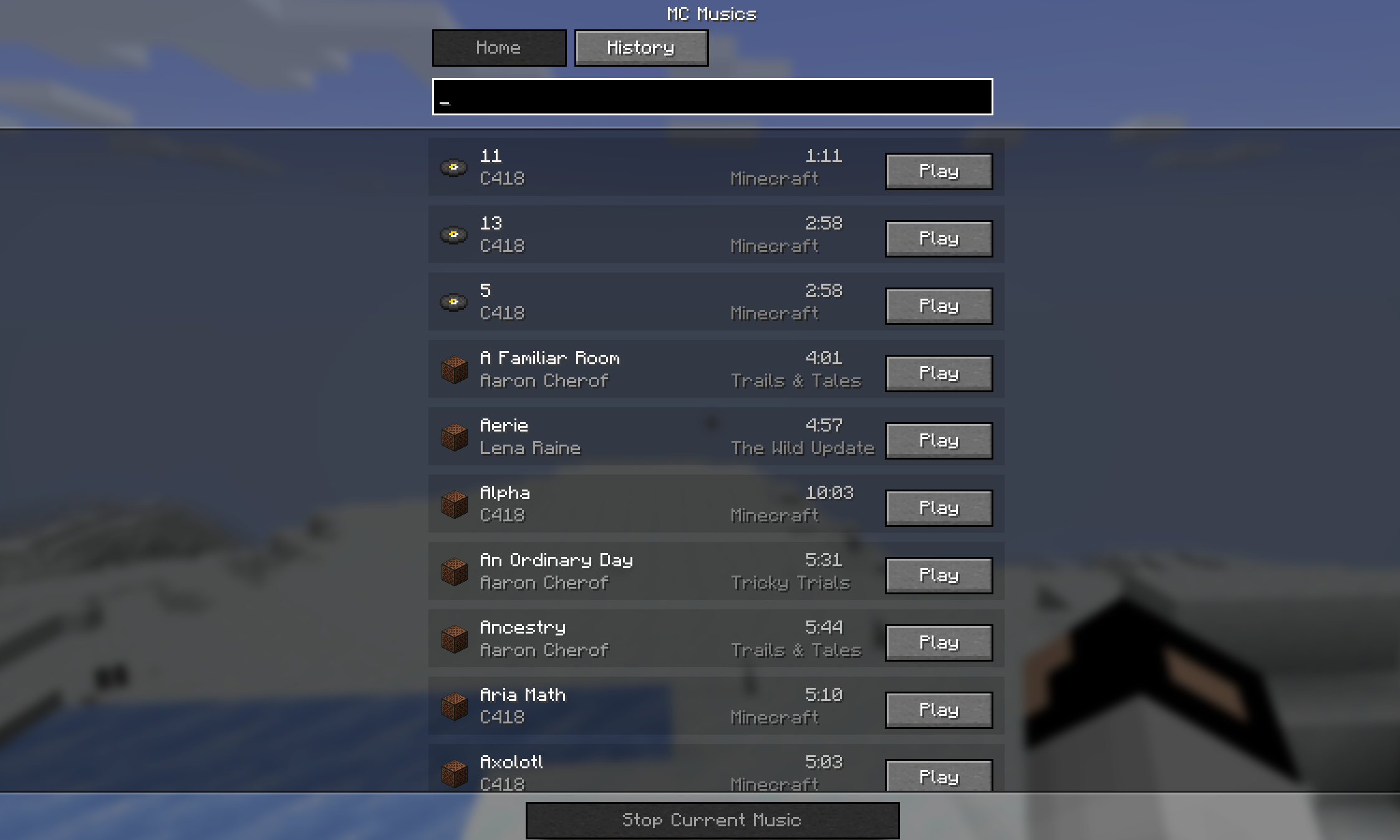
Play Any Minecraft Music Instantly Press the U key (default keybind) to open the Music Menu.
Default Key:
U(Fully customizable in Minecraft Controls settings.)
Inside the GUI, you’ll find a collection of Minecraft’s official music tracks. Simply click on any song to start playing it instantly.
Beautiful Music Library
The music selection screen displays useful information for every track, including:
- Music Name
- Official Composer/Author
- Music Duration
- One-click Play
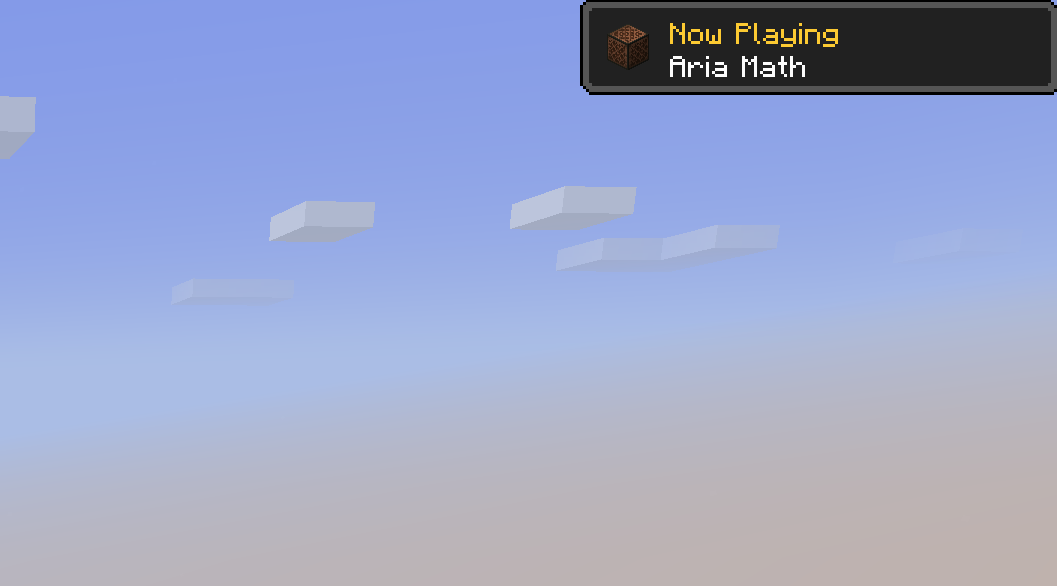
“Now Playing” Toast Notification
Whenever a music track starts playing, either automatically by Minecraft or manually through the mod, you’ll see a beautiful advancement-style toast notification in the corner of your screen.
It displays:
- Now Playing
- Music Name
This makes the experience feel just like Minecraft’s built-in notifications while letting you know exactly which soundtrack is currently playing.
Search Your Favourite Music Instantly
MC Musics includes a built-in Search feature that helps you quickly find any available music track. Simply type the song’s name, and the list updates instantly, making it easy to play your favourite music without scrolling through the entire library.
Recently Played History
MC Musics also keeps track of your recently played songs.
The History section lets you quickly access tracks you’ve listened to before, so you can replay your favourite Minecraft music with just a single click instead of searching for it again.
Compatibility
- Fabric Loader
- Client-side Mod
- Multiplayer Compatible
- Lightweight & Performance Friendly
How to Use
- Install MC Music with Fabric.
- Launch Minecraft.
- Press U (or your custom keybind).
- Browse the music library.
- Click any song to play it instantly.
- Enjoy the official Minecraft soundtrack whenever you want!
常见问题
MC Musics 支持哪些 Minecraft 版本?
MC Musics 支持 Minecraft Java 版 1.21,可用的加载器:Fabric。下载时注意选择和你游戏版本一致的文件。
MC Musics 怎么安装?
先用 PCL2 或 HMCL 启动器安装对应版本的 Fabric,再把下载的 .jar 文件放进游戏目录的 mods 文件夹,重新启动游戏即可。开启了版本隔离的,mods 文件夹在 versions/版本名 下面。运行环境:仅客户端。
spunkyinsaan 的其他作品
查看全部 →
Spunky PVP Texture Pack
Spunky Insaan 制作的自定义 PvP 材质包,旨在提升你的 Minecraft PvP 与 SMP 游戏体验。

Brightness Plus
允许你通过增强控制将亮度设置到超过默认水平。

Spunky Boost
优化 PojavLauncher 性能的最佳整合包!全版本可用

Armour Durablity Hud
在 HUD 上直接显示所有可穿戴装备的耐久度,并可自定义位置和缩放。
评论
登录后评论和评分