
Stoneworks Boss Timer
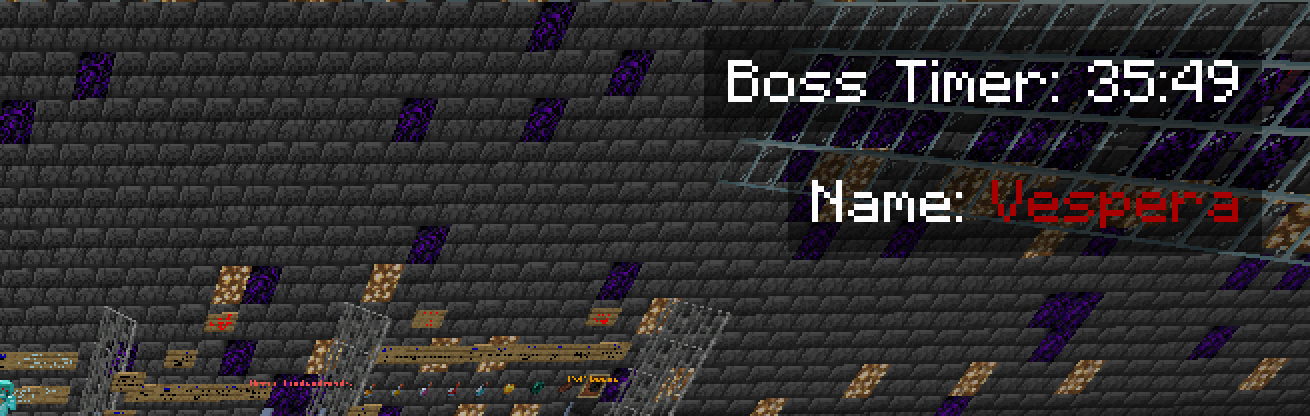
A simple QoL mod for Stoneworks Nether that adds a Boss Timer to the HUD
截图
介绍

This project has been archived due to Stoneworks Nether having native timers in the TAB now.
How does it work?
All you need to do is to press the setup key, select the next boss that will spawn, and set its time.
Features
- Displays a timer for the next boss spawn on the HUD.
- Allows you to select the next boss and set the spawn time.
- Supports multiple bosses with customizable names and colors.
- Toggle the HUD visibility with a key press.
- Change the position of the HUD elements.
Installation
- Download and install Fabric Loader.
- Download the latest release of the mod from the releases page.
- Place the downloaded
.jarfile in themodsfolder of your Minecraft directory. - Launch Minecraft with the Fabric profile.
Usage
- Press the setup key (
Rby default) to open the boss selection screen. - Select the next boss from the list.
- Enter the spawn time in the format
MM:SS(e.g.,30:00for 30 minutes). - Press the submit button to start the timer.
Key Bindings
- Toggle HUD:
Z - Setup Timer:
R - Restart Timer:
X - Change Position:
C
Got any issues?
- DM me in discord: @dupernite
- Open a issue in github: here
Credits
- DuperKnight (Developer)
- _wheeat (Beta Tester & Artist)
NOTE: This mod is not officially made by the Stoneworks staff, this is a community made mod and is not officially endorsed by the Stoneworks team in any way.
常见问题
Stoneworks Boss Timer 支持哪些 Minecraft 版本?
Stoneworks Boss Timer 支持 Minecraft Java 版 1.20–1.21.1,共 9 个版本,可用的加载器:Fabric。下载时注意选择和你游戏版本一致的文件。
Stoneworks Boss Timer 怎么安装?
先用 PCL2 或 HMCL 启动器安装对应版本的 Fabric,再把下载的 .jar 文件放进游戏目录的 mods 文件夹,重新启动游戏即可。开启了版本隔离的,mods 文件夹在 versions/版本名 下面。运行环境:仅客户端。
DuperKnight 的其他作品
查看全部 →
Duper’s Auto Walk
A simple mod that allows you to walk without holding the forward key.

Aurus: Novae Terrae
Aurus is a not so vanilla-friendly Adventure mod

Duper’s Auto Walk: Barebones
A simple mod that allows you to auto walk through your minecraft worlds!

Stoneworks HUD chat
An unofficial mod that displays your current selected Stoneworks channel in your HUD.
评论
登录后评论和评分