
NPotFixer
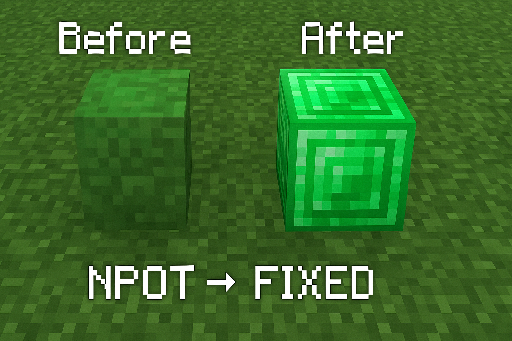
Makes your modded Minecraft look the way it should - no more broken textures from weird image sizes.
截图
介绍
🎨 NPotFixer



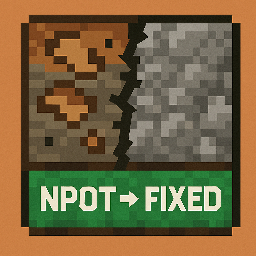
Fixes broken, blurry textures in modded Minecraft caused by NPOT (Non-Power-Of-Two) images.
Drop it in. Play. Done. 👊
🔧 What It Does
- ✅ Fixes blurry or broken textures caused by weird image sizes (like 37×19)
- ✅ Makes far-distance sprites look sharp again
- ✅ Drop-in ready – zero configuration
- ✅ Great for modpacks, custom textures, and Sodium users
🤔 Why It Matters
Many Minecraft mods use custom textures that don’t follow the power-of-two (POT) rule.
This breaks mipmaps and causes artifacts, especially when viewing from a distance.
NPotFixer automatically resizes and corrects these textures without touching the original files.
📚 Learn more:
🧩 How to Use
- Download the latest
.jarfrom Modrinth - Drop it into your
mods/folder - Launch the game – and enjoy flawless textures 🎮
🌐 Links
- 💻 GitHub – Source, Issues, Feedback
- 💬 Discord – Community, Support
- 🧠 Read about mipmaps
- 🧠 NPOT explained
📥 Version List
| Version | Minecraft | Description |
|———|———-|————————|
| 1.0.0 | 1.20.1 | Initial public release |
📄 License
All rights reserved
You may not copy, modify, distribute, or use this mod without explicit permission from the author.
For usage inquiries or permission, contact the developer on GitHub or via Discord
常见问题
NPotFixer 支持哪些 Minecraft 版本?
NPotFixer 支持 Minecraft Java 版 1.20.1,可用的加载器:Fabric。下载时注意选择和你游戏版本一致的文件。
NPotFixer 怎么安装?
先用 PCL2 或 HMCL 启动器安装对应版本的 Fabric,再把下载的 .jar 文件放进游戏目录的 mods 文件夹,重新启动游戏即可。开启了版本隔离的,mods 文件夹在 versions/版本名 下面。运行环境:仅客户端。
PPekKunGz 的其他作品
查看全部 →
Carry On Throw Addon
Adds a fully-featured Throw mechanic to the Carry On mod - allowing players to throw carried entities with physics-based velocity, charge time, obstacle detection, client-side toggle, configurable cooldown, and more.

ChestLocker
🗝️ Adds a secure, UUID-based key system that lets you lock, unlock, and share chests with password protection.

SSkins Mouth
🎨 Custom Skin Servers — 64-2048px! Now supports custom mouths for truly unique faces!

Figura Lite
Smart, lightweight Figura enhancement that adds automatic permission control, responsive GUI, and real-time player distance management.
评论
登录后评论和评分