
Simple Voice Chat Enhanced Groups
A server side Fabric mod providing useful features to Simple Voice Chat groups.
截图
介绍
Simple Voice Chat Enhanced Groups
A server side Fabric mod providing useful features to Simple Voice Chat groups.
Features
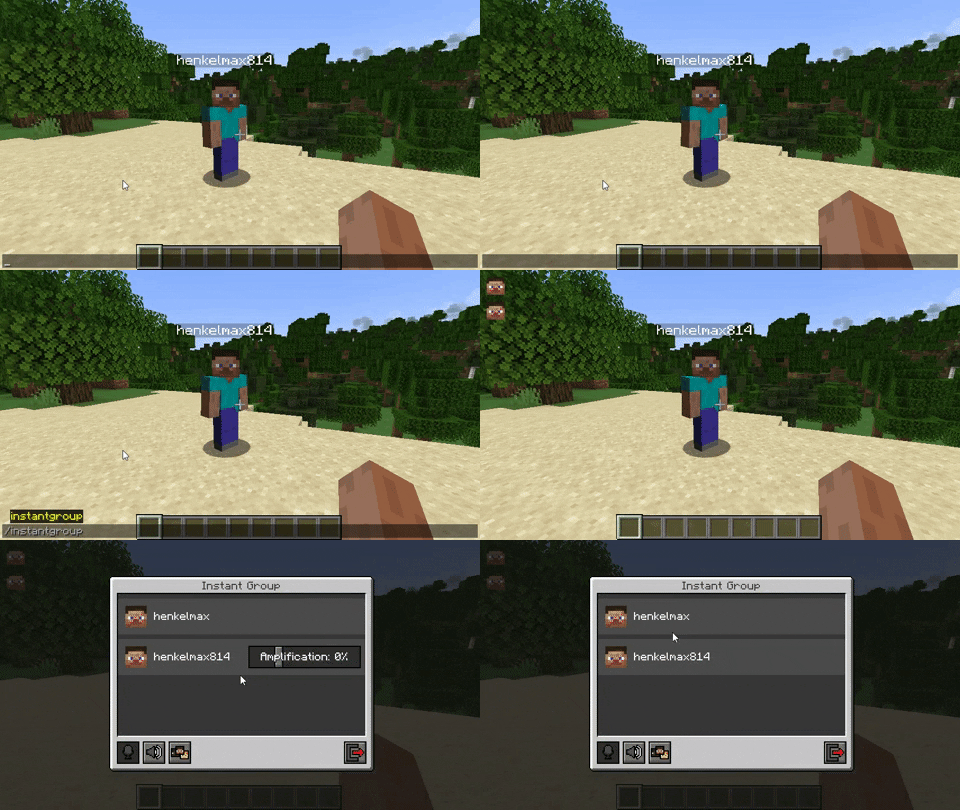
Instant Groups
The command /instantgroup automatically adds every player nearby to a group,
if they are not already in a group.
The default range of this is 128 blocks.
Alternatively you can provide the range as the first argument of the command: /instantgroup 256.
Group Summary
Players that join the server will get a quick summary of all active voice chat groups.
Persistent Groups
The command /persistentgroup creates a group that will not be deleted when all players leave it or the server
restarts.
Usage:
/persistentgroup list – Lists all persistent groups
/persistentgroup remove <name> – Deletes the group with the given name
/persistentgroup remove <id> – Deletes the group with the given ID (For internal use only)
/persistentgroup add <name> [<normal|open|isolated>] [<hidden>] [<password>] – Creates a persistent group
Auto Joining Groups
Players can be automatically added to a group when they join the server.
Note: This feature is only available for persistent groups.
Usage:
/autojoingroup set <group-name> [password] – Sets your auto join group
/autojoingroup set <id> [password] – Sets your auto join group (For internal use only)
/autojoingroup remove – Removes your auto join group
Global Auto Join Group
Players can be automatically added to the same group when they join the server.
Note: This feature is only available for persistent groups.
Usage:
/autojoingroup global set <group-name> [password] – Sets the global auto join group
/autojoingroup global set <id> [password] – Sets the global auto join group (For internal use only)
/autojoingroup global remove – Removes the global auto join group
/autojoingroup global force <true|false> – Forces global auto join. If disabled the players auto join group takes priority
Force Joining Groups
Players can be forced to join a group.
Usage:
/forcejoingroup <player> – Forces the player to join your group
Forced Group Types
If force_group_type is enabled in the config, players won’t be able to create groups with a different type.
All created groups will be of the type specified in the config.
This will be useful for servers that used the global open_groups config option in older versions of Simple Voice Chat.
Note: Forced group types will only be applied to groups that are created with the GUI in Simple Voice Chat.
It does not apply to any of the commands provided by this mod.
If you don’t want regular players to be able to use these commands,
you can set the permission levels in the config to a higher value.
Possible config values are OFF, NORMAL, OPEN and ISOLATED.
Config Options
The config file is located at config/enhancedgroups/enhancedgroups.properties.
| Name | Default Value | Description |
|————————————————–|—————–|————————————————————————————————————————————————————————————————————————|
| default_instant_group_range | 128 | The default range for the /instantgroup command if no range was provided |
| instant_group_name | Instant Group | The name of the instant group |
| instant_group_command_permission_type | EVERYONE | The default permission level of the /instantgroup command
EVERYONE – Every player can use this command
OPS – Operators can use this command
NOONE – The command can’t be used by anyone |
| persistent_group_command_permission_type | OPS | The default permission level of the /persistentgroup command
EVERYONE – Every player can use this command
OPS – Operators can use this command
NOONE – The command can’t be used by anyone |
| auto_join_group_command_permission_type | EVERYONE | The default permission level of the /autojoingroup command
EVERYONE – Every player can use this command
OPS – Operators can use this command
NOONE – The command can’t be used by anyone |
| auto_join_group_global_command_permission_type | OPS | The default permission level of the /autojoingroup global command
EVERYONE – Every player can use this command
OPS – Operators can use this command
NOONE – The command can’t be used by anyone |
| force_join_group_command_permission_type | OPS | The default permission level of the /forcejoingroup command
EVERYONE – Every player can use this command
OPS – Operators can use this command
NOONE – The command can’t be used by anyone |
| group_summary | true | If a summary of all groups should be shown when a player joins the server |
| force_group_type | OFF | If the group type should be forced to a specific type
OFF – No forced group type
NORMAL – Forced group type: Normal
OPEN – Forced group type: Open
ISOLATED – Forced group type: Isolated |
Permissions
This mod supports the fabric-permissions-api.
The default permission type of each node is defined in the config.
| Permission Node | Description |
|—————————————|——————————————————————————–|
| enhancedgroups.instantgroup | The permission node to be able to execute the /instantgroup commands |
| enhancedgroups.persistentgroup | The permission node to be able to execute the /persistentgroup commands |
| enhancedgroups.autojoingroup | The permission node to be able to execute the /autojoingroup commands |
| enhancedgroups.autojoingroup.global | The permission node to be able to execute the /autojoingroup global commands |
| enhancedgroups.forcejoingroup | The permission node to be able to execute the /forcejoingroup commands |
常见问题
Simple Voice Chat Enhanced Groups 支持哪些 Minecraft 版本?
Simple Voice Chat Enhanced Groups 支持 Minecraft Java 版 1.19.2–26.3,共 26 个版本,可用的加载器:Fabric / Quilt。下载时注意选择和你游戏版本一致的文件。
Simple Voice Chat Enhanced Groups 怎么安装?
先用 PCL2 或 HMCL 启动器安装对应版本的 Fabric / Quilt,再把下载的 .jar 文件放进游戏目录的 mods 文件夹,重新启动游戏即可。开启了版本隔离的,mods 文件夹在 versions/版本名 下面。运行环境:仅服务端。
henkelmax 的其他作品
查看全部 →
Sound Physics Remastered
一个通过方块实现逼真声音衰减、混响和吸收效果的 Minecraft 模组。

Simple Voice Chat
Minecraft里能用的语音聊天!

Corpse
再也不怕丢物品了!

GraveStone Mod
死亡时会放置一块墓碑,里面存放你的物品栏物品。
评论
登录后评论和评分