
截图

介绍


Please join the Streamline Hub Discord in order to get updates and for me to fully assist you with bugs, questions, or suggestions.
Discord: click here

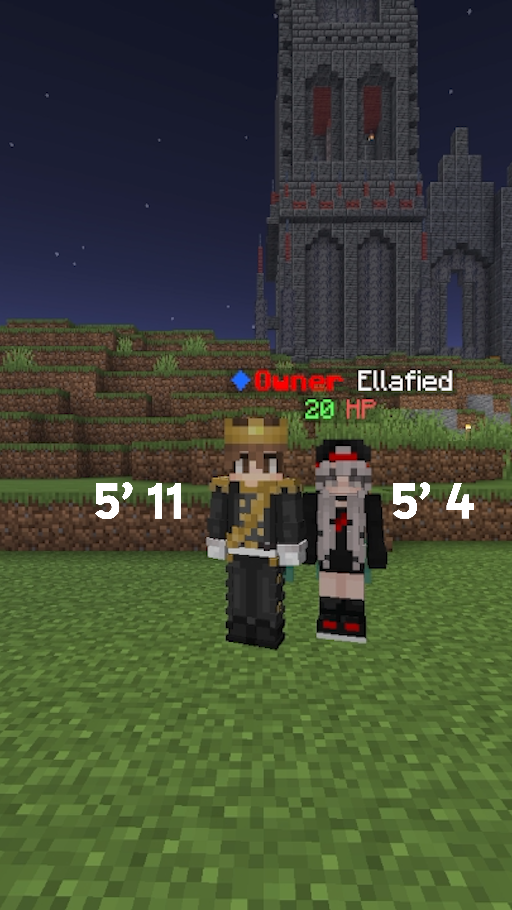
Allow players to be their actual (real-life) height in Minecraft!

Extremely easy to use with drag and drop functionality.
Ever wanted to see what your Minecraft friends would look like in real life when compared to you? Well, it isn’t VR, but it sure is close! You get to see exactly how tall your friends are and there will definitely be a lot of good laughs when you find out who is actually the shortest, or tallest!
This plugin was officially made for Drak SMP: play.drak.gg
Comes with RESTful API hooks so if your players have used this plugin elsewhere, they can remain the same height from server to server. This is toggle-able of course! And, players will still have to set their height upon first use!
This also has database support for cross-network SMPs or height syncing.

- Download and install BukkitOfUtils. Found here: BukkitOfUtils
- Download the correct version of this plugin for you server version.
- Place in your
pluginsfolder. - Stop server.
- Start server.
- Use to your liking.

How to set your height
- Install plugin. (Shown above.)
/heights set <integer or decimal>(i/c/f/m)– where(i/c/f/m)is replaced with one of those characters (i=inches,c=centimeters,f=feet, andm=meters) and<integer or decimal>is replaced with a positive number (between1 footand9 feet– or equivalent).
Notes
i=inchesc=centimetersf=feetm=meters- Defaults to feet if none of the above.

Argument Key
<required>= argument described by “required” is required in the command(optional)= argument described by “optional” is optional in the command(unit "i/c/f/m")= argument described by “unit” is optional in the command and must be one of “i”, “c”, “f”, or “m” verbatim.
Commands
/heights/heights set <integer or decimal>(unit "i/c/f/m") (player)- Sets the height of a player or self.
/heights get (player)- Gets the height of a player or self.
/heights reset (player)- Resets the height of a player or self.
常见问题
RealHeights 支持哪些 Minecraft 版本?
RealHeights 支持 Minecraft Java 版 1.8–26.2,共 74 个版本,可用的加载器:Bukkit / Fabric / Folia / Paper / Purpur / Spigot。下载时注意选择和你游戏版本一致的文件。
RealHeights 怎么安装?
先用 PCL2 或 HMCL 启动器安装对应版本的 Bukkit / Fabric / Folia / Paper / Purpur / Spigot,再把下载的 .jar 文件放进游戏目录的 mods 文件夹,重新启动游戏即可。开启了版本隔离的,mods 文件夹在 versions/版本名 下面。
MrDrak 的其他作品
查看全部 →
Tier Tagger
Display PvP tiers in nametags, up to two tier lists at once. Supports Tier Tests, MCTiers, PVPTiers and SubTiers
Simple Performance
Dead simple performance pack with Simple Voice Chat added.

NoBlockRotations
A texture pack for modern versions of Minecraft that helps you not have your base coordinates leaked.

Community
Simple modpack for fun with friends! - Minecraft was meant to be played together; Adding mods just dials it up a notch!
评论
登录后评论和评分