
Tier Tagger
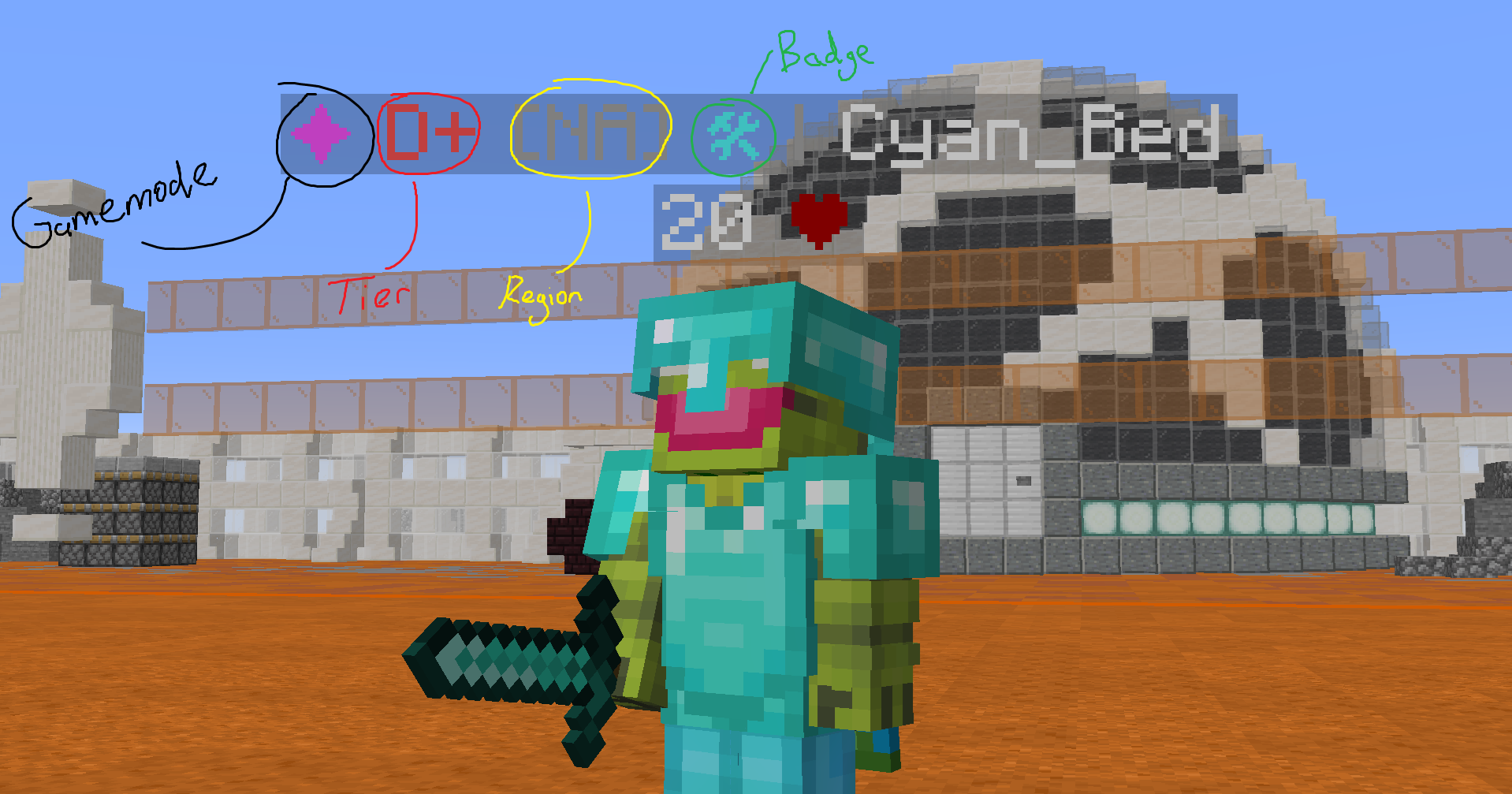
Display PvP tiers in nametags, up to two tier lists at once. Supports Tier Tests, MCTiers, PVPTiers and SubTiers
截图

介绍
Tier Tagger
See every player’s PvP tier right in their nametag. Tier Tagger pulls rankings from Tier Tests, MCTiers, PVPTiers and SubTiers and shows them next to player names, in the tab list, and in quick lookup panels: with two tier lists at once if you want.
Supports Fabric on Minecraft 1.21 → 26.2 and Forge on 1.8.9.

Features
🏷️ Nametags & tab list
- Primary tag: any tier list + gamemode, shown before or after the name
- Secondary tag (new in 1.3.0): a second tier list + gamemode next to the first one, e.g. Tier Tests Sword and MCTiers Vanilla in the same nametag
- Layouts: Prefix, Suffix, or Split (primary before the name, secondary after)
- Display modes: Highest Fallback, Highest Always, Selected Only, Ranking, and Cross-API fallback (same mode / any mode) when a tier list has no data
- Icons: MCTiers-style icons or classic colored symbols, region tag, MCTiers (
HT1/LT5) or standard (S/F) tier format - Shown in the tab list too
🔎 Lookups
- Nearest player and last hit player popups with skin, name, region, rank and all gamemode tiers (with peaks)
- Player search: look up any username across every tier list at once

Default Keybinds
| Action | Default |
|—|—|
| Open config | N |
| Look up nearest player | U |
| Look up last hit player | C |
All keys can be changed in Options → Controls.
Something not working on a specific client or server? Contact @flxmeyt on Discord with the server IP and what isn’t working, or join the Discord.
常见问题
Tier Tagger 支持哪些 Minecraft 版本?
Tier Tagger 支持 Minecraft Java 版 1.8.8–26.2,共 18 个版本,可用的加载器:Fabric / Forge / Quilt。下载时注意选择和你游戏版本一致的文件。
Tier Tagger 怎么安装?
先用 PCL2 或 HMCL 启动器安装对应版本的 Fabric / Forge / Quilt,再把下载的 .jar 文件放进游戏目录的 mods 文件夹,重新启动游戏即可。开启了版本隔离的,mods 文件夹在 versions/版本名 下面。运行环境:仅客户端。
评论
登录后评论和评分