
截图

介绍
Flop | floating point operations for Minecraft
This datapack is a library for handling floating-point operations using scoreboards. A new data representation, the ‘eroxifloat’, is introduced to support this.
What is a floating-point number?
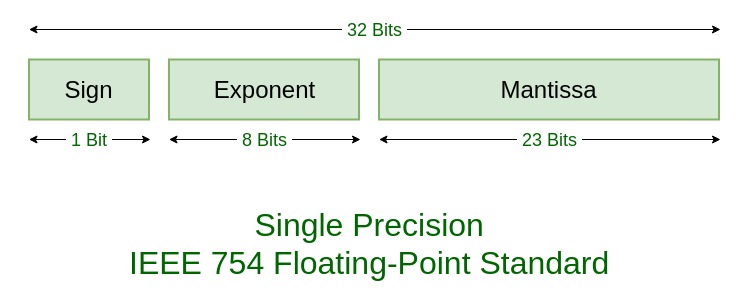
A floating-point number is a way to represent real numbers in binary. It consists of three parts:
- Sign: whether the number is positive or negative
- Exponent: determines the magnitude of the number
- Mantissa: determines the precision to which numbers can be represented
The numerical value of this representation is:
$$(-1)^\text{sign} \times \text{mantissa} \times 2^\text{exponent} $$
The Eroxifloat
An eroxifloat uses 3 scoreboards to store the sign, exponent and mantissa separately. Functions are provided to convert floating-point numbers in NBT storage to eroxifloats and back again. All math operations are performed on this scoreboard representation, but there are also functions provided that perform all the conversions so that you can simply do math on numbers in NBT storage.
The eroxifloat uses 30 bits to represent the mantissa, making it slightly more precise than a float, but less precise than a double. It is worth to note that the division and square root operations only have 15-bit precision. All other operation preserve 30-bit precision.
The sign can take on the values -1 and 1, rather than 0 and 1 as is the case in regular floating point representations.
How to use
Before you can use the pack, you need to run the function flop:api/create_scoreboards to set up the required scoreboard objectives and values. This function is not included in the minecraft:load tag by default, you need to run it yourself.
Currently, the following six operations are available:
- Addition ($a + b$)
- Subtraction ($a – b$)
- Multiplication ($a \times b$)
- Division ($\frac{a}{b}$)
- Square ($x^2$)
- Square root ($\sqrt{x}$)
The easiest way to use this library is to make use of the functions in the flop:api/storage/ folder. These perform operations directly on floating-point numbers in NBT storage. For addition, for example:
data modify storage flop:api operand.a set value 5d

data modify storage flop:api operand.b set value 0.13d

function flop:api/storage/add

data modify <destination> set from storage flop:api output
Operations that take only one input, such as sqrt and square, are used as follows:
data modify storage flop:api input set value 42.0d

function flop:api/storage/sqrt

data modify <destination> set from storage flop:api output
Advanced usage
If you want to calculate complicated formulas, using the operations on storage can cause overhead due to unnecessary conversion between NBT and eroxifloat representations. You can instead perform operations on eroxifloats directly. To create an eroxifloat from a number in NBT storage, use the following function flop:api/storage/read_as_eroxifloat. This will convert the number stored in storage flop:api input into the three scoreboard values input.sign flop, input.exponent flop and input.mantissa flop:
data modify storage flop:api input set value 5d

function flop:api/storage/read_as_eroxifloat

scoreboard players operation <destination 1> = input.sign flop
scoreboard players operation <destination 2> = input.exponent flop
scoreboard players operation <destination 3> = input.mantissa flop
You can then perform the same kinds of calculations as before, but without the overhead of converting to NBT.
scoreboard players operation operand.a.sign flop = <source 1>
scoreboard players operation operand.a.exponent flop = <source 2>
scoreboard players operation operand.a.mantissa flop = <source 3>
scoreboard players operation operand.b.sign flop = <source 4>
scoreboard players operation operand.b.exponent flop = <source 5>
scoreboard players operation operand.b.mantissa flop = <source 6>

function flop:api/eroxifloat/add

scoreboard players operation <destination 1> = output.sign flop
scoreboard players operation <destination 2> = output.exponent flop
scoreboard players operation <destination 3> = output.mantissa flop
scoreboard players operation input.sign flop = <source 1>
scoreboard players operation input.exponent flop = <source 2>
scoreboard players operation input.mantissa flop = <source 3>
function flop:api/eroxifloat/sqrt
scoreboard players operation <destination 1> = output.sign flop
scoreboard players operation <destination 2> = output.exponent flop
scoreboard players operation <destination 3> = output.mantissa flopAnd for converting back to NBT, there are two options: writing as a float or as a double. Since the eroxifloat is slightly more precise than a normal float, the latter is reccomended. However, in some cases you may need your number to be a float instead.
scoreboard players operation output.sign flop = <source 1>
scoreboard players operation output.exponent flop = <source 2>
scoreboard players operation output.mantissa flop = <source 3>

function flop:api/eroxifloat/write_to_float
scoreboard players operation output.sign flop = <source 1>
scoreboard players operation output.exponent flop = <source 2>
scoreboard players operation output.mantissa flop = <source 3>
function flop:api/eroxifloat/write_to_doubleFinal note
Thanks for reading :D\
-Eroxen
常见问题
Flop 支持哪些 Minecraft 版本?
Flop 支持 Minecraft Java 版 1.15–1.20.2,共 22 个版本。下载时注意选择和你游戏版本一致的文件。
Flop 怎么安装?
新建世界时在「数据包」里把下载的 .zip 拖进去;已有的存档,把文件放进存档目录下的 datapacks 文件夹,进游戏输入 /reload 即可生效。服务器同样放在世界目录的 datapacks 里。
Eroxen 的其他作品
查看全部 →
MC Paint
数据包,让你在游戏内创建并放置自定义画作

Catenary
Adds hanging chains and ropes as decorations, no resourcepack required. Now with ziplines!

Map Preview Icons
Shows a preview of maps on their item icon. No more searching through 100 identical looking maps in your inventory!

InstaSlate
Insta-mine Deepslate with an Efficiency 5 Netherite Pickaxe + Haste 2
评论
登录后评论和评分