Frostbyte’s Item Model Modifier
Adds the /model command, allowing any item to be given any model
截图

介绍
[]()


Overview:
This mod adds a “/model` command, allowing any item to be given any model. `/model“ can be called with one of four arguments, as long as the player’s main hand is not empty:
- “
/model get“: Returns the identifier of the model that is currently applied to the item - “
/model set <identifier>`: Sets the item's model to the model defined by`<identifier>“ - “
/model reset“: Resets the item to its vanilla model - “
/model gui“: Opens a GUI which can be used to visually browse through every currently loaded item model
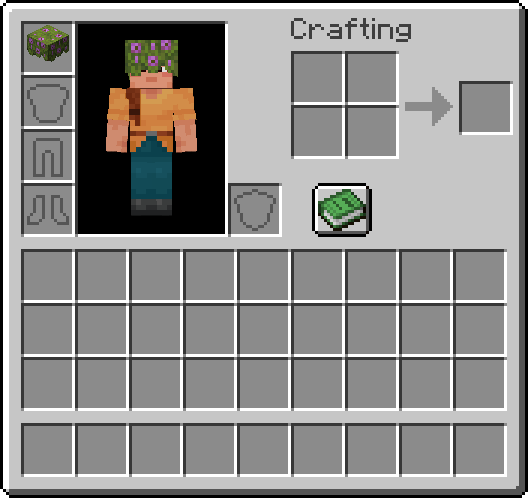
Items modified via the “/model“ command remain 100% vanilla, so the custom model will render even for players who don’t have Frostbyte’s Item Model Modifier installed (as long as the model is vanilla or part of a texture pack that is shared by all players involved). Additionally, if the item being modified is a helmet, the new model will be rendered instead of the helmet texture.
Using the GUI:
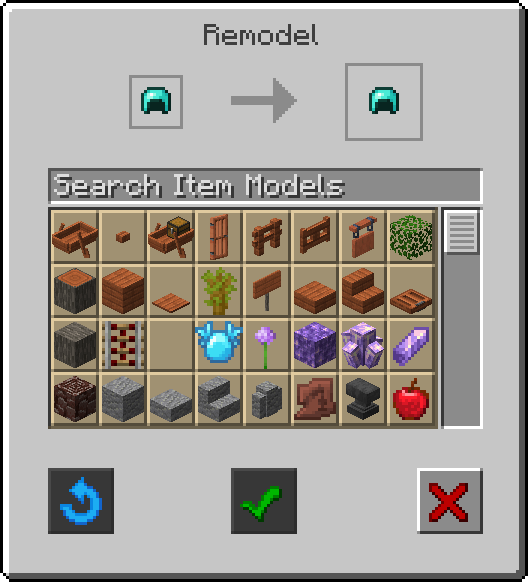
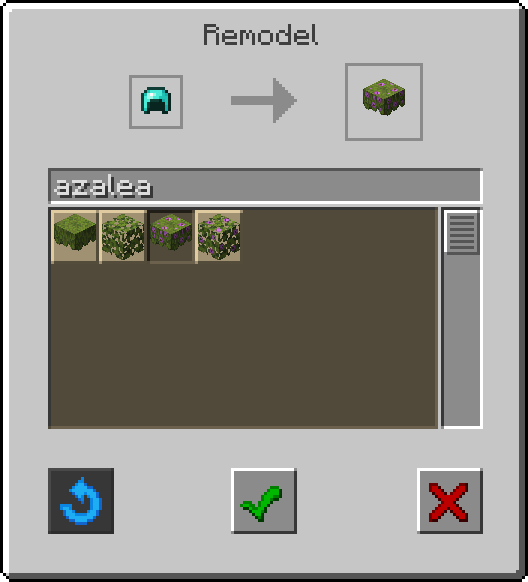
When running the “/model gui“ command while holding any item in the player’s mainhand, a new Remodel screen will be opened. The two item slots at the top of the screen will display the current held item (left) and a preview of that item with the currently slected model applied (right).
Below these item slots are a search bar and a stonecutter-style scrollable list of every currently loaded item model, listed in alphabetical order by identifier.
The GUI also contains three buttons:
- A blue circular arrow (left): resets the held item to its vanilla model
- A green check mark (center): applies the currently selected model
- A red X (right): exits the GUI
If any of the models in the list are clicked, the preview item slot (right) will update to reflect the current selection. The button with the green check mark (center) will then become active, signifying that it can be clicked to apply the current selection and exit the GUI.
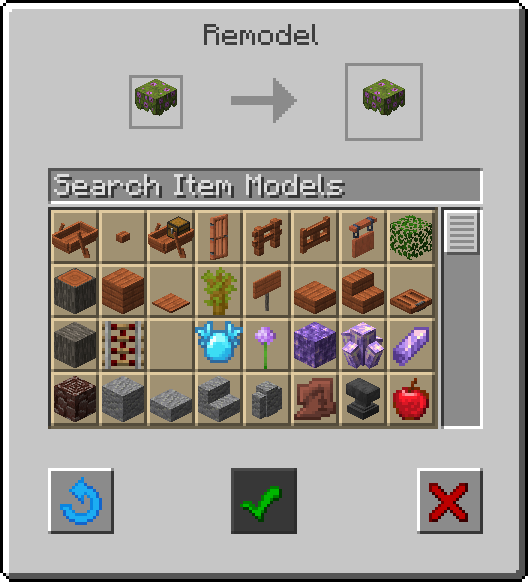
If “/model gui“ is run with an already modified item in the player’s mainhand, the button with the blue circular arrow (left) will be active, signifying that it can be clicked to reset the current item to its vanilla model and exit the GUI.
Once an item has been remodeled:
- No mod-dependent data will have been applied, meaning custom model will remain even if Frostbyte’s Item Model Modifier is uninstalled
- If the item is stackable, it will now only stack with other items with the same NBT data
- If the item can be equipped to the head slot, its new model will be rendered instead of the armor texture
FAQs:
- Will this be updated to [Insert Version]? – Yes! I plan on updating this mod for as long as I can. Expect to wait a few weeks after major Minecraft updates for an updated version of this mod. There may be longer pauses between minor versions depending on how busy I am.
- Will you make a Forge version? – No. I don’t make Forge mods, but feel free to make your own (unofficial) port as long as you credit me for any code borrowed from this mod.
- Can I use this in my mod pack? – Yes! I made this mod for people to use!
Download:
Modrinth – https://modrinth.com/mod/frostbytes-item-model-modifier
Curseforge – https://www.curseforge.com/minecraft/mc-mods/frostbytes-item-model-modifier

常见问题
Frostbyte’s Item Model Modifier 支持哪些 Minecraft 版本?
Frostbyte’s Item Model Modifier 支持 Minecraft Java 版 1.21.7–26.3,共 9 个版本,可用的加载器:Fabric。下载时注意选择和你游戏版本一致的文件。
Frostbyte’s Item Model Modifier 怎么安装?
先用 PCL2 或 HMCL 启动器安装对应版本的 Fabric,再把下载的 .jar 文件放进游戏目录的 mods 文件夹,重新启动游戏即可。开启了版本隔离的,mods 文件夹在 versions/版本名 下面。运行环境:客户端和服务端都要装。
FrostbyteGames 的其他作品
查看全部 →
Frostbyte’s Slabs & Stairs
为许多原版方块添加台阶、楼梯、墙、栅栏等非完整方块变体。

Frostbyte’s Improved Inventory
Slot cycle, Durability display, Stack refill, Auto swap tools, Container sort & search, Zoom, Paperdoll, Gamma, Boat item view, Colored armor bar, Inventory tabs, Map & Shulker box preview, Expanded bundle tooltip, More HUD info, & Better locator bar

Frostbyte’s Maximum Mobility
Adds QoL features to the movement system: Step up, Boat step up, Coyote time (jump forgiveness), Bedrock bridging, & Bedrock elytra canceling.

Frostbyte’s Improved Inventory
Makes parts of the inventory and HUD more useful
评论
登录后评论和评分